
Web & PDF Marker Pro
Premium highlighter with Auto-Highlighter, Local Backup/Restore, Smart Reader Mode, and advanced analytics.
As of June 2026, Web & PDF Marker Pro has 6 users in the Education category.
Usersup 100.0 percent+100.0%
6
6
Ratingno change0%
—
— reviews
Reviewsno change0%
—
Version
2.0
Manifest V3
90-day change · In the last 90 days this extension 1 version update, changed permissions.
History
8 snapshotsTracking since Apr 10, 2026.
View as table
| Date | Users | Rating | Reviews | Version |
|---|---|---|---|---|
| Apr 10, 2026 | 3 | — | — | 1.1 |
| Apr 20, 2026 | 5 | — | — | 2.0 |
| Apr 25, 2026 | 4 | — | — | 2.0 |
| May 9, 2026 | 4 | — | — | 2.0 |
| May 14, 2026 | 6 | — | — | 2.0 |
| May 20, 2026 | 4 | — | — | 2.0 |
| May 26, 2026 | 10 | — | — | 2.0 |
| Jun 2, 2026 | 9 | — | — | 2.0 |
| Now | 6 | — | — | 2.0 |
Changelog
- Apr 10, 2026short_description
Highlight web pages and PDFs, take notes, and organize your research.
Premium highlighter with Auto-Highlighter, Local Backup/Restore, Smart Reader Mode, and advanced analytics.
- Apr 10, 2026name
Web & PDF Marker
Web & PDF Marker Pro
- Apr 10, 2026host_permissions
(empty)
https://web-pdf-marker.hammad-extension.workers.dev/*, https://www.google-analytics.com/*
- Apr 10, 2026permissions
storage, activeTab, contextMenus, tabs
storage, activeTab, contextMenus, tabs, unlimitedStorage
Permissions & access
- Permissions
- storageactiveTabcontextMenustabsunlimitedStorage
- Host access
- https://web-pdf-marker.hammad-extension.workers.dev/*, https://www.google-analytics.com/*
Screenshots


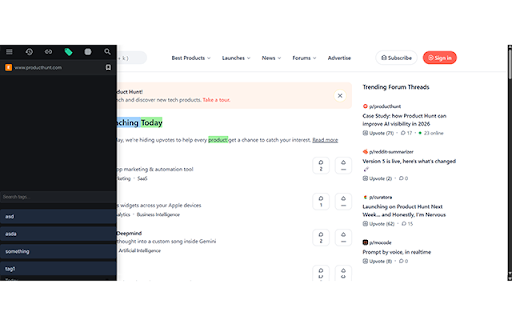
About
Transform the way you read and research online with Web & PDF Marker.

Whether you're a student, researcher, or just someone who loves to stay organized, Web & PDF Marker provides the ultimate set of tools to capture and categorize information effortlessly. Say goodbye to scattered bookmarks and forgotten notes.

✨ Key Features:
Intuitive Highlighting: Select any text and highlight it instantly with a simple right-click or keyboard shortcut (Alt+S).
Sticky Notes: Attach detailed notes to your highlights to capture your thoughts, questions, or summaries.
Multi-Color System: Organize your research visually with a beautiful palette of colors.
Smart Tagging: Categorize your highlights with custom tags for easy filtering and site-wide organization.
Powerful Sidebar: Manage everything in a sleek dashboard. View your history, browse by domain, or filter by tags.
Global Search: Search through all your saved highlights across every website you've ever visited.
Export as Markdown: Seamlessly export your collections into Markdown files, ready for apps like Obsidian, Notion, or Roam.

🚀 Why Choose Web & PDF Marker?
Fast & Lightweight: High-performance engine that won't slow down your browser.
Privacy First: Your data stays local to your browser—no external servers involved.
Real-time Sync: Highlights and edits sync instantly across all your open tabs.
Clean & Modern UI: A premium, focus-oriented interface designed for productivity.

📖 How to Use:
Select text on any webpage.
Use the floating menu or press Alt + S to highlight.
Click a highlight to add a note, change its color, or add tags.
Click the extension icon to toggle the sidebar and manage your knowledge base.
Start building your digital notebook today with Web & PDF Marker!
Technical
- Version
- 2.0
- Manifest
- V3
- Size
- 58.97KiB
- Min Chrome
- 88
- Languages
- 1
- Featured
- No
Metadata
- ID
- kmbikngcjfogmfbabphpdincooedbhml
- Developer ID
- u00183ec53e605d7d6eb04a823435ed11
- Developer Email
- [email protected]
- Created
- Mar 2, 2026
- Last Updated (Store)
- Apr 9, 2026
- Last Scraped
- Jun 8, 2026
- Website
- —
- Support URL
- —
Similar extensions
Alternatives to Web & PDF Marker Pro, ranked by description similarity.

WebNote
Fast, private, and lightweight. Highlight web pages, take notes, and sync your data with total security.
12

notemaker
Highlight and annotate text on any webpage. Organize notes into subjects and topics with persistent storage.
13
★ 5.0

MuseMarker AI
Mark anything on any website with MuseMarker. Chat with an AI about your selected text for insights, summaries & discussions.
7

Highlight
A powerful web highlighter that lets you mark, annotate, and organize content across the web for better learning and research.
282
★ 5.0

Markr
Highlight custom words on any webpage with soft green and red highlights
4
★ 5.0

Website Input Module
A browser extension for highlighting and saving text from websites. Works in Chrome, Firefox, Edge, Safari, and Samsung Internet.
—

Recallio — Organize What You Learn Online
Organize everything you learn online. Save highlights, links, videos, and notes in folders for quick access anytime.
3

Page Marker Extension
Use Page Marker Extension — Website Annotation Tool. Draw on page, draw on screen, annotate website, work in whiteboard online mode.
4.0K
★ 4.9
Data sourced from the Chrome Web Store · last verified Jun 8, 2026.