
Shopify Dev Tools
Quick dev tools for Shopify theme development
As of June 2026, Shopify Dev Tools has 39 users and a 5.00/5 rating from 4 reviews in the Developer Tools category.
Usersup 116.7 percent+116.7%
39
39
Ratingno change0%
5.00
4 reviews
Reviewsno change0%
4
Version
1.0.1
Manifest V3
History
9 snapshotsTracking since Apr 1, 2026.
View as table
| Date | Users | Rating | Reviews | Version |
|---|---|---|---|---|
| Apr 1, 2026 | 18 | 5.00 | 4 | 1.0.1 |
| Apr 9, 2026 | 21 | 5.00 | 4 | 1.0.1 |
| Apr 20, 2026 | 22 | 5.00 | 4 | 1.0.1 |
| Apr 26, 2026 | 27 | 5.00 | 4 | 1.0.1 |
| May 9, 2026 | 31 | 5.00 | 4 | 1.0.1 |
| May 14, 2026 | 33 | 5.00 | 4 | 1.0.1 |
| May 20, 2026 | 35 | 5.00 | 4 | 1.0.1 |
| May 27, 2026 | 34 | 5.00 | 4 | 1.0.1 |
| Jun 5, 2026 | 38 | 5.00 | 4 | 1.0.1 |
| Now | 39 | 5.00 | 4 | 1.0.1 |
Permissions & access
- Permissions
- activeTabclipboardWritescripting
- Host access
- None declared
Screenshots


About
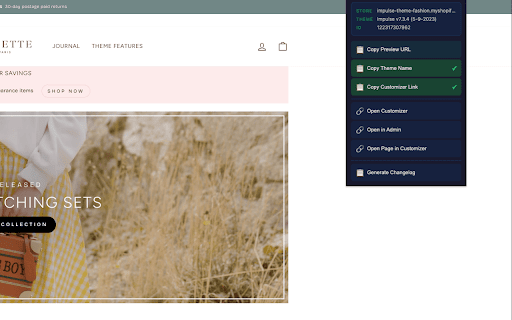
Quick-access developer tools for Shopify theme development. Auto-detects any Shopify store and gives you one-click shortcuts to the tools you use every day.

Shopify Dev Tools Extension lets you speed up your Shopify theme development workflow with a compact popup toolbar that auto-detects store info, theme details, and page context.

It includes:

Quick Copy Tools: Copy frequently used data to your clipboard instantly.

Copy Preview URL: Copies the current page URL with the preview_theme_id parameter — ready to share with your team or client for theme preview.
Copy Theme Name: Copies the active theme name — useful for changelogs, support tickets, and documentation.
Copy Customizer Link: Copies a direct link to the Shopify Theme Editor for the detected theme.
Quick Navigation: Jump to Shopify admin pages in one click.

Open Customizer: Opens the Shopify Theme Editor for the active theme in a new tab.
Open in Admin: Navigates to the admin page for the current resource. Smart detection automatically resolves the correct admin URL for products, collections, pages, articles, and blogs.
Open Page in Customizer: Opens the Theme Editor with the current page pre-loaded as preview context, so you can edit exactly what you're looking at.
Developer Utilities: Tools built for theme dev workflows.

Generate Changelog: Creates and copies a formatted changelog entry with theme name, theme ID, preview URL, and timestamp — perfect for development logs and client handoffs.
Smart Auto-Detection: The extension reads Shopify's built-in JavaScript variables to detect:

Store domain (works on *.myshopify.com and custom domains)
Active theme name, ID, and role
Current page type (product, collection, page, article, blog, home)
Resource handles and IDs from URL, ShopifyAnalytics.meta, and page metadata
How it works: The extension uses a content script on *.myshopify.com pages. For stores on custom domains, it activates on-demand when you click the extension icon — no broad permissions needed. Data flows securely: page context → content script → popup UI. No external requests are made.

Built by Shopify theme developers, for Shopify theme developers.
Technical
- Version
- 1.0.1
- Manifest
- V3
- Size
- 10.98KiB
- Min Chrome
- 88
- Languages
- 1
- Featured
- No
Metadata
- ID
- gahokdpgdangdgbigdabgjomnpjikkkg
- Developer ID
- u23f55c278b8fafb7746294936494d606
- Developer Email
- [email protected]
- Created
- Feb 19, 2026
- Last Updated (Store)
- Feb 21, 2026
- Last Scraped
- Jun 5, 2026
- Website
- —
- Support URL
- —
Similar extensions
Alternatives to Shopify Dev Tools, ranked by description similarity.

Shopify Toolbox
A 'do it all' tool, which provides quality of life features for Shopify merchants and developers.
457
★ 5.0

Shopify Theme Assist
Shopify theme Assist! Find theme details, third-party apps, scripts, and performance metrics in one click.
94
★ 5.0

Shopify Store Analyzer
Analyze Shopify stores to detect themes, apps, and metadata. Read-only and privacy-friendly.
4

Shopify Peek
Shopify store/theme information with the click of a button.
23
★ 5.0

Best Shopify Theme Detector
Detects the current theme (light/dark) of a website.
271
★ 4.7

Theme Aid for Shopify
Switch themes, toggle preview bar, deep-link to Customizer & QR codes. The ultimate Shopify workflow tool.
8

Cart Tools for Shopify
Developer tools for Shopify: inspect cart/product data, view SKUs, copy JSON, and manage carts.
34
★ 5.0

Shopify Inspector
Professional intelligence tool for Shopify storefronts. theme detection, app discovery, and catalog insights.
151
Data sourced from the Chrome Web Store · last verified Jun 5, 2026.