
ScreenRecPro
Effortlessly capture and save screenshots of your screen with this intuitive and feature-rich plugin.
As of May 2026, ScreenRecPro has 130 users in the Workflow & Planning category.
Usersup 5.7 percent+5.7%
130
130
Ratingno change0%
—
— reviews
Reviewsno change0%
—
Version
1.0.1
Manifest V3
History
2 snapshotsTracking since Apr 26, 2026.
View as table
| Date | Users | Rating | Reviews | Version |
|---|---|---|---|---|
| Apr 26, 2026 | 123 | — | — | 1.0.1 |
| May 23, 2026 | 114 | — | — | 1.0.1 |
| Now | 130 | — | — | 1.0.1 |
Permissions & access
- Permissions
- desktopCapturetabCapturetabsnativeMessagingscriptingactiveTabstoragedebuggerdownloadsunlimitedStorage
- Host access
- http://*/*, https://*/*
Screenshots
About
ScreenRecPro: A Powerful Chrome Extension for Screen Capture and Recording.

Introduction:
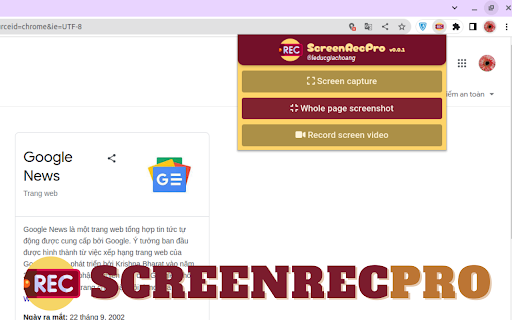
ScreenRecPro is a feature-packed Chrome extension designed to provide users with seamless screen capture and recording capabilities. Whether you need to capture a specific region of your screen, take a screenshot of an entire webpage, or record a video of your screen activity, ScreenRecPro offers a comprehensive set of tools to meet your needs. With its user-friendly interface and advanced features, ScreenRecPro empowers users to effortlessly capture, save, and share visual content.

Key Features:

Screen Capture:
ScreenRecPro allows you to capture precise screenshots of your screen with just a few clicks.

Full Page Capture:
With the Full Page Capture feature, ScreenRecPro enables you to take screenshots of entire web pages, even those that extend beyond the visible area of your screen. This is particularly useful when you want to preserve the entire content of a webpage, including scrollable sections. ScreenRecPro intelligently stitches together multiple screenshots to create a comprehensive snapshot of the entire webpage.

Screen Recording:
ScreenRecPro goes beyond static screenshots and allows you to record your screen activity as a video. Whether you want to create tutorials, demonstrate software functionality, or showcase your gameplay, this extension offers powerful screen recording capabilities. Capture smooth, high-resolution videos with adjustable frame rates and customizable recording options.

Customization and Settings:
ScreenRecPro offers a variety of customization options to tailor your screen capture and recording experience. Adjust settings such as video quality, audio sources, hotkeys, and output formats to suit your preferences. The extension also provides a user-friendly interface that allows you to easily navigate through the available features and make personalized adjustments.
Technical
- Version
- 1.0.1
- Manifest
- V3
- Size
- 2.57MiB
- Min Chrome
- 88
- Languages
- 1
- Featured
- No
Metadata
- ID
- gahlngdoanfigablopbkppdmmjbpbcgk
- Developer ID
- ua2473acb4a15be4fff5b635c70db48ed
- Developer Email
- [email protected]
- Created
- Jul 14, 2023
- Last Updated (Store)
- Mar 6, 2024
- Last Scraped
- May 23, 2026
- Website
- —
- Support URL
- —
- Privacy Policy
- —
Similar extensions
Alternatives to ScreenRecPro, ranked by description similarity.

Screen & Webcam recorder - Flonnect
Allows Screen Recording from your Webcam and Desktop
100.0K
★ 4.6

Screen Recorder with Webcam + Video Editor
Screen recorder & desktop capture tool. Record a video, presentation, open a front camera, or a window. Edit, download, and share.
1.0K
★ 4.3

Screen recorder
Elevate your productivity with Screen Recorder tool. Effortlessly capture and share your screen recordings for optimal efficiency.
4.0K
★ 3.6

Screenshot and screen video recording - Screeny
The #1 screen recorder and screenshot tool! Full capture and video recording of your screen.
80.0K
★ 4.7

Screen Recorder
Screen recorder - simple, tiny, user-friendly and full-featured!
863
★ 4.5

Audio & Screen Recorder Pro
Capture Crystal-Clear 4k Video (3840 X 2160) and Professional Studio Quality Audio for Tutorials, Presentations, & Video Editing.
50

Real Screen Recorder
Real Screen Recorder records the screen and webcam with audio.
20.0K
★ 4.4

Quick Screen Recorder
Record your screen, browser tab, or window with one click. Fast, lightweight screen recorder with instant download and no watermark.
33
Data sourced from the Chrome Web Store · last verified May 23, 2026.