CWS: Chinese Dictionary + Pinyin Annotator
Chinese words separator + Chinese-English/English-Chinese dictionary + Pinyin annotator + Pin1yin1 IME
As of June 2026, CWS: Chinese Dictionary + Pinyin Annotator has 4,000 users and a 4.72/5 rating from 50 reviews in the Education category.
Usersdown 33.3 percent−33.3%
4.0K
4,000
Ratingdown 0.6 percent−0.6%
4.72
50 reviews
Reviewsup 4.2 percent+4.2%
50
Version
8.24.84.3301
Manifest V3
90-day change · In the last 90 days this extension lost 2.0K users, 6 version updates.
History
7 snapshotsTracking since Apr 8, 2026.
View as table
| Date | Users | Rating | Reviews | Version |
|---|---|---|---|---|
| Apr 8, 2026 | 6.0K | 4.75 | 48 | 8.24.84.3211 |
| Apr 17, 2026 | 4.0K | 4.75 | 48 | 8.24.84.3240 |
| May 3, 2026 | 4.0K | 4.76 | 49 | 8.24.84.3240 |
| May 11, 2026 | 4.0K | 4.76 | 49 | 8.24.84.3250 |
| May 28, 2026 | 4.0K | 4.76 | 49 | 8.24.84.3260 |
| Jun 3, 2026 | 4.0K | 4.76 | 49 | 8.24.84.3272 |
| Jun 12, 2026 | 4.0K | 4.72 | 50 | 8.24.84.3291 |
| Now | 4.0K | 4.72 | 50 | 8.24.84.3301 |
Changelog
- Jun 3, 2026description
Chinese-English/English-Chinese dictionary + Pinyin annotator + Words separator + Chinese pin1yin1 IME.

CWS (Chinese words separator) is pronounced as Swiss.

The fastest Chinese dictionary. Lookups are instant.

"A study from 2008 showed that if spaces are placed after what are commonly regarded as words in Chinese, Chinese native speakers reading actually becomes faster and easier." -- Julesy https://www.youtube.com/watch?v=kCSe3dgGVMQ

If the introduction of spacing provides measurable benefits for native Chinese readers, these benefits are likely to be even more pronounced for non-native readers.

Learn Chinese by reading, listening, and practicing speaking Chinese with this CWS army knife. Oh, and you can practice writing with it too.

Can be used by native Chinese speakers to learn English as well.

Your personal pinyin tutor for every web page.

Say goodbye to guessing games. Hello, effortless reading and learned words tracking.

Turns any web page into your personal Chinese lesson. Never run out of reading material again.

Text-to-speech, can read aloud sentences, phrases, words, characters, or pinyin/zhuyin. The audio can be played at a normal pace, or adjusted to a slower or faster speed to help you master pronunciation and improve your listening comprehension.

Suddenly remembers a Chinese word (or needing to quickly know the Chinese word(s) of an English word(or phrase)) that is not in the page? CWS has a searchable dictionary (🔍 icon in CWS toolbar pop-up) that you can use in this situation. You can also use your device's microphone to search the word instead of typing it out.

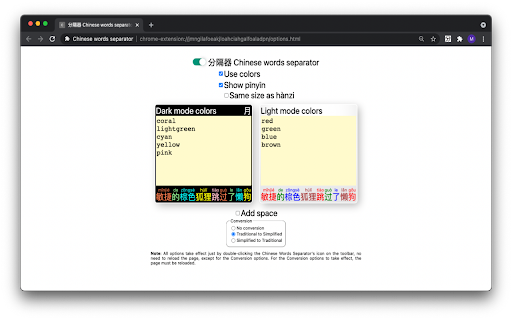
Set your own learning priorities by color-coding and/or annotating the words with Pinyin(or zhuyin/bopomofo), HSK, or Familiarity. You already know how to pronounce most words, and you need reinforcement on their tones? Just color-code or annotate the hanzi(Chinese character) with tone. You just want to learn the Chinese language without needing to learn hanzi? You can make CWS convert the hanzi to pinyin automatically. The learner decides what to learn based on his/her priorities, not the tool.

Words separator for page and dictionary.

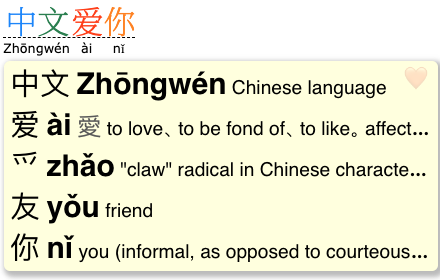
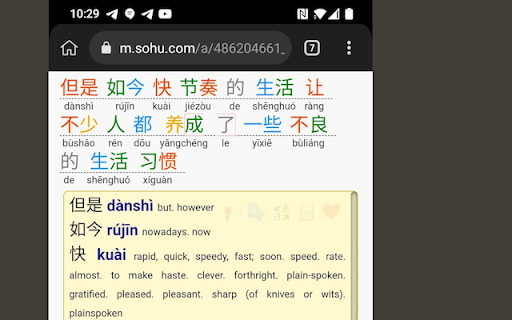
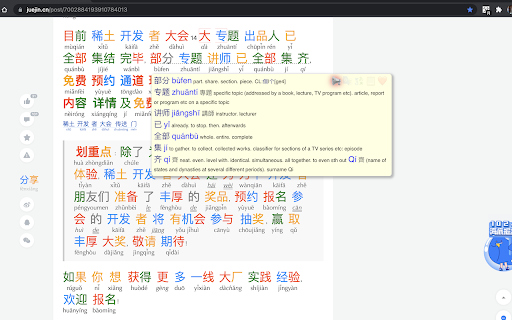
Demystifies Chinese readability by words separation and pinyin(or zhuyin/bopomofo) annotation.

Demystifies a Chinese character by separating it to its component characters, this can be done in the dictionary by right-clicking the character.

Mine sentences from imported Offline sentence miner.

Mine sentences from 10 or more online mining sites.

Mined sentences are saved in Learning Tracking Sheet in Google Sheets.

Create Anki flashcards by importing the CSV file exported from Learning Tracking Sheet in Google Sheets.

Learners can add more sentence mining sites by themselves without needing to ask the developer to update the list of 10 online sentence mining sites.

Hover less, read more using the extension's sentence mode dictionary, saves a lot of time.

Look up the meanings of a Chinese word(or phrase) while browsing the web.

Lookup the Chinese word(s) of an English word(or phrase) while browsing the web.

Easily change the hanzi's size and font of the page to make reading more relaxing.

Enhances tones memorization by using pin1yin1 IME.

Quite configurable, and easy to use.

Can be made to remember 3 websites visited for each word, this can be enabled in Recall and Rewrite modules.

Catch tricky garden-path words even when using keyboard shortcut for word navigation. Unlike other Chinese dictionaries; in CWS, using keyboard shortcut for word navigation does not make it skip garden-path words.

When your computer has built-in AI and the browser supports it, dual subtitles are available for leading video sites, such as Netflix, YouTube, Viki, iQIYI etc

Read the complete functionalities of CWS in https://chinese-words-separator.github.io/

**********

HOW TO USE THE DICTIONARY:
Simply go to a web page in Chinese. Then to use the dictionary, hover the mouse cursor over any Chinese words (i.e., Chinese characters or even Chinese words that are not using pure Chinese characters, e.g., 3Q, AA制) to pop up the sticky note-like dictionary that shows the English translation of the Chinese word(or phrase) along with its pinyin (or zhuyin/bopomofo) romanization; on phone or tablet, just tap the Chinese word or sentence(or phrase).

HOW TO USE THE WORD OR CHARACTER SEPARATOR IN THE DICTIONARY:
Right-click the word(or phrase) or character in the dictionary. On phone/tablet, swipe the word(or phrase) or character to the right.

HOW TO USE THE WORDS SEPARATOR IN THE PAGE:
Choose any of the following: Beginner, Lower-intermediate, Intermediate, Advanced, or configure it in More Settings (⚙ icon in CWS pop-up toolbar) screen.

To make the extension work on Android, install Kiwi browser on your Android device:
https://play.google.com/store/apps/details?id=com.kiwibrowser.browser

then install CWS from Chrome Web Store.

Note: Kiwi browser is discontinued since January 2025, some of Kiwi's code is now integrated to Microsoft Edge Canary Android browser. Follow the instruction here to install extensions on Microsoft Edge Canary Android browser: https://github.com/kiwibrowser/src.next. CWS's extension id on Microsoft Edge Add-ons store is peglphdebebicogkcpinemlaanfabeip

If installing extensions on Microsoft Edge Canary Android browser is cumbersome, you can opt to use Lemur browser instead on your Android device:
https://play.google.com/store/apps/details?id=com.lemurbrowser.exts

then install CWS from Chrome Web Store.

To use the extension on Safari on iOS, iPadOS, and macOS, install CWS from:
https://apps.apple.com/app/chinese-words-separator/id1598790017

For Chinese-Vietnamese, Chinese-French, Chinese-German, Chinese-Hungarian definitions, follow these instructions:
https://github.com/chinese-words-separator/chinese-words-separator.github.io/issues/27#issuecomment-2235239809

**********

Latest version (optimizations):

* Optimized the words separator's processor, it is now using just a 160 KB memory lookup to perform a task.
In the past, it was reading the word's HSK level from a big file which causes the words separator memory consumption to spike up to 100 MB; now the words HSK level info is embedded directly into the code, which is just 160 KB in size

* Optimized memory footprint for CWS's dictionary, it can now be just 26 MB.
CWS's dictionary can now be made significantly more lightweight than other dictionaries despite CWS having over 180K words (others have 120K words). This can be made possible by making CWS read the dictionary from the database instead of from file. To configure CWS to read the dictionary from the database instead of from file, go to CWS's Options screen and click the button labeled *Save the dictionary to database*. With database use, the dictionary's memory footprint will be reduced from 108 MB down to 26 MB

    Other file-based dictionaries' memory footprint:
    * Zhongwen: 42 MB
    * LiuChan: 82 MB
    * Inkah: 76 MB
    * Zhongzhong: 45 MB

Versions: https://chinese-words-separator.github.io/versions.html

**********

Dictionary sources:
* CC-CEDICT - Over 120K words
* CedPane - Over 70K words, plenty of names and proper nouns

If you need to contribute word definitions, prefer contributing to CC-CEDICT:
https://cc-cedict.org/editor/editor.php?handler=ListChanges

If you need to contribute names and proper nouns, prefer contributing to CedPane:
https://github.com/ssb22/CedPane

**********

Why the name "Chinese Words Separator"?
This tool began with a singular focus: helping learners bridge the gap between individual characters and modern multi-character words. Since virtually accurate word segmentation is the foundation of literacy, it became the perfect 'engine' to build upon.

Today, it's a full-featured learning suite:
* Instant Dictionary: Quick Pinyin and definitions without leaving the page.
* Vocabulary Tracking: Mark and monitor learned words.
* Frequency Analytics: See statistics on commonly occurring terms.
* Familiarity Detection: Tracks your familiarity with each word.

We're outgrowing our name!
Since this tool does so much more now, we're looking for a new title. We know "Chinese Words Separator" is a mouthful, help us find a name that's as smart as the language learning tool itself!

Got an idea? We're not just looking for name suggestions; we also welcome new feature ideas! Leave your thoughts in the support tab or review section.
CWS (Chinese words separator) is pronounced as Swiss. The fastest Chinese dictionary. Lookups are instant. Look up the Chinese words of English words as well, and other great tools for learning Mandarin Chinese. The most configurable pinyin annotator, and zhuyin annotator too. "A study from 2008 showed that if spaces are placed after what are commonly regarded as words in Chinese, Chinese native speakers reading actually becomes faster and easier." -- Julesy https://www.youtube.com/watch?v=kCSe3dgGVMQ If the introduction of spacing provides measurable benefits for native Chinese readers, these benefits are likely to be even more pronounced for non-native readers. Learn Chinese by reading, listening, and practicing speaking Chinese with this CWS army knife. Oh, and you can practice writing with it too. Can be used by native Chinese speakers to learn English as well. Your personal pinyin tutor for every web page. Say goodbye to guessing games. Hello, effortless reading and learned words tracking. Turns any web page into your personal Chinese lesson. Never run out of reading material again. Text-to-speech, can read aloud sentences, phrases, words, characters, or pinyin/zhuyin. The audio can be played at a normal pace, or adjusted to a slower or faster speed to help you master pronunciation and improve your listening comprehension. Suddenly remembers a Chinese word (or needing to quickly know the Chinese word(s) of an English word(or phrase)) that is not in the page? CWS has a searchable dictionary (🔍 icon in CWS toolbar pop-up) that you can use in this situation. You can also use your device's microphone to search the word instead of typing it out. Set your own learning priorities by color-coding and/or annotating the words with Pinyin(or zhuyin/bopomofo), HSK, or Familiarity. You already know how to pronounce most words, and you need reinforcement on their tones? Just color-code or annotate the hanzi(Chinese character) with tone. You just want to learn the Chinese language without needing to learn hanzi? You can make CWS convert the hanzi to pinyin automatically. The learner decides what to learn based on his/her priorities, not the tool. Words separator for page and dictionary. Demystifies Chinese readability by words separation and pinyin(or zhuyin/bopomofo) annotation. Demystifies a Chinese character by separating it to its component characters, this can be done in the dictionary by right-clicking the character. Mine sentences from imported Offline sentence miner. Mine sentences from 10 or more online mining sites. Mined sentences are saved in Learning Tracking Sheet in Google Sheets. Create Anki flashcards by importing the CSV file exported from Learning Tracking Sheet in Google Sheets. Learners can add more sentence mining sites by themselves without needing to ask the developer to update the list of 10 online sentence mining sites. Hover less, read more using the extension's sentence mode dictionary, saves a lot of time. Look up the meanings of a Chinese word(or phrase) while browsing the web. Lookup the Chinese word(s) of an English word(or phrase) while browsing the web. Easily change the hanzi's size and font of the page to make reading more relaxing. Enhances tones memorization by using pin1yin1 IME. Quite configurable, and easy to use. Can be made to remember 3 websites visited for each word, this can be enabled in Recall and Rewrite modules. Catch tricky garden-path words even when using keyboard shortcut for word navigation. Unlike other Chinese dictionaries; in CWS, using keyboard shortcut for word navigation does not make it skip garden-path words. When your computer has built-in AI and the browser supports it, dual subtitles are available for leading video sites, such as Netflix, YouTube, Viki, iQIYI etc Read the complete functionalities of CWS in https://chinese-words-separator.github.io/ ********** HOW TO USE THE DICTIONARY: Simply go to a web page in Chinese. Then to use the dictionary, hover the mouse cursor over any Chinese words (i.e., Chinese characters or even Chinese words that are not using pure Chinese characters, e.g., 3Q, AA制) to pop up the sticky note-like dictionary that shows the English translation of the Chinese word(or phrase) along with its pinyin (or zhuyin/bopomofo) romanization; on phone or tablet, just tap the Chinese word or sentence(or phrase). HOW TO USE THE WORD OR CHARACTER SEPARATOR IN THE DICTIONARY: Right-click the word(or phrase) or character in the dictionary. On phone/tablet, swipe the word(or phrase) or character to the right. HOW TO USE THE WORDS SEPARATOR IN THE PAGE: Choose any of the following: Beginner, Lower-intermediate, Intermediate, Advanced, or configure it in More Settings (⚙ icon in CWS pop-up toolbar) screen. To make the extension work on Android, install Kiwi browser on your Android device: https://play.google.com/store/apps/details?id=com.kiwibrowser.browser then install CWS from Chrome Web Store. Note: Kiwi browser is discontinued since January 2025, some of Kiwi's code is now integrated to Microsoft Edge Canary Android browser. Follow the instruction here to install extensions on Microsoft Edge Canary Android browser: https://github.com/kiwibrowser/src.next. CWS's extension id on Microsoft Edge Add-ons store is peglphdebebicogkcpinemlaanfabeip If installing extensions on Microsoft Edge Canary Android browser is cumbersome, you can opt to use Lemur browser instead on your Android device: https://play.google.com/store/apps/details?id=com.lemurbrowser.exts then install CWS from Chrome Web Store. To use the extension on Safari on iOS, iPadOS, and macOS, install CWS from: https://apps.apple.com/app/chinese-words-separator/id1598790017 For Chinese-Vietnamese, Chinese-French, Chinese-German, Chinese-Hungarian definitions, follow these instructions: https://github.com/chinese-words-separator/chinese-words-separator.github.io/issues/27#issuecomment-2235239809 ********** Latest version (optimizations): * Optimized the words separator's processor, it is now using just a 160 KB memory lookup to perform a task. In the past, it was reading the word's HSK level from a big file which causes the words separator memory consumption to spike up to 100 MB; now the words HSK level info is embedded directly into the code, which is just 160 KB in size * Optimized memory footprint for CWS's dictionary, it can now be just 26 MB. CWS's dictionary can now be made significantly more lightweight than other dictionaries despite CWS having over 180K words (others have 120K words). This can be made possible by making CWS read the dictionary from the database instead of from file. To configure CWS to read the dictionary from the database instead of from file, go to CWS's Options screen and click the button labeled *Save the dictionary to database*. With database use, the dictionary's memory footprint will be reduced from 108 MB down to 26 MB Other file-based dictionaries' memory footprint: * Zhongwen: 42 MB * LiuChan: 82 MB * Inkah: 76 MB * Zhongzhong: 45 MB Versions: https://chinese-words-separator.github.io/versions.html ********** Dictionary sources: * CC-CEDICT - Over 120K words * CedPane - Over 70K words, plenty of names and proper nouns If you need to contribute word definitions, prefer contributing to CC-CEDICT: https://cc-cedict.org/editor/editor.php?handler=ListChanges If you need to contribute names and proper nouns, prefer contributing to CedPane: https://github.com/ssb22/CedPane ********** Why the name "Chinese Words Separator"? This tool began with a singular focus: helping learners bridge the gap between individual characters and modern multi-character words. Since virtually accurate word segmentation is the foundation of literacy, it became the perfect 'engine' to build upon. Today, it's a full-featured learning suite: * Instant Dictionary: Quick Pinyin and definitions without leaving the page. * Vocabulary Tracking: Mark and monitor learned words. * Frequency Analytics: See statistics on commonly occurring terms. * Familiarity Detection: Tracks your familiarity with each word. We're outgrowing our name! Since this tool does so much more now, we're looking for a new title. We know "Chinese Words Separator" is a mouthful, help us find a name that's as smart as the language learning tool itself! Got an idea? We're not just looking for name suggestions; we also welcome new feature ideas! Leave your thoughts in the support tab or review section. - Jun 3, 2026short_description
Look up the Chinese words of English words as well, and other great tools for learning Mandarin Chinese
Chinese words separator + Chinese-English/English-Chinese dictionary + Pinyin annotator + Pin1yin1 IME
- Jun 3, 2026name
Chinese words separator: Chinese dictionary
CWS: Chinese Dictionary + Pinyin Annotator
Permissions & access
- Permissions
- storagecontextMenusttsidentitytabs
- Host access
- https://accounts.google.com/*
Screenshots


About
CWS (Chinese words separator) is pronounced as Swiss.

The fastest Chinese dictionary. Lookups are instant.

Look up the Chinese words of English words as well, and other great tools for learning Mandarin Chinese.

The most configurable pinyin annotator, and zhuyin annotator too.

"A study from 2008 showed that if spaces are placed after what are commonly regarded as words in Chinese, Chinese native speakers reading actually becomes faster and easier." -- Julesy https://www.youtube.com/watch?v=kCSe3dgGVMQ

If the introduction of spacing provides measurable benefits for native Chinese readers, these benefits are likely to be even more pronounced for non-native readers.

Learn Chinese by reading, listening, and practicing speaking Chinese with this CWS army knife. Oh, and you can practice writing with it too.

Can be used by native Chinese speakers to learn English as well.

Your personal pinyin tutor for every web page.

Say goodbye to guessing games. Hello, effortless reading and learned words tracking.

Turns any web page into your personal Chinese lesson. Never run out of reading material again.

Text-to-speech, can read aloud sentences, phrases, words, characters, or pinyin/zhuyin. The audio can be played at a normal pace, or adjusted to a slower or faster speed to help you master pronunciation and improve your listening comprehension.

Suddenly remembers a Chinese word (or needing to quickly know the Chinese word(s) of an English word(or phrase)) that is not in the page? CWS has a searchable dictionary (🔍 icon in CWS toolbar pop-up) that you can use in this situation. You can also use your device's microphone to search the word instead of typing it out.

Set your own learning priorities by color-coding and/or annotating the words with Pinyin(or zhuyin/bopomofo), HSK, or Familiarity. You already know how to pronounce most words, and you need reinforcement on their tones? Just color-code or annotate the hanzi(Chinese character) with tone. You just want to learn the Chinese language without needing to learn hanzi? You can make CWS convert the hanzi to pinyin automatically. The learner decides what to learn based on his/her priorities, not the tool.

Words separator for page and dictionary.

Demystifies Chinese readability by words separation and pinyin(or zhuyin/bopomofo) annotation.

Demystifies a Chinese character by separating it to its component characters, this can be done in the dictionary by right-clicking the character.

Mine sentences from imported Offline sentence miner.

Mine sentences from 10 or more online mining sites.

Mined sentences are saved in Learning Tracking Sheet in Google Sheets.

Create Anki flashcards by importing the CSV file exported from Learning Tracking Sheet in Google Sheets.

Learners can add more sentence mining sites by themselves without needing to ask the developer to update the list of 10 online sentence mining sites.

Hover less, read more using the extension's sentence mode dictionary, saves a lot of time.

Look up the meanings of a Chinese word(or phrase) while browsing the web.

Lookup the Chinese word(s) of an English word(or phrase) while browsing the web.

Easily change the hanzi's size and font of the page to make reading more relaxing.

Enhances tones memorization by using pin1yin1 IME.

Quite configurable, and easy to use.

Can be made to remember 3 websites visited for each word, this can be enabled in Recall and Rewrite modules.

Catch tricky garden-path words even when using keyboard shortcut for word navigation. Unlike other Chinese dictionaries; in CWS, using keyboard shortcut for word navigation does not make it skip garden-path words.

When your computer has built-in AI and the browser supports it, dual subtitles are available for leading video sites, such as Netflix, YouTube, Viki, iQIYI etc

Read the complete functionalities of CWS in https://chinese-words-separator.github.io/

**********

HOW TO USE THE DICTIONARY:
Simply go to a web page in Chinese. Then to use the dictionary, hover the mouse cursor over any Chinese words (i.e., Chinese characters or even Chinese words that are not using pure Chinese characters, e.g., 3Q, AA制) to pop up the sticky note-like dictionary that shows the English translation of the Chinese word(or phrase) along with its pinyin (or zhuyin/bopomofo) romanization; on phone or tablet, just tap the Chinese word or sentence(or phrase).

HOW TO USE THE WORD OR CHARACTER SEPARATOR IN THE DICTIONARY:
Right-click the word(or phrase) or character in the dictionary. On phone/tablet, swipe the word(or phrase) or character to the right.

HOW TO USE THE WORDS SEPARATOR IN THE PAGE:
Choose any of the following: Beginner, Lower-intermediate, Intermediate, Advanced, or configure it in More Settings (⚙ icon in CWS pop-up toolbar) screen.

To make the extension work on Android, install Kiwi browser on your Android device:
https://play.google.com/store/apps/details?id=com.kiwibrowser.browser

then install CWS from Chrome Web Store.

Note: Kiwi browser is discontinued since January 2025, some of Kiwi's code is now integrated to Microsoft Edge Canary Android browser. Follow the instruction here to install extensions on Microsoft Edge Canary Android browser: https://github.com/kiwibrowser/src.next. CWS's extension id on Microsoft Edge Add-ons store is peglphdebebicogkcpinemlaanfabeip

If installing extensions on Microsoft Edge Canary Android browser is cumbersome, you can opt to use Lemur browser instead on your Android device:
https://play.google.com/store/apps/details?id=com.lemurbrowser.exts

then install CWS from Chrome Web Store.

To use the extension on Safari on iOS, iPadOS, and macOS, install CWS from:
https://apps.apple.com/app/chinese-words-separator/id1598790017

For Chinese-Vietnamese, Chinese-French, Chinese-German, Chinese-Hungarian definitions, follow these instructions:
https://github.com/chinese-words-separator/chinese-words-separator.github.io/issues/27#issuecomment-2235239809

**********

Latest version (optimizations):

* Optimized the words separator's processor, it is now using just a 160 KB memory lookup to perform a task.
In the past, it was reading the word's HSK level from a big file which causes the words separator memory consumption to spike up to 100 MB; now the words HSK level info is embedded directly into the code, which is just 160 KB in size

* Optimized memory footprint for CWS's dictionary, it can now be just 26 MB.
CWS's dictionary can now be made significantly more lightweight than other dictionaries despite CWS having over 180K words (others have 120K words). This can be made possible by making CWS read the dictionary from the database instead of from file. To configure CWS to read the dictionary from the database instead of from file, go to CWS's Options screen and click the button labeled *Save the dictionary to database*. With database use, the dictionary's memory footprint will be reduced from 108 MB down to 26 MB

    Other file-based dictionaries' memory footprint:
    * Zhongwen: 42 MB
    * LiuChan: 82 MB
    * Inkah: 76 MB
    * Zhongzhong: 45 MB

Versions: https://chinese-words-separator.github.io/versions.html

**********

Dictionary sources:
* CC-CEDICT - Over 120K words
* CedPane - Over 70K words, plenty of names and proper nouns

If you need to contribute word definitions, prefer contributing to CC-CEDICT:
https://cc-cedict.org/editor/editor.php?handler=ListChanges

If you need to contribute names and proper nouns, prefer contributing to CedPane:
https://github.com/ssb22/CedPane

**********

Why the name "Chinese Words Separator"?
This tool began with a singular focus: helping learners bridge the gap between individual characters and modern multi-character words. Since virtually accurate word segmentation is the foundation of literacy, it became the perfect 'engine' to build upon.

Today, it's a full-featured learning suite:
* Instant Dictionary: Quick Pinyin and definitions without leaving the page.
* Vocabulary Tracking: Mark and monitor learned words.
* Frequency Analytics: See statistics on commonly occurring terms.
* Familiarity Detection: Tracks your familiarity with each word.

We're outgrowing our name!
Since this tool does so much more now, we're looking for a new title. We know "Chinese Words Separator" is a mouthful, help us find a name that's as smart as the language learning tool itself!

Got an idea? We're not just looking for name suggestions; we also welcome new feature ideas! Leave your thoughts in the support tab or review section.Technical
- Version
- 8.24.84.3301
- Manifest
- V3
- Size
- 27.19MiB
- Min Chrome
- 88
- Languages
- 1
- Featured
- Yes
Metadata
- ID
- gacfacdpfimbkgcnlegknnmcccjgcbnp
- Developer ID
- ua75dd1d8f0fe75ecb3478739bdb2e026
- Developer Email
- [email protected]
- Created
- Apr 13, 2021
- Last Updated (Store)
- Jun 9, 2026
- Last Scraped
- Jun 12, 2026
- Website
- —
- Support URL
- —
- Privacy Policy
- —
Similar extensions
Alternatives to CWS: Chinese Dictionary + Pinyin Annotator, ranked by description similarity.

Zhongwen: Chinese-English Dictionary
Great tool for learning Chinese. Includes links to Chinese Grammar Wiki. Supports adding words to Skritter.
100.0K
★ 4.6

Translate Buddy
Translate with context.
19
★ 3.7

AI英语学习助手
AI驱动的英语学习工具,支持豆包与 DeepSeek,可在 Key 页按需启用。
5

Chinese Tools
Useful Chinese learning tools, can be used to convert text into Pinyin/Zhuyin, Trad./Simp. version, or generate vocabulary list
9.0K
★ 3.2

Mandarin Kit
Display pinyin above Chinese characters on any webpage
7

Smart Translation
边读边翻译,边翻译边记词:整页对照翻译帮你读懂英文,并把你要学的词直接高亮在每个网页上——按 CEFR 等级、你收藏的单词、单词包(NGSL/商务/TOEIC)三种来源,配合生词本间隔复习。
29
★ 5.0

Osama's Word Saver
Language Learning Tool. Instantly translate any word to English. Supports 100+ languages.
9

Panda Jiayou
Your AI-powered Chinese learning companion. Instant definitions, translations, and pronunciation for any text or subtitles.
6
Data sourced from the Chrome Web Store · last verified Jun 12, 2026.