
Open in ChatGPT
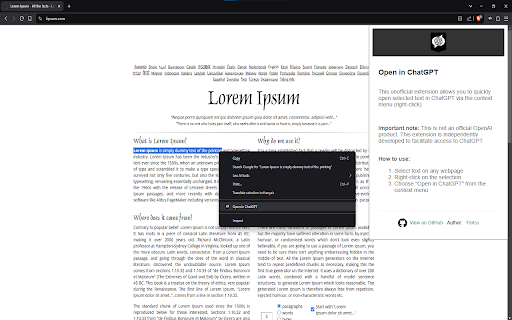
Select any text on a webpage, right-click, and send it directly to ChatGPT for quick answers. Simple, fast, and efficient.
As of May 2026, Open in ChatGPT has 7 users in the Productivity category.
Usersno change0%
7
7
Ratingno change0%
—
— reviews
Reviewsno change0%
—
Version
1.0
Manifest V3
History
2 snapshotsTracking since Apr 26, 2026.
View as table
| Date | Users | Rating | Reviews | Version |
|---|---|---|---|---|
| Apr 26, 2026 | 7 | — | — | 1.0 |
| May 23, 2026 | 6 | — | — | 1.0 |
| Now | 7 | — | — | 1.0 |
Permissions & access
- Permissions
- contextMenustabsscripting
- Host access
- https://chat.openai.com/*, https://chatgpt.com/*
Screenshots
About
Open in ChatGPT - Store Description

Select any text on a webpage, right-click, and send it directly to ChatGPT for quick answers. Simple, fast, and efficient.

🚀 FEATURES
    • Instantly send selected text to ChatGPT with a simple right-click
    • Seamless integration with any webpage
    • Clean and intuitive interface
    • No account creation required (requires ChatGPT account)
    • Zero data collection - your privacy is respected
    • Works with any text selection on any webpage

🎯 PERFECT FOR
    • Students researching topics
    • Professionals seeking quick explanations
    • Writers needing instant feedback
    • Researchers analyzing content
    • Anyone wanting quick AI assistance while browsing

💡 HOW TO USE
    1. Select any text on a webpage
    2. Right-click on your selection
    3. Click "Open in ChatGPT" from the menu
    4. Your selected text will automatically open in ChatGPT

⚙️ TECHNICAL DETAILS
    • Minimal permissions required
    • Only accesses ChatGPT when you request it
    • Open source code available on GitHub
    • Regular updates and maintenance
    • Compatible with all Chromium-based browsers

🔒 PRIVACY
    • No data collection or storage
    • No tracking
    • Only processes text you explicitly select
    • Only communicates with official ChatGPT domains

⚠️ NOTE
This is not an official OpenAI product. This extension is independently developed to enhance your ChatGPT experience.

💫 VERSION HISTORY
1.0 - Initial release
    • Context menu integration
    • Automatic text insertion
    • Clean user interface
    • Full ChatGPT compatibility

📧 SUPPORT
For support, feature requests, or bug reports, please visit our GitHub repository:
https://github.com/Flotss/OpenInChatGPTExtension

Keywords: ChatGPT, AI Assistant, Text Processing, Productivity, Research Tool
Technical
- Version
- 1.0
- Manifest
- V3
- Size
- 81.32KiB
- Min Chrome
- 88
- Languages
- 1
- Featured
- No
Metadata
- ID
- gabakmfnaplpfbnpbbkdppknimcfahpe
- Developer ID
- udc340d4b8440a79b33ddfd76aff650ab
- Developer Email
- [email protected]
- Created
- Mar 5, 2025
- Last Updated (Store)
- Mar 5, 2025
- Last Scraped
- May 23, 2026
- Website
- —
Similar extensions
Alternatives to Open in ChatGPT, ranked by description similarity.

Ask ChatGPT - Text Search
Highlight text on any site, right-click to search with ChatGPT instantly. Your AI assistant is always one right-click away.
14
★ 5.0

ChatGPT Quick Access
Quickly access ChatGPT from your browser and ask questions about selected text
16

Ask ChatGPT
Highlight text and ask ChatGPT instantly via right-click context menu
3

Copy to ChatGPT
Right-click to copy text and open ChatGPT with it
16

ChromeGPT for ChatGPT
The easiest way to use ChatGPT.
889
★ 5.0

ChatGPT Quick Access
Floating button + hotkey to open ChatGPT instantly on any website.
14

ChatGPT for Google by cloudHQ
Generate ChatGPT responses next to Google search results
10.0K
★ 4.2

Select to AI
Send selected text to ChatGPT, Gemini, or Perplexity via New Tab, Popup Window, or Side Panel.
905
★ 3.7
Data sourced from the Chrome Web Store · last verified May 23, 2026.