
LogMeOnce
Securely Single Sign-On to all of your Apps with one click
As of June 2026, LogMeOnce has 10,000 users and a 4.47/5 rating from 163 reviews in the Privacy & Security category.
Usersno change0%
10.0K
10,000
Ratingup 0.2 percent+0.2%
4.47
163 reviews
Reviewsup 2.5 percent+2.5%
163
Version
7.14.2
Manifest V3
History
3 snapshotsTracking since Apr 3, 2026.
View as table
| Date | Users | Rating | Reviews | Version |
|---|---|---|---|---|
| Apr 3, 2026 | 10.0K | 4.46 | 159 | 7.14.2 |
| Apr 7, 2026 | 10.0K | 4.46 | 160 | 7.14.2 |
| Apr 17, 2026 | 10.0K | 4.47 | 162 | 7.14.2 |
| Now | 10.0K | 4.47 | 163 | 7.14.2 |
Permissions & access
- Permissions
- geolocationtabscookieswebRequestcontextMenusprivacystoragescriptingsystem.displayoffscreenactiveTab
- Host access
- http://*/*, https://*/*
Screenshots


About
The Problem

With too many accounts and log-ins, users mostly tend to choose weak, easy to guess passwords, and rarely change passwords, hence placing themselves at risk from fraud and identity theft. Most consumers may have dozens of password-protected accounts. Users with multiple accounts needing passwords often give up and use the same password, or a derivative of the same password for every account which makes them easy targets for hackers. When consumers are required to follow existing security policies and use various log-ins or passwords, they usually end up writing down their passwords making them easy targets.

LogMeOnce Solution

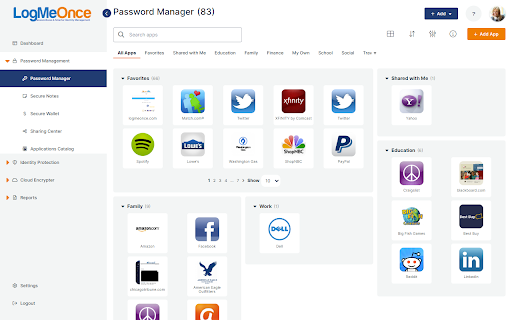
LogMeOnce dashboard offers simple user friendly access for each user to their unique web site which entails a list of all of their applications, with security protection behind each Application icon. Simply click the icon of your desired Application, and you are logged in without the need to enter a username and password each time. Your security credentials for each Application are individually secured and encrypted with your unique encryption key, that only you are aware of.
Technical
- Version
- 7.14.2
- Manifest
- V3
- Size
- 5.22MiB
- Min Chrome
- 88
- Languages
- 16
- Featured
- Yes
Metadata
- ID
- folnjigffmbjmcjgmbbfcpleeddaedal
- Developer ID
- u213010c20ee7c7f29d137292d5bca79b
- Developer Email
- [email protected]
- Created
- Sep 10, 2012
- Last Updated (Store)
- Feb 27, 2026
- Last Scraped
- Jun 6, 2026
- Website
- http://logmeonce.com/
- Support URL
- https://support.logmeonce.com
- Privacy Policy
- https://www.logmeonce.com/privacy/
Similar extensions
Alternatives to LogMeOnce, ranked by description similarity.
MasterPassword for chrome
Remember your MasterPassword, and this app will generate unique passwords for every other site you visit
2.0K
★ 4.7

MindYourPass – Password Manager
MindYourPass makes authentication safe and easy.
4.0K
★ 4.6

Dashlane — Password Manager
Dashlane makes the internet easier. Save all your passwords, fill forms fast, and keep your data accessible and safe.
1.0M
★ 4.7

Lockwell
Lockwell provides fast and secure access to you and your team’s passwords. Easily view, copy, and autofill logins.
178
★ 5.0

ScrambleID
All-in-One Passwordless Authentication.
873

Strong Password Generator
Generate strong random passwords or memorable passphrases with CSPRNG. Customize length, character sets, and separators.
1.0K
★ 4.8

perc.pass - Password Manager
perc.pass is a simple and secure password management tool.
244
★ 5.0

Parked Password
The extension generates a password for a website based on the hash algorithm
26
★ 4.3
Data sourced from the Chrome Web Store · last verified Jun 6, 2026.