TimeSlotYou for Google Calendar™
Availability finder for your busy Google Calendar™.
As of May 2026, TimeSlotYou for Google Calendar™ has 244 users and a 3.00/5 rating from 2 reviews in the Workflow & Planning category.
Usersdown 4.7 percent−4.7%
244
244
Ratingno change0%
3.00
2 reviews
Reviewsno change0%
2
Version
1.1.6
Manifest V3
History
2 snapshotsTracking since Apr 25, 2026.
View as table
| Date | Users | Rating | Reviews | Version |
|---|---|---|---|---|
| Apr 25, 2026 | 256 | 3.00 | 2 | 1.1.6 |
| May 22, 2026 | 246 | 3.00 | 2 | 1.1.6 |
| Now | 244 | 3.00 | 2 | 1.1.6 |
Permissions & access
- Permissions
- activeTabdeclarativeContentstorageidentity
- Host access
- None declared
Screenshots

About
Many people, especially busy professionals such as doctors, practitioners, therapists, excecutives, managers, salon administrators and many others, arrange and schedule their every day appointments in google calendar. The daily agenda can easily get crowded and messy with continuous 10, 15, 30 minutes appointments during working hours and days. Google calendar and numerous extensions and apps are perfect in creating, rearranging and viewing these calendars.

But what about availability? How easily can you spot let's say a 15 minute opening (appointment-free time) in the next two months in your packed agenda?

TimeSlotYou for Google Calendar™ browses your google calendar and spots openings, so you have a clear picture of availability for new appointments.

1. Download the extension.
2. Go to Google Calendar page and click on the extension to open the popup.
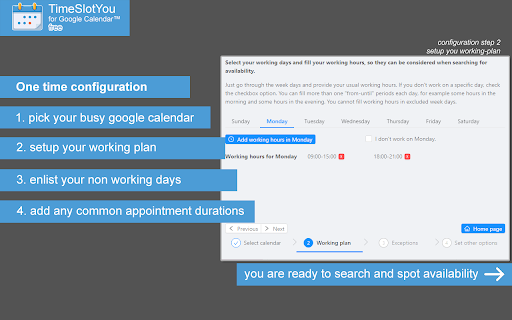
3. Go to configuration and select your busy calendar from the list of google calendars you have write access to.
4. Setup your working plan; which days of the week and hours of the day you normally work.
5. Complete any possible exceptions of your normal working plan, days off, holidays, overtime.
6. Optionally, provide commonly used appointment durations, such as 15 minutes, 30 minutes, 45 minutes.

That's it... Now you can

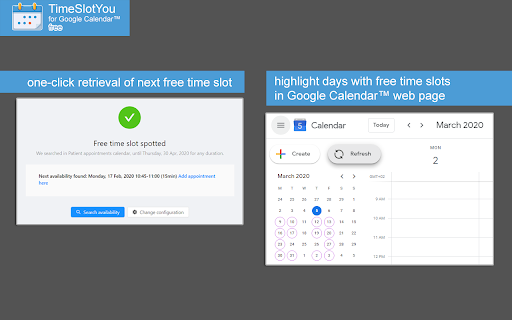
1. instantly see your next opening,
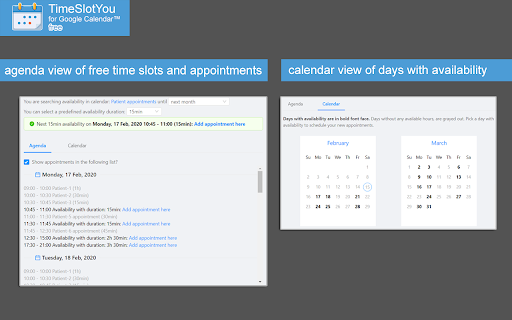
2. list all openings for the next 2, 3 or 6 months,
3. narrow availability searching for specific time durations (for example see availability at least 30 minutes long) and
4. get an overview picture of your availability calendar in google calendar web page.
Technical
- Version
- 1.1.6
- Manifest
- V3
- Size
- 8.18MiB
- Min Chrome
- 88
- Languages
- 2
- Featured
- No
Metadata
- ID
- foankeofjffaafjieigffenmkffjneif
- Developer ID
- u2b6db9d14e1dd215871080c83ef0dd08
- Developer Email
- [email protected]
- Created
- Feb 19, 2020
- Last Updated (Store)
- Oct 27, 2023
- Last Scraped
- May 22, 2026
- Website
- https://www.timeslotyou.com/
- Support URL
- https://www.timeslotyou.com
- Privacy Policy
- —
Similar extensions
Alternatives to TimeSlotYou for Google Calendar™, ranked by description similarity.

FreeFinder
Finds availability from active Google Calendar tab.
36
★ 5.0

My Free Schedule - Calendar Availability
View your Google Calendar availability for the next 7 business days. Multi-account support. Copy & share your free time slots.
—

FreeBusy Copilot
Schedule meetings 10x faster with people inside & outside your company. Companion for Gmail, Google Calendar and many other web apps
965
★ 4.7

Overlappr - Timezone Extension for Google Calendar
Add multiple timezones to Google Calendar and share available slots in just 3 clicks.
69
★ 5.0

Slotify
No need anymore to look up manually when colleagues are free. No more "what time works for you" messages. No more back and forth to…
7
★ 5.0

Scheduling Calendar
This Scheduling Calendar: Manage events, calendar reminders & sync calendars. Join video meetings in a shared calendar app.
5.0K
★ 4.5

TimeDraft
Insert your calendar availability into Gmail drafts with one click
8

Calendar Check
Find optimal meeting times by checking calendar availability
3
Data sourced from the Chrome Web Store · last verified May 22, 2026.