GG Auto Clicker 1.2
GG Auto clicker helps you automate mouse clicks on your chrome browser and has multiple options for automation.
As of May 2026, GG Auto Clicker 1.2 has 50,000 users and a 2.83/5 rating from 420 reviews in the Workflow & Planning category.
Usersno change0%
50.0K
50,000
Ratingup 0.4 percent+0.4%
2.83
420 reviews
Reviewsup 0.5 percent+0.5%
420
Version
1.2
Manifest V3
History
2 snapshotsTracking since Apr 25, 2026.
View as table
| Date | Users | Rating | Reviews | Version |
|---|---|---|---|---|
| Apr 25, 2026 | 50.0K | 2.82 | 418 | 1.2 |
| May 22, 2026 | 60.0K | 2.82 | 418 | 1.2 |
| Now | 50.0K | 2.83 | 420 | 1.2 |
Permissions & access
- Permissions
- storage
- Host access
- <all_urls>
Screenshots
About
Note- ALL THE BUGS IN EXTENSION HAVE BEEN RESOLVED. IT WORKS PERFECT NOW.

Hello people of the internet, we made an auto clicker for y’all that works, cherry on the top, in your chrome!

☆  GG Auto clicker chrome extension  ☆

The first chrome extension with multiple clicking features to automate mouse clicks on chrome browser.

NOTE - Press Ctrl and comma together to start. (Ctrl + ,). Don’t get confused! The plus symbol only means that ctrl and , should be pressed together (don’t press +)

Support email - [email protected] (feel free to reach out for support)

Allow us a moment to explain all the features to you-

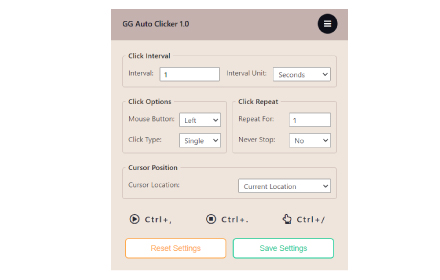
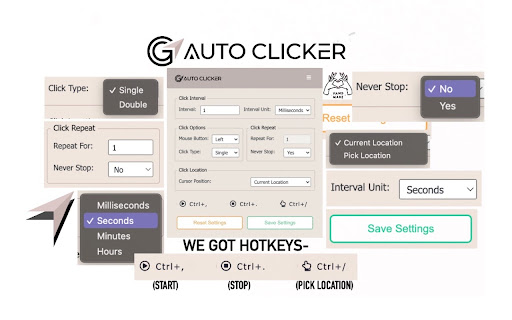
✓ Click Interval: You can select the click interval between two clicks and set the unit. Example: 1 millisecond, 10 seconds or 20 minutes.

✓ Click options: You can select right or left, single or double mouse options.

✓ Click repeat: You can set the number of times it should click. Press “NEVER STOP” if you want it to run until stopped.

✓ Cursor position: You can click on current cursor location, or pick X-Y coordinates using Ctrl + / from anywhere on the screen and manually input them.


☆☆ How to operate ☆☆

✓ Fill in your required settings.
✓ Leave the boxes that you don’t want to change, as it is.
✓ Save settings.
✓ Go back to your desired chrome window where you want to run the auto clicker online. Click on the screen once.
✓ Press Ctrl and comma buttons together to start (ctrl + ,) - please do not use the +, you only have to use two buttons simultaneously- the + is only for showing you which buttons to use together.


Here are the shortcuts / commands you can use.

★  To start the auto clicker, press Ctrl + ,
★  To stop, press Ctrl + .
★  To pick X-Y coordinates, press Ctrl + /

THAT IS IT, SEE THE MAGIC HAPPEN.

ADDITIONAL:

You will find two other options at the bottom in colour-

★  Reset settings: It will reset the settings to default.
★  Save settings: It will save your current settings. (It will stay like this, unless you press reset).

The chrome extension is free of cost and all the features have been thoroughly tested by our developers. But if you still find any bugs or face any issue operating, feel free to email us.

★★★ EMAIL US at [email protected] for any kind of support. ★★★

Please don’t drop a negative review, before reaching out to us. We will make it work for you, in most cases.
Technical
- Version
- 1.2
- Manifest
- V3
- Size
- 1.48MiB
- Min Chrome
- 88
- Languages
- 1
- Featured
- No
Metadata
- ID
- fndokfnecpehdehdjpdldadienbcjllf
- Developer ID
- uc6c103ceadf951e37422e403a7a6c8f7
- Developer Email
- [email protected]
- Created
- Jan 18, 2022
- Last Updated (Store)
- Aug 14, 2024
- Last Scraped
- May 22, 2026
- Website
- https://autoclicker.gg/
- Support URL
- https://autoclicker.gg/contact
- Privacy Policy
- https://autoclicker.gg/privacy-policy
Similar extensions
Alternatives to GG Auto Clicker 1.2, ranked by description similarity.

Auto Clicker - AutoFill [BETA]
AutoFill input field or auto click button or link anything anywhere.You can configure and check click speed test
7.0K
★ 3.1

Auto Clicker - AutoFill
AutoFill input field or auto click button or link anything anywhere.You can configure and check click speed test
200.0K
★ 4.0
Auto Clicker - AutoFill [DEV]
AutoFill input field or auto click button or link anything anywhere.You can configure and check click speed test
2.0K
★ 3.0
MT Auto Clicker
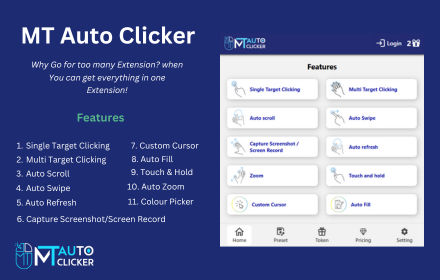
MT Auto Clicker is your go-to tool for automating repetitive tasks on your system.
20.0K
★ 3.7

Safe Auto Clicker — Smart Mouse Click Automation for Any Website
Auto-click anything on any website. Smart, safe, user-controlled clicker for forms, games, Salesforce, eBay, Amazon.
458
★ 3.2

Auto Clicker
Automate Clicks
100.0K
★ 3.8

click
Click on frequently used hard-to-reach DOM elements fast without a single mouse click
59

Auto Refresh for Chrome™
Use Auto Refresh for Chrome™ extension to enable automatic refreshing of any web page (tab) of your choice.
115
Data sourced from the Chrome Web Store · last verified May 22, 2026.