
ClipRelay – Save, Merge & Relay AI Answers
Stop losing your best AI answers. Clip, merge, and reuse content from ChatGPT, Claude, Gemini, Grok — or any webpage. All local.
As of June 2026, ClipRelay – Save, Merge & Relay AI Answers has 9 users in the Productivity category.
Usersno change0%
9
9
Ratingno change0%
—
— reviews
Reviewsno change0%
—
Version
5.6.57
Manifest V3
90-day change · In the last 90 days this extension 2 version updates.
History
6 snapshotsTracking since Apr 7, 2026.
View as table
| Date | Users | Rating | Reviews | Version |
|---|---|---|---|---|
| Apr 7, 2026 | 9 | — | — | 5.3.5 |
| Apr 19, 2026 | 10 | — | — | 5.3.5 |
| May 3, 2026 | 9 | — | — | 5.3.5 |
| May 9, 2026 | 11 | — | — | 5.3.5 |
| May 27, 2026 | 10 | — | — | 5.6.37 |
| Jun 3, 2026 | 11 | — | — | 5.6.37 |
| Now | 9 | — | — | 5.6.57 |
Changelog
- May 9, 2026description
You asked ChatGPT something last week. It gave you a perfect answer. Now you need it again — but it's buried somewhere in your chat history.

ClipRelay saves your best AI answers — and makes them reusable. One shortcut saves any AI answer. Merge pieces together. Send them to another AI as a ready-to-use prompt.

𝗛𝗢𝗪 𝗜𝗧 𝗪𝗢𝗥𝗞𝗦
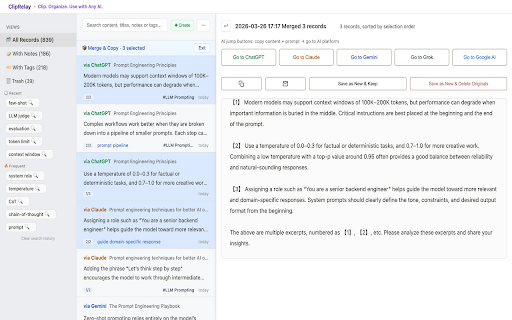
1. Select any text on ChatGPT, Claude, Gemini, Grok, or any webpage
2. Press the shortcut — it's saved with source link, platform, and timestamp
3. Open the dashboard to search, tag, or merge your clips
4. Hit "Send to AI" to relay everything to another AI in one click

No account. No cloud. Everything stays in your browser.

𝗪𝗛𝗔𝗧 𝗬𝗢𝗨 𝗖𝗔𝗡 𝗗𝗢
– Save AI answers with one keyboard shortcut
– Merge multiple clips into a single prompt
– Relay merged content to any AI instantly
– Search across your entire clip library
– Tag, group, and organize clips
– Jump back to the original conversation in one click
– Export to CSV for backup or migration

𝗕𝗨𝗜𝗟𝗧 𝗙𝗢𝗥 𝗣𝗢𝗪𝗘𝗥 𝗨𝗦𝗘𝗥𝗦
– Three-panel dashboard for browsing and merging
– Auto-archive keeps large libraries fast
– Soft delete with recycle bin protection
– Customizable shortcut (default: Shift+Alt+Z / Cmd+Shift+Z)
– 12 interface languages

𝗦𝗨𝗣𝗣𝗢𝗥𝗧𝗘𝗗 𝗣𝗟𝗔𝗧𝗙𝗢𝗥𝗠𝗦
Works with ChatGPT, Claude, Gemini, Grok, and any webpage — just select and save. Shortcut: Alt+Shift+Z (Windows) / ⌘+Shift+Z (Mac).

𝗪𝗛𝗢 𝗜𝗦 𝗧𝗛𝗜𝗦 𝗙𝗢𝗥
Developers comparing answers across AI assistants. Researchers collecting insights from multiple models. Writers building prompts from past conversations. Anyone tired of re-asking questions they already solved.

Save once. Reuse everywhere.
You asked ChatGPT something last week. It gave you a perfect answer. Now you need it again — but it's buried somewhere in your chat history.
ClipRelay saves your best AI answers — and makes them reusable. One shortcut saves any AI answer. Merge pieces together. Send them to another AI as a ready-to-use prompt.
𝗛𝗢𝗪 𝗜𝗧 𝗪𝗢𝗥𝗞𝗦

Select any text on ChatGPT, Claude, Gemini, Grok, or any webpage
Press the shortcut — it's saved with source link, platform, and timestamp
Open the dashboard to search, tag, or merge your clips
Hit "Send to AI" to relay everything to another AI in one click

No account. No cloud. Everything stays in your browser.
𝗪𝗛𝗔𝗧 𝗬𝗢𝗨 𝗖𝗔𝗡 𝗗𝗢
– Save AI answers with one keyboard shortcut
– Merge multiple clips into a single prompt
– Relay merged content to any AI instantly
– Search across your entire clip library
– Tag, group, and organize clips
– Jump back to the original conversation in one click
– Export to CSV for backup or migration
𝗕𝗨𝗜𝗟𝗧 𝗙𝗢𝗥 𝗣𝗢𝗪𝗘𝗥 𝗨𝗦𝗘𝗥𝗦
– Three-panel dashboard for browsing and merging
– Auto-archive keeps large libraries fast
– Soft delete with recycle bin protection
– Customizable shortcut (default: Alt+Shift+Z (Windows) / Option+Shift+Z (Mac))
– 12 interface languages
𝗦𝗨𝗣𝗣𝗢𝗥𝗧𝗘𝗗 𝗣𝗟𝗔𝗧𝗙𝗢𝗥𝗠𝗦
Works with ChatGPT, Claude, Gemini, Grok, and any webpage — just select and save. Shortcut: Alt+Shift+Z (Windows) / Option+Shift+Z (Mac).
𝗪𝗛𝗢 𝗜𝗦 𝗧𝗛𝗜𝗦 𝗙𝗢𝗥
Developers comparing answers across AI assistants. Researchers collecting insights from multiple models. Writers building prompts from past conversations. Anyone tired of re-asking questions they already solved.
Save once. Reuse everywhere.
- May 9, 2026name
ClipRelay – Save, Merge & Relay AI Answers (ChatGPT, Claude, Gemini, Grok)
ClipRelay – Save, Merge & Relay AI Answers
Permissions & access
- Permissions
- storageactiveTabscriptingdownloads
- Host access
- https://chatgpt.com/*, https://chat.openai.com/*, https://claude.ai/*, https://gemini.google.com/*, https://www.google.com/search*, https://grok.com/*, https://x.com/*
Screenshots


About
You asked ChatGPT something last week. It gave you a perfect answer. Now you need it again — but it's buried somewhere in your chat history.
ClipRelay saves your best AI answers — and makes them reusable. One shortcut saves any AI answer. Merge pieces together. Send them to another AI as a ready-to-use prompt.
𝗛𝗢𝗪 𝗜𝗧 𝗪𝗢𝗥𝗞𝗦

Select any text on ChatGPT, Claude, Gemini, Grok, or any webpage
Press the shortcut — it's saved with source link, platform, and timestamp
Open the dashboard to search, tag, or merge your clips
Hit "Send to AI" to relay everything to another AI in one click

No account. No cloud. Everything stays in your browser.
𝗪𝗛𝗔𝗧 𝗬𝗢𝗨 𝗖𝗔𝗡 𝗗𝗢
– Save AI answers with one keyboard shortcut
– Merge multiple clips into a single prompt
– Relay merged content to any AI instantly
– Search across your entire clip library
– Tag, group, and organize clips
– Jump back to the original conversation in one click
– Export to CSV for backup or migration
𝗕𝗨𝗜𝗟𝗧 𝗙𝗢𝗥 𝗣𝗢𝗪𝗘𝗥 𝗨𝗦𝗘𝗥𝗦
– Three-panel dashboard for browsing and merging
– Auto-archive keeps large libraries fast
– Soft delete with recycle bin protection
– Customizable shortcut (default: Alt+Shift+Z (Windows) / Option+Shift+Z (Mac))
– 12 interface languages
𝗦𝗨𝗣𝗣𝗢𝗥𝗧𝗘𝗗 𝗣𝗟𝗔𝗧𝗙𝗢𝗥𝗠𝗦
Works with ChatGPT, Claude, Gemini, Grok, and any webpage — just select and save. Shortcut: Alt+Shift+Z (Windows) / Option+Shift+Z (Mac).
𝗪𝗛𝗢 𝗜𝗦 𝗧𝗛𝗜𝗦 𝗙𝗢𝗥
Developers comparing answers across AI assistants. Researchers collecting insights from multiple models. Writers building prompts from past conversations. Anyone tired of re-asking questions they already solved.
Save once. Reuse everywhere.
Technical
- Version
- 5.6.57
- Manifest
- V3
- Size
- 173KiB
- Min Chrome
- 88
- Languages
- 12
- Featured
- No
Metadata
- ID
- fmkfjnifamcdpmbknefjkheljapmjmej
- Developer ID
- ub95cfd7eceaf86881d6cd55fd9a578b7
- Developer Email
- [email protected]
- Created
- Feb 22, 2026
- Last Updated (Store)
- May 30, 2026
- Last Scraped
- Jun 8, 2026
- Website
- —
- Support URL
- https://anpuone.github.io/cliprelay-privacy/
Similar extensions
Alternatives to ClipRelay – Save, Merge & Relay AI Answers, ranked by description similarity.

The Memory Mate
The Memory Mate — Chrome Extension
Never lose a valuable AI answer again!
The Memory Mate is your personal AI memory assistant for…
8
★ 5.0

MindBind - Save AI Conversations
Save text snippets and images from ChatGPT, Claude, and other AI chats to your MindBind library.
6
★ 5.0

AIChatLens - AI Memory and Knowledge layer for Chats
Save, search, and organize AI chats and snippets from ChatGPT, Copilot, and Gemini
4

AI Context Flow: Use Your AI Memory Everywhere
Save your AI context once, reuse it across ChatGPT, Claude, Gemini, OpenClaw and every AI tool — stop repeating yourself.
3.0K
★ 5.0

Prompt Pocket
A tool to save frequently used prompts and copy them with a single click. Speeds up interaction with AI.
26
★ 5.0

AI Prompt Manager
Save, organize, and quickly access your frequently used AI prompts
1

XPrompt - Multi-AI Prompt Runner: ChatGPT, Gemini, Claude, Grok
Multi-LLM prompt runner without API keys. Send one prompt to ChatGPT, Gemini, Claude, Grok etc.
45
★ 5.0

AI Chat Personalities
Enhance your AI chat experience with customizable character personalities
5
★ 5.0
Data sourced from the Chrome Web Store · last verified Jun 8, 2026.