
Prompt Pocket
A tool to save frequently used prompts and copy them with a single click. Speeds up interaction with AI.
As of May 2026, Prompt Pocket has 26 users and a 5.00/5 rating from 1 reviews in the Productivity category.
Usersdown 3.7 percent−3.7%
26
26
Ratingno change0%
5.00
1 reviews
Reviewsno change0%
1
Version
0.1.4
Manifest V3
History
4 snapshotsTracking since Apr 21, 2026.
View as table
| Date | Users | Rating | Reviews | Version |
|---|---|---|---|---|
| Apr 21, 2026 | 27 | 5.00 | 1 | 0.1.4 |
| May 6, 2026 | 26 | 5.00 | 1 | 0.1.4 |
| May 17, 2026 | 24 | 5.00 | 1 | 0.1.4 |
| May 30, 2026 | 30 | 5.00 | 1 | 0.1.4 |
| Now | 26 | 5.00 | 1 | 0.1.4 |
Permissions & access
- Permissions
- storagecontextMenusactiveTabscriptingidentity
- Host access
- None declared
Screenshots


About
✨ 10x Faster Conversations with AI. No More Tedious Prompt Input.

Prompt Clipper is the ultimate productivity tool for instantly recalling frequently used prompts in ChatGPT, Gemini, Claude, and more.

Are you tired of manually typing or hunting through notepads to copy-paste your:
- "Magic spells for high-quality answers"
- "Daily information-gathering templates"
- "Standard formats for translation and summarization"

With Prompt Clipper, that hassle is a thing of the past. Copy your saved prompts with a single click and dramatically speed up your AI workflow.

### Key Features

- **Unlimited Prompt Storage**:
  Save as many prompts as you like, each with a title, tags, and the prompt text itself.

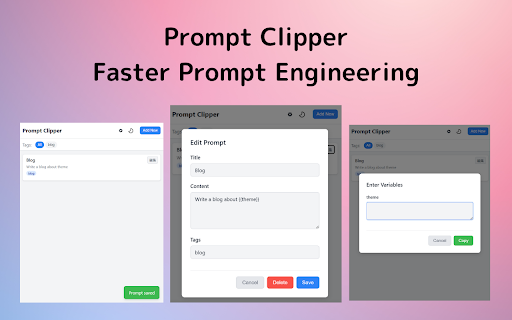
- **Innovative `{{variable}}` Feature**:
  Embed variables like `{{keyword}}` in your prompts. When you copy, a special form appears, allowing you to dynamically generate different prompts every time just by filling it in. No more manual rewriting.
  (e.g., "Write a blog post about `{{topic}}` in a `{{formal}}` tone.")

- **One-Click Copy**:
  Copy any saved prompt to your clipboard with a single click from the extension popup.

- **Tag Management & Search (Coming Soon)**:
  Organize your prompts with tags like "Summarization" or "Brainstorming" to find what you need instantly.

- **Quick Access to Major AIs**:
  Jump to ChatGPT, Gemini, and more with one click from the popup.

### Perfect for You If You Are:

- **Engineers**: Looking to save prompts for code reviews, specification writing, or debugging.
- **Writers/Marketers**: Wanting to streamline the creation of article outlines, social media posts, and press releases.
- **Students/Researchers**: Needing to speed up tasks like summarizing papers, creating bibliographies, or translating text.
- **Business Professionals**: Anyone using AI to make daily reports, email composition, and information gathering more efficient.

### How to Use

1.  **Save**: From the extension's "Add New" menu, save your frequently used prompts with a title and tags.
2.  **Recall**: Click the toolbar icon and press the "Copy" button for the prompt you want to use.
3.  **Paste**: Paste it into the input field of ChatGPT, Gemini, or any other AI!
Technical
- Version
- 0.1.4
- Manifest
- V3
- Size
- 276KiB
- Min Chrome
- 88
- Languages
- 2
- Featured
- No
Metadata
- ID
- mcplkeiigonncoeaaeniohhimipilcpo
- Developer ID
- u27fa1ca1cf2fc3484f3c672a2cb1cbd8
- Developer Email
- [email protected]
- Created
- Jul 2, 2025
- Last Updated (Store)
- Sep 20, 2025
- Last Scraped
- May 30, 2026
- Website
- —
- Support URL
- —
Similar extensions
Alternatives to Prompt Pocket, ranked by description similarity.

AiPromptAgent
Manage your AI prompts across multiple AI platforms with ease.
79
★ 5.0

PromptEasy - AI Prompt Manager
Manage and use your AI prompts across ChatGPT, Claude, Gemini and more
13

AI Chat Personalities
Enhance your AI chat experience with customizable character personalities
5
★ 5.0

Promptly – AI Prompt Enhancer & Manager for ChatGPT, Claude, Gemini
Optimize, save & reuse AI prompts for ChatGPT, Claude, Gemini & more. Prompt library, one-click enhancer & conversation exporter.
30.0K
★ 4.5

Prompt Master
Prompt Master enables you to manage AI prompts for each AI tool (based on URL) separately and effectively
6

AI Prompt Manager
A browser extension to manage and insert AI prompts using shortcuts.
7
★ 5.0

Prompts Cake
Create reusable AI prompts with dynamic variables. Boost productivity across ChatGPT, Gemini, Grok & more
13
★ 5.0

AI Prompt Manager – PromptIn for ChatGPT, Claude, Gemini & More
AI Prompt Manager for ChatGPT, Claude, Gemini, Perplexity & Grok. Save, organize & reuse your best prompts in one place.
178
★ 5.0
Data sourced from the Chrome Web Store · last verified May 30, 2026.