
SP Formatter
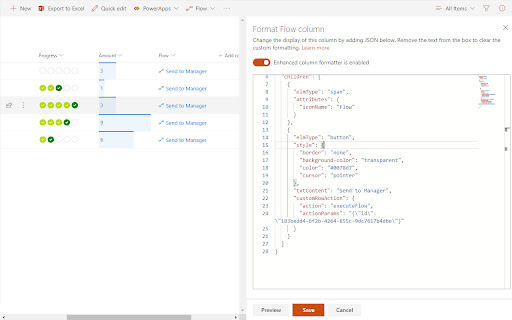
Customize your SharePoint Column, View or Form Layout Formatting JSON using a full-featured editor instead of the default one.
As of May 2026, SP Formatter has 3,000 users and a 4.20/5 rating from 5 reviews in the Developer Tools category.
Usersno change0%
3.0K
3,000
Ratingno change0%
4.20
5 reviews
Reviewsno change0%
5
Version
0.1.6
Manifest V3
Permissions & access
- Permissions
- storage
- Host access
- None declared
Screenshots



About
SP Formatter features:

- Live Preview as you type (no need to click "Preview" button)
- Intellisense (suggestions) based on Column or View formatting schema, CSS styles, replaceable tokens (`@currentField`, list fields with `$` based on the context)
- JSON validation with error messages in the editor
- Help tooltips for JSON properties
- Color highlights
- Line numbers, brace matching, collapsible regions
- Hotkeys: search, replace, format document, go to line and others available for monaco-editor
- Easily switch between default and enhanced editor
- VSCode integration
- Full screen mode

Supported platforms:

 - SharePoint Online
 - SharePoint 2019 (through a separate extension, read more https://github.com/pnp/sp-formatter/blob/master/sp2019/README.md)

PRIVACY POLICY
SP Formatter does not collect nor store any personal data.

CHANGELOG:
https://github.com/pnp/sp-formatter/blob/master/web-extension/CHANGELOG.md
Technical
- Version
- 0.1.6
- Manifest
- V3
- Size
- 4.28MiB
- Min Chrome
- 88
- Languages
- 1
- Featured
- No
Metadata
- ID
- fmeihfaddhdkoogipahfcjlicglflkhg
- Developer ID
- u39ff42617c1ba2f6cf7c6c6c743d6e20
- Developer Email
- [email protected]
- Created
- May 31, 2019
- Last Updated (Store)
- Jul 9, 2024
- Last Scraped
- May 22, 2026
- Website
- —
- Support URL
- https://github.com/pnp/sp-formatter/issues
- Privacy Policy
- —
Similar extensions
Alternatives to SP Formatter, ranked by description similarity.

JSON Formatter Pro
Auto-format and validate JSON & API responses instantly. Syntax highlighting, tree view, dark mode. Data never leaves your browser.
3.0K
★ 4.8

JSON Formatter
Formats JSON automatically! Open Source, Available with 60+ Themes, Syntax Highlighting, automatically linkifies links and more.
40.0K
★ 4.4

JSONFormatter Pro
An advanced JSON editor, formatter, and viewer with Tree, Graph, YAML, CSV and Diff tools.
10

JSON Formatter
The most beautiful and customizable JSON / JSONP highlighter, makes JSON / JSONP easy to read. Open source.
49

JSON File Manager Pro
Advanced JSON dev tool: Format, minify, compare diffs side-by-side, convert HTML/Strings ↔ JSON, and manage saved files.
6

JSON Viewer & Beautifier, Formatter - Lumina JSON
JSON viewer & formatter to view JSON easily. JSON beautifier, JSON editor & JSON prettier for JSON (JavaScript Object Notation).
1

JSON Formatter Everywhere
Automatically formats JSON responses in any tab, not just raw JSON pages.
3

JSON Formatter Pro 2026
Ultra-modern JSON formatter with blazing fast viewer, syntax highlighting, breadcrumb navigation, and toggle view modes.
4
Data sourced from the Chrome Web Store · last verified May 22, 2026.