
JSON Formatter
Formats JSON automatically! Open Source, Available with 60+ Themes, Syntax Highlighting, automatically linkifies links and more.
As of June 2026, JSON Formatter has 40,000 users and a 4.41/5 rating from 44 reviews in the Developer Tools category.
Usersdown 20.0 percent−20.0%
40.0K
40,000
Ratingup 1.6 percent+1.6%
4.41
44 reviews
Reviewsdown 6.4 percent−6.4%
44
Version
v2.2.0
Manifest V3
90-day change · In the last 90 days this extension lost 10.0K users, 2 version updates.
History
10 snapshotsTracking since Apr 1, 2026.
View as table
| Date | Users | Rating | Reviews | Version |
|---|---|---|---|---|
| Apr 1, 2026 | 50.0K | 4.34 | 47 | Version 2.1.14 Beta |
| Apr 5, 2026 | 50.0K | 4.35 | 48 | Version 2.1.14 Beta |
| Apr 16, 2026 | 50.0K | 4.37 | 49 | Version 2.1.14 Beta |
| May 1, 2026 | 40.0K | 4.37 | 49 | Version 2.1.14 Beta |
| May 5, 2026 | 40.0K | 4.37 | 49 | Version 2.1.19 Beta |
| May 10, 2026 | 40.0K | 4.44 | 48 | Version 2.1.19 Beta |
| May 12, 2026 | 40.0K | 4.45 | 49 | Version 2.1.19 Beta |
| May 30, 2026 | 40.0K | 4.41 | 46 | Version 2.1.19 Beta |
| Jun 4, 2026 | 40.0K | 4.40 | 45 | Version 2.1.19 Beta |
| Jun 6, 2026 | 40.0K | 4.40 | 45 | v2.2.0 |
| Now | 40.0K | 4.41 | 44 | v2.2.0 |
Changelog
- Jun 4, 2026description
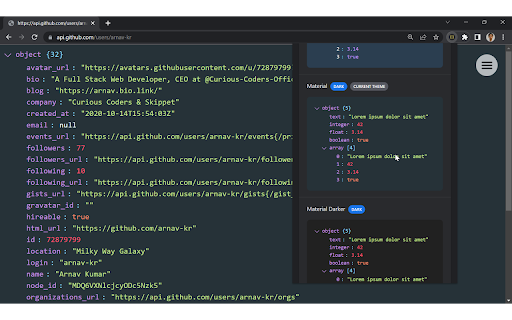
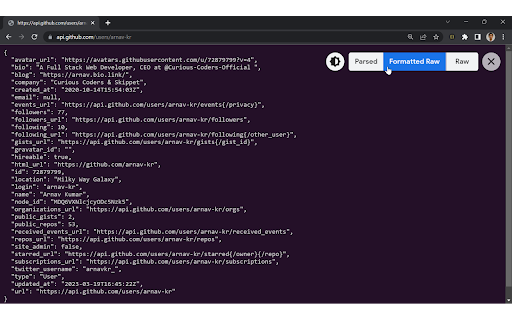
JSON Formatter automatically formats and prettifies JSON in Chrome. It comes with support for syntax highlighting and over 60 themes. It also makes links clickable automatically and has multiple modes to view JSON, including Parsed Mode, Formatted Raw Mode, and Raw Mode.

You can toggle between modes using shortcut keys:

Parsed Mode: P key
Formatted Raw Mode: Shift + R key
Raw Mode: R key
Collapse All: [ Key
Expand All: ] Key
Toggle Dark Mode: D key
Toggle Toolbar: T key

Features:
● Over 60 themes for both light and dark mode
● Syntax highlighting
● Works offline
● No tracking or analytics
● Word wrapping and sorting order to stay organized
● Works with any JSON webpage
● Makes links clickable
● Formats JSON automatically
● Raw, Formatted Raw, and Parsed Mode
● Remembers theme preferences
● Shortcut keys for ease of use
● Collapsible toolbar

Note: By default, the extension theme is "System Default." It will change according to your browser's theme. If you want it to be the theme of your choice, you have to set it from the "Extension Settings" or "Extension Options."

To change the default formatting option and other settings, set your desired option in the extension settings.

To make JSON Formatter work properly on all kinds of sites, in the extension permissions, change "Allow this extension to read and change all your data on websites you visit" from "On Click" to "On all sites," if not already set.

To use JSON Formatter in local files, enable "Allow access to file URLs" in the extension settings.

To use JSON Formatter in Incognito mode, enable "Allow in Incognito" in the extension settings.

Some URLs to test on:
- https://api.github.com/users
- https://microsoftedge.github.io/Demos/json-dummy-data/64KB.json
- https://raw.githubusercontent.com/mxstbr/markdown-test-file/refs/heads/master/TEST.md
- https://raw.githubusercontent.com/mdn/learning-area/refs/heads/main/javascript/introduction-to-js-1/assessment-finished/main.js

Source code:
https://github.com/arnav-kr/json-formatter/

Bug reports and suggestions:
https://github.com/arnav-kr/json-formatter/issues

Changelog:
https://github.com/arnav-kr/json-formatter/blob/main/CHANGELOG.md
JSON Formatter automatically formats and prettifies JSON in Chrome. It comes with support for syntax highlighting and over 60 themes. It also makes links clickable automatically and has multiple modes to view JSON, including Parsed Mode, Formatted Raw Mode, and Raw Mode.

You can toggle between modes using shortcut keys:

Parsed Mode: P key
Formatted Raw Mode: Shift + R key
Raw Mode: R key
Collapse All: [ Key
Expand All: ] Key
Toggle Dark Mode: D key
Toggle Toolbar: T key

Features:
● Over 60 themes for both light and dark mode
● Syntax highlighting
● Works offline
● No tracking or analytics
● Word wrapping and sorting order to stay organized
● Works with any JSON webpage
● Supports excluding domains from formatting
● Makes links clickable
● Formats JSON automatically
● Raw, Formatted Raw, and Parsed Mode
● Remembers theme preferences
● Shortcut keys for ease of use
● Collapsible toolbar

Note: By default, the extension theme is "System Default." It will change according to your browser's theme. If you want it to be the theme of your choice, you have to set it from the "Extension Settings" or "Extension Options."

To change the default formatting option and other settings, set your desired option in the extension settings.

To make JSON Formatter work properly on all kinds of sites, in the extension permissions, change "Allow this extension to read and change all your data on websites you visit" from "On Click" to "On all sites," if not already set.

To use JSON Formatter in local files, enable "Allow access to file URLs" in the extension settings.

To use JSON Formatter in Incognito mode, enable "Allow in Incognito" in the extension settings.

Some URLs to test on:
- https://api.github.com/users
- https://microsoftedge.github.io/Demos/json-dummy-data/64KB.json
- https://raw.githubusercontent.com/mxstbr/markdown-test-file/refs/heads/master/TEST.md
- https://raw.githubusercontent.com/mdn/learning-area/refs/heads/main/javascript/introduction-to-js-1/assessment-finished/main.js

Source code:
https://github.com/arnav-kr/json-formatter/

Bug reports and suggestions:
https://github.com/arnav-kr/json-formatter/issues

Changelog:
https://github.com/arnav-kr/json-formatter/blob/main/CHANGELOG.md
- May 1, 2026description
JSON Formatter automatically formats and prettifies JSON in Chrome. It comes with support for syntax highlighting and over 60 themes. It also makes links clickable automatically and has multiple modes to view JSON, including Parsed Mode, Formatted Raw Mode, and Raw Mode.

You can toggle between modes using shortcut keys:

Parsed Mode: P key
Formatted Raw Mode: Shift + R key
Raw Mode: R key
Collapse All: [ Key
Expand All: ] Key
Toggle Dark Mode: D key
Toggle Toolbar: T key

Features:
● Over 60 themes for both light and dark mode
● Syntax highlighting
● Works offline
● No tracking or analytics
● Word wrapping and sorting order to stay organized
● Works with any JSON webpage
● Makes links clickable
● Formats JSON automatically
● Raw, Formatted Raw, and Parsed Mode
● Remembers theme preferences
● Shortcut keys for ease of use
● Collapsible toolbar

Note: By default, the extension theme is "System Default." It will change according to your browser's theme. If you want it to be the theme of your choice, you have to set it from the "Extension Settings" or "Extension Options."

To change the default formatting option and other settings, set your desired option in the extension settings.

To make JSON Formatter work properly on all kinds of sites, in the extension permissions, change "Allow this extension to read and change all your data on websites you visit" from "On Click" to "On all sites," if not already set.

To use JSON Formatter in local files, enable "Allow access to file URLs" in the extension settings.

To use JSON Formatter in Incognito mode, enable "Allow in Incognito" in the extension settings.

Some URLs to test on:
- https://api.github.com/users
- https://microsoftedge.github.io/Demos/json-dummy-data/64KB.json
- https://raw.githubusercontent.com/mxstbr/markdown-test-file/refs/heads/master/TEST.md
- https://raw.githubusercontent.com/mdn/learning-area/refs/heads/main/javascript/introduction-to-js-1/assessment-finished/main.js

Source code:
https://github.com/jformatter/json-formatter-crx/

Bug reports and suggestions:
https://github.com/jformatter/json-formatter-crx/issues

Changelog:
https://github.com/jformatter/json-formatter-crx/blob/main/CHANGELOG.md
JSON Formatter automatically formats and prettifies JSON in Chrome. It comes with support for syntax highlighting and over 60 themes. It also makes links clickable automatically and has multiple modes to view JSON, including Parsed Mode, Formatted Raw Mode, and Raw Mode.

You can toggle between modes using shortcut keys:

Parsed Mode: P key
Formatted Raw Mode: Shift + R key
Raw Mode: R key
Collapse All: [ Key
Expand All: ] Key
Toggle Dark Mode: D key
Toggle Toolbar: T key

Features:
● Over 60 themes for both light and dark mode
● Syntax highlighting
● Works offline
● No tracking or analytics
● Word wrapping and sorting order to stay organized
● Works with any JSON webpage
● Makes links clickable
● Formats JSON automatically
● Raw, Formatted Raw, and Parsed Mode
● Remembers theme preferences
● Shortcut keys for ease of use
● Collapsible toolbar

Note: By default, the extension theme is "System Default." It will change according to your browser's theme. If you want it to be the theme of your choice, you have to set it from the "Extension Settings" or "Extension Options."

To change the default formatting option and other settings, set your desired option in the extension settings.

To make JSON Formatter work properly on all kinds of sites, in the extension permissions, change "Allow this extension to read and change all your data on websites you visit" from "On Click" to "On all sites," if not already set.

To use JSON Formatter in local files, enable "Allow access to file URLs" in the extension settings.

To use JSON Formatter in Incognito mode, enable "Allow in Incognito" in the extension settings.

Some URLs to test on:
- https://api.github.com/users
- https://microsoftedge.github.io/Demos/json-dummy-data/64KB.json
- https://raw.githubusercontent.com/mxstbr/markdown-test-file/refs/heads/master/TEST.md
- https://raw.githubusercontent.com/mdn/learning-area/refs/heads/main/javascript/introduction-to-js-1/assessment-finished/main.js

Source code:
https://github.com/arnav-kr/json-formatter/

Bug reports and suggestions:
https://github.com/arnav-kr/json-formatter/issues

Changelog:
https://github.com/arnav-kr/json-formatter/blob/main/CHANGELOG.md
Permissions & access
- Permissions
- storageunlimitedStorage
- Host access
- *://*/*, <all_urls>
Screenshots



About
JSON Formatter automatically formats and prettifies JSON in Chrome. It comes with support for syntax highlighting and over 60 themes. It also makes links clickable automatically and has multiple modes to view JSON, including Parsed Mode, Formatted Raw Mode, and Raw Mode.

You can toggle between modes using shortcut keys:

Parsed Mode: P key
Formatted Raw Mode: Shift + R key
Raw Mode: R key
Collapse All: [ Key
Expand All: ] Key
Toggle Dark Mode: D key
Toggle Toolbar: T key

Features:
● Over 60 themes for both light and dark mode
● Syntax highlighting
● Works offline
● No tracking or analytics
● Word wrapping and sorting order to stay organized
● Works with any JSON webpage
● Supports excluding domains from formatting
● Makes links clickable
● Formats JSON automatically
● Raw, Formatted Raw, and Parsed Mode
● Remembers theme preferences
● Shortcut keys for ease of use
● Collapsible toolbar

Note: By default, the extension theme is "System Default." It will change according to your browser's theme. If you want it to be the theme of your choice, you have to set it from the "Extension Settings" or "Extension Options."

To change the default formatting option and other settings, set your desired option in the extension settings.

To make JSON Formatter work properly on all kinds of sites, in the extension permissions, change "Allow this extension to read and change all your data on websites you visit" from "On Click" to "On all sites," if not already set.

To use JSON Formatter in local files, enable "Allow access to file URLs" in the extension settings.

To use JSON Formatter in Incognito mode, enable "Allow in Incognito" in the extension settings.

Some URLs to test on:
- https://api.github.com/users
- https://microsoftedge.github.io/Demos/json-dummy-data/64KB.json
- https://raw.githubusercontent.com/mxstbr/markdown-test-file/refs/heads/master/TEST.md
- https://raw.githubusercontent.com/mdn/learning-area/refs/heads/main/javascript/introduction-to-js-1/assessment-finished/main.js

Source code:
https://github.com/arnav-kr/json-formatter/

Bug reports and suggestions:
https://github.com/arnav-kr/json-formatter/issues

Changelog:
https://github.com/arnav-kr/json-formatter/blob/main/CHANGELOG.md
Technical
- Version
- v2.2.0
- Manifest
- V3
- Size
- 213KiB
- Min Chrome
- 88
- Languages
- 1
- Featured
- No
Metadata
- ID
- gpmodmeblccallcadopbcoeoejepgpnb
- Developer ID
- u7de1956642b1c93c66299ead95d60293
- Developer Email
- [email protected]
- Created
- Sep 8, 2021
- Last Updated (Store)
- May 31, 2026
- Last Scraped
- Jun 25, 2026
- Website
- json-formatter.js.org
- Privacy Policy
- —
Similar extensions
Alternatives to JSON Formatter, ranked by description similarity.

JSON Formatter
The most beautiful and customizable JSON / JSONP highlighter, makes JSON / JSONP easy to read. Open source.
49

JSON Formatter & Viewer for Chrome
JSON Formatter & Beautifier for Chrome.
222

json-prettifier
prettify json
—

JSON Formatter by Code Architecture
Dark theme JSON formatter with Tree and Table views. Automatically formats JSON with syntax highlighting and navigation.
6
★ 5.0

JSON Formatter - Simple & Clean
Automatically formats JSON responses in the browser with themes, collapsible nodes, and other helpful features.
7
★ 5.0

JSON Formatter - Beautify & Validate
Format, beautify & validate JSON with syntax highlighting.
2

JSON Formatter Everywhere
Automatically formats JSON responses in any tab, not just raw JSON pages.
3

JSON Viewer
Most aesthetic & customizable JSON/JSONP viewer with themes, custom search, syntax highlighting/checking & copy features.
6.0K
★ 4.8
Data sourced from the Chrome Web Store · last verified Jun 25, 2026.