
Meeting Timer - for Google Meet
Google Meet Timer with Calendar Sync and a shareable SubTimer for tasks, speaking time, and agenda items.
As of June 2026, Meeting Timer - for Google Meet has 8,000 users and a 4.71/5 rating from 52 reviews in the Productivity category.
Usersno change0%
8.0K
8,000
Ratingdown 1.5 percent−1.5%
4.71
52 reviews
Reviewsup 4.0 percent+4.0%
52
Version
3.2.12
Manifest V3
History
4 snapshotsTracking since Apr 19, 2026.
View as table
| Date | Users | Rating | Reviews | Version |
|---|---|---|---|---|
| Apr 19, 2026 | 8.0K | 4.78 | 50 | 3.2.12 |
| Apr 29, 2026 | 10.0K | 4.78 | 50 | 3.2.12 |
| May 10, 2026 | 10.0K | 4.73 | 51 | 3.2.12 |
| May 23, 2026 | 9.0K | 4.71 | 52 | 3.2.12 |
| Now | 8.0K | 4.71 | 52 | 3.2.12 |
Permissions & access
- Permissions
- identityidentity.emailstoragetabsscriptingalarmsidle
- Host access
- <all_urls>
Screenshots


About
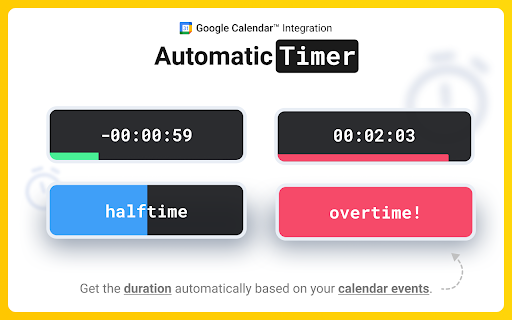
Meeting Timer is a lightweight timer for Google Meet with Google Calendar Sync, a Mini SubTimer for agenda items, and a shareable timer that stays visible when you present. Why it’s better: • Automatic countdown from your Calendar – join a Meet, and the Google Meet countdown timer starts with the correct duration. • Mini SubTimer (new) – time tasks, speaking turns, or agenda points without touching the main timer. • Share across tabs – show the timer on every tab so it appears on your shared screen. • Stay on track – halftime/overtime color cues, optional sound alerts, and overlap warnings. • Drag & drop – place the timer where you want; we remember the position. • Quick access to upcoming events – open the extension popup to see and join your next meetings. Two ways to use it: • Automatic: Connect Google Calendar once. The timer counts down for any Meet that matches your event. • Manual: Set a duration yourself. Great when there’s no calendar event, or an event couldn't be matched. Core features: • 🕒 Automatic Timer (Calendar matched) • ⏰ Manual Timer (Calendar event not matched) (set duration, see progress/halftime/overtime) •➕ Mini SubTimer for topics, Q&A, exercises • 🤝 Shareable timer (visible while screen sharing) • 🎛️ Drag & drop + saved position • 🌈 Progress, halftime & overtime color states • 🚨 Overlap alerts for back-to-back meetings • 🔊 Sound alerts (optional; configurable volume) • 📍 Favicon badge before a meeting starts • 📅 See all upcoming meetings from your Google Calendar in the popup How it works: 1. Install the extension. 2. (Optional) Connect Google Calendar. 3. Join a Google Meet. The meeting timer overlay appears automatically. 4. Click the SubTimer icon to add a mini countdown for agenda items or controlling speaking time. 5. Click Share to mirror timers across tabs so they appear on your shared screen. Settings: • Open settings from the gear icon on the timer. Requirements & notes: • Works best in Google Chrome. • Authorization may not work in some Chromium browsers (e.g., Brave, Arc). Help: 📋 Timer's controls Cheat Sheet: https://www.meetingtimer.io/cheatsheet ❓Troubleshooting & FAQ: https://www.meetingtimer.io/troubleshooting Contact Us: 🚀 Request a feature: https://forms.gle/U4MyETCPCxv8cozm7 🐛 Report a bug: https://forms.gle/GfipS5TGyVUZgx1V6 Privacy: We don’t store data on our servers. Your settings and meeting data stay in your browser. Legal Info: Google Meet Meeting Timer's use and transfer of information received from Google APIs to any other app will adhere to Google API Services User Data Policy, including the Limited Use requirements. Google Calendar is a trademark of Google LLC. Use of this trademark is subject to Google Permissions. Google Meet is a trademark of Google LLC. Use of this trademark is subject to Google Permissions.
Technical
- Version
- 3.2.12
- Manifest
- V3
- Size
- 1.63MiB
- Min Chrome
- 88
- Languages
- 1
- Featured
- Yes
Metadata
- ID
- flmcglmalcnabfaalkomeaohklknbbhg
- Developer ID
- u549062cb44c893c7a7a21f477ca1cd0f
- Developer Email
- [email protected]
- Created
- Jun 19, 2024
- Last Updated (Store)
- Oct 27, 2025
- Last Scraped
- Jun 5, 2026
- Website
- meetingtimer.io
- Support URL
- —
- Privacy Policy
- https://www.meetingtimer.io/privacy
Similar extensions
Alternatives to Meeting Timer - for Google Meet, ranked by description similarity.

Event Timer
Clear event timer with fullscreen, alarms and customization.
13

Swift Standup — Per-Speaker Timer
Stop long meetings with gentle social pressure. A floating per-speaker timer for focused, time-boxed standups on any webpage.
17
★ 5.0

Meet on Time - Join meetings on time, automatically
Never miss a meeting again. Join meeting waiting rooms on time, every time. Works with Google Meet, Zoom, Microsoft Teams, and more.
133
★ 5.0

Time Share
A visible countdown timer overlay for screen sharing during meetings
26

Calendar Ringer
🔔 Never be late again! Calendar Ringer makes sure you never miss a meeting with a ringtone and popup before your events start.
126
★ 5.0

Timer for Google Slides™
Utilize a draggable timer directly within Google Slides™ pages, including during slideshow mode.
256

No-Nonsense Time Tracker
Simple time tracker that syncs to Google Calendar (Cross-Browser)
4

Slides Timer
Live timer overlay for Google Slides presentations with countdown, stopwatch, and wall clock modes.
545
Data sourced from the Chrome Web Store · last verified Jun 5, 2026.