
Vtiger Aide - Your new Personal Assistant
Vtiger Aide helps you manage meetings, tasks, approvals, and comments—anywhere on the web, not just Vtiger.
As of June 2026, Vtiger Aide - Your new Personal Assistant has 37 users in the Workflow & Planning category.
Usersdown 9.8 percent−9.8%
37
37
Ratingno change0%
—
— reviews
Reviewsno change0%
—
Version
1.3
Manifest V3
History
5 snapshotsTracking since Apr 19, 2026.
View as table
| Date | Users | Rating | Reviews | Version |
|---|---|---|---|---|
| Apr 19, 2026 | 41 | — | — | 1.3 |
| May 4, 2026 | 46 | — | — | 1.3 |
| May 13, 2026 | 47 | — | — | 1.3 |
| May 25, 2026 | 42 | — | — | 1.3 |
| Jun 7, 2026 | 41 | — | — | 1.3 |
| Now | 37 | — | — | 1.3 |
Permissions & access
- Permissions
- storagetabsactiveTabscripting
- Host access
- http://*/*, https://*/*, http://localhost/*
Screenshots

About
Vtiger Aide is a feature that lets you have a seamless experience of attending meetings, taking notes, and creating action items. It is a Google Chrome extension that you can install with a few simple steps. Let us dive into the installation process.

**Managing Events**

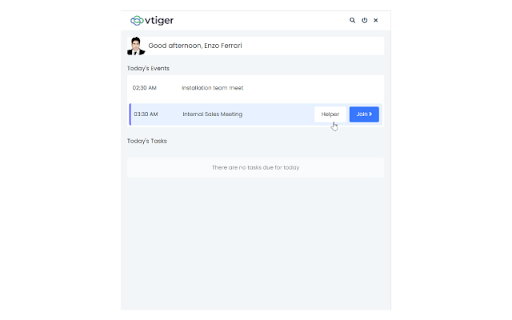
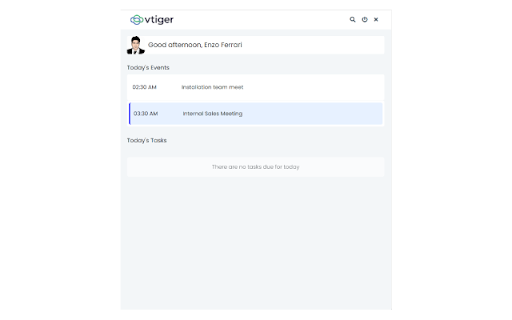
Under the Today’s Events section, you see the events whose start date is the current date.

* Clicking on an event under Today’s Events takes you to the event’s Detail View.
* If it’s a Google Meet or Zoom Meet or Microsoft Teams meeting or Webex meetings event, you will see an option to join the meeting. Clicking on Join> will take you to the meeting link.

If the event is [Google Meet](https://help.vtiger.com/article/146450020-Using-Google-Meet) or [Zoom Meet](https://help.vtiger.com/article/148048597-Zoom-Meetings-Integration) or Microsoft Teams or Webex, you will see the Helper option. Read further to learn more.

**Helper Button**

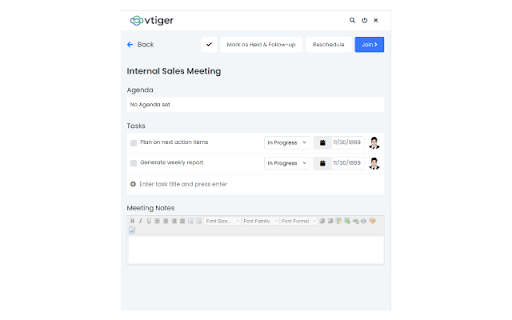
Click the Helper button. There are multiple actions that you can take with its help.

* Click the checkmark on the left to mark the event as Held (closed).
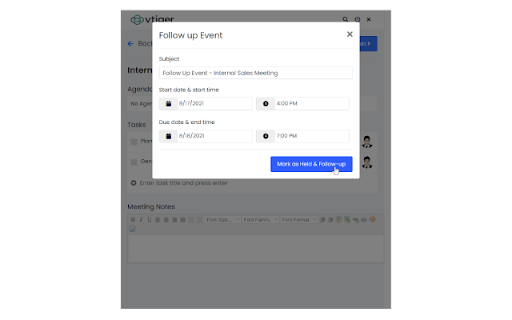
* Mark as Held & Follow up - This option allows you to close an event (mark as Held) and create a follow-up event.
* Reschedule - This option lets you reschedule the event by selecting new start and end dates.
* Join> - You can join the meeting by clicking this button.
* Tasks - Specify the task title and press Enter to create a task (action item). You can additionally set the task status, due date, and assignee.
* Meeting notes - Add the meeting minutes here. This gets copied to the event record’s description.

If the event is of type Zoom Meet, Webex also, you get the following additional options:

* The number of invitees who joined vs. the number of invitees who did not join the meeting
* A list of invitees who joined or did not join the meeting
* An option to alert the invitees who did not join the meeting

**Managing Tasks**

The Today’s Tasks section shows tasks whose start date is the current date. Here are the actions you can perform on the task.

* Mark task as Completed
* Edit task name
* Change task status
* Change task’s due date

**Searching records**

Apart from managing your events and tasks, you can also search for relevant records from Vtiger Aide.

Follow these steps to search for records:

* Open Vtiger Aide from Google Chrome.
* Click the Search icon on the top.
* Choose a module from the drop-down on the left.
* Type a keyword in the search bar.

The search results are shown automatically as you type.

You can access Vtiger Aide from not just the CRM screen but also from any tab or page on your browser. You can be watching Ted Talks on YouTube and using Vtiger Aide at the same time.

**About Vtiger CRM**

Vtiger CRM empowers Sales, Marketing, Customer Service, and Implementation teams with the power of one view on deals, cases, contacts, and tasks.
Over 300,000 businesses use Vtiger to create delightful customer experiences that measurably improve business revenue, customer loyalty, and team performance.

**Questions or suggestions?**
Email us at [email protected]
Technical
- Version
- 1.3
- Manifest
- V3
- Size
- 5.84MiB
- Min Chrome
- 88
- Languages
- 1
- Featured
- No
Metadata
- ID
- fldknjpophnlpdaefimjdklamcddaajk
- Developer ID
- u6511a612aaa9c43343fbb82108e7a567
- Developer Email
- [email protected]
- Created
- Sep 7, 2021
- Last Updated (Store)
- Jun 29, 2025
- Last Scraped
- Jun 7, 2026
- Website
- —
Similar extensions
Alternatives to Vtiger Aide - Your new Personal Assistant, ranked by description similarity.

Vtiger Buzz
Meet your New Personal Assistant
440
★ 4.6

Vtiger for Gmail
Vtiger for Gmail TM
1.0K
★ 3.2

Avoma
Schedule meetings, send reminders and agendas, and capture insights from your Google Meet calls — all from one place.
2.0K
★ 5.0

Customer Meetings
Add video meeting rooms to your Google Calendar events, record the meetings and try cobrowsing sessions.
5.0K
★ 4.6

Overachieve
Easily create and manage tasks, view your day-to-day schedule, get SMS notifications, and manage projects, notes, and even files.
18
★ 5.0

Acta.ai Google Meet Teams and Zoom helper
Acta Agent is AI note-taker designed to streamline meeting conversations, placeholder for all your meeting discussions and…
625
★ 4.7

Video meetings assistant
Take me to video meetings on time.
7

Kickscale Sales Meeting Assistant
View meeting insights, prepare for upcoming meetings, schedule bots and track your questions.
560
★ 5.0
Data sourced from the Chrome Web Store · last verified Jun 7, 2026.