Twitch Chat Downloader
Twitch Chat Downloader: An essential tool for streamers and viewers to record and download Twitch chat logs in CSV, JSON, or XLSX.
As of June 2026, Twitch Chat Downloader has 407 users and a 4.43/5 rating from 7 reviews in the Productivity category.
Usersup 3.3 percent+3.3%
407
407
Ratingdown 11.4 percent−11.4%
4.43
7 reviews
Reviewsup 16.7 percent+16.7%
7
Version
1.0.4
Manifest V3
90-day change · In the last 90 days this extension 1 version update.
History
8 snapshotsTracking since Apr 26, 2026.
View as table
| Date | Users | Rating | Reviews | Version |
|---|---|---|---|---|
| Apr 26, 2026 | 394 | 5.00 | 6 | 1.0.3 |
| May 3, 2026 | 455 | 5.00 | 6 | 1.0.4 |
| May 9, 2026 | 437 | 5.00 | 6 | 1.0.4 |
| May 14, 2026 | 477 | 4.43 | 7 | 1.0.4 |
| May 20, 2026 | 508 | 4.43 | 7 | 1.0.4 |
| May 27, 2026 | 463 | 4.43 | 7 | 1.0.4 |
| Jun 3, 2026 | 412 | 4.43 | 7 | 1.0.4 |
| Jun 8, 2026 | 415 | 4.43 | 7 | 1.0.4 |
| Now | 407 | 4.43 | 7 | 1.0.4 |
Permissions & access
- Permissions
- storageidentity
- Host access
- *://twitchchatdownloader.extensionsbox.com/*, *://*.twitch.tv/*
Screenshots

About
Twitch Chat Downloader, Your Comprehensive Live Chat, and Replay Chat Recorder

Elevate your Twitch streaming experience with our cutting-edge browser extension, the Twitch Chat Downloader. This tool is designed not only to capture the flurry of comments, reactions, and conversations during live streams but also to record chat interactions from live replay videos and clips. It's perfect for streamers who want to analyze viewer engagement and for viewers who desire to revisit the lively discussions in chatrooms during intense streaming sessions.

The Twitch Chat Recorder is an essential tool for anyone looking to enhance their interaction with streamers and the Twitch community. Whether you're a streamer aiming to monitor and analyze the engagement levels of your viewers or a spectator wanting to save memorable chat moments for later review, this extension has got you covered.

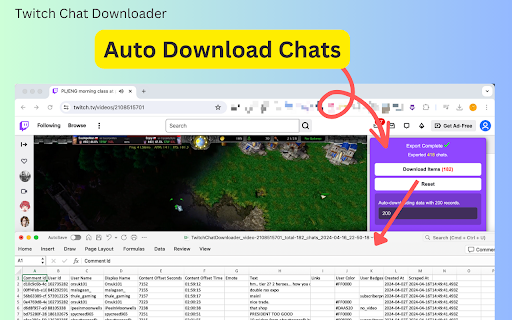
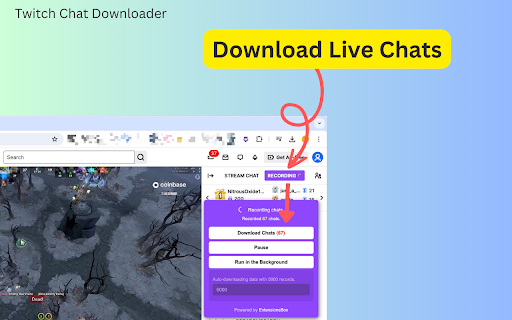
Using the extension is straightforward and efficient. As a user, you can start the chat recording on any Twitch live room, live replay, or clip by clicking the "Record" button located at the top of the chat window on the right-hand side of your screen. Once activated, it begins to log all chat content. You can customize settings, such as specifying the number of chat messages to record before the extension automatically triggers a download, for example, setting it to download after every 5,000 messages.

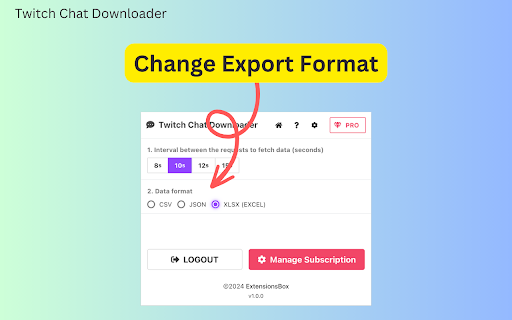
When the set threshold is reached, the Twitch Chat Downloader automatically saves the recorded chats. Additionally, you have the option to manually download the chat data whenever you choose. To ensure that your data is both accessible and manageable, the Twitch Chat Exporter saves the chat logs in various formats including CSV, JSON, or XLSX (Excel), facilitating easy analysis or viewing at your convenience.


Data Privacy
Your data stays on your device and is not stored or transmitted to our servers. We prioritize keeping your information secure and confidential.

Disclaimer
This extension is an independently developed product by ExtensionsBox and has no association with Twitch Inc.
Technical
- Version
- 1.0.4
- Manifest
- V3
- Size
- 2.39MiB
- Min Chrome
- 88
- Languages
- 54
- Featured
- No
Metadata
- ID
- fkcglcjlhbfbechmbmcajldcfkcpklng
- Developer ID
- ubf8f655c0dfde69b196318e2633e7f7b
- Developer Email
- [email protected]
- Created
- Apr 17, 2024
- Last Updated (Store)
- Apr 8, 2026
- Last Scraped
- Jun 8, 2026
- Website
- extensionsbox.com
- Privacy Policy
- https://twitchchatdownloader.extensionsbox.com/privacy
Similar extensions
Alternatives to Twitch Chat Downloader, ranked by description similarity.

T-Streams Scraper: Export Channels, Clips, Videos & More
Twitch Scraper: Collect chat messages, search results & channel details. Export to CSV, JSON, XLSX easily.
55
★ 5.0

Live Chat Collect
in live stream record chats
14

TTV Tools
Adds extra features to Twitch
2.0K
★ 3.4

Discord Chats Exporter - Capture Messages Attachments in One Click
Save Discord messages in multiple formats like CSV or Excel. Perfect for archiving, analyzing, or managing community data seamlessly
547
★ 3.1

Live Streaming Downloader
Use this extension to download live streams from Twitch.tv, Loco.com, and more in one click.
157
★ 1.0

Deepseek Chat Exporter
Install this extension to download your chats in PDF, TEXT, JSON, PNG, or CSV with one click.
8.0K
★ 3.8

Twitch Streaming Recorder
Live streaming recorder for Twitch
697
★ 3.7

Discord Chat Exporter - Export Discord messages and attachments
Discord Chat Exporter helps you save messages as CSV, JSON, or Excel and download media and attachments easily.
448
★ 3.9
Data sourced from the Chrome Web Store · last verified Jun 8, 2026.