
Discord Chats Exporter - Capture Messages Attachments in One Click
Save Discord messages in multiple formats like CSV or Excel. Perfect for archiving, analyzing, or managing community data seamlessly
As of June 2026, Discord Chats Exporter - Capture Messages Attachments in One Click has 547 users and a 3.13/5 rating from 8 reviews in the Productivity category.
Usersup 9.0 percent+9.0%
547
547
Ratingdown 8.7 percent−8.7%
3.13
8 reviews
Reviewsup 14.3 percent+14.3%
8
Version
1.0.2
Manifest V3
History
10 snapshotsTracking since Apr 1, 2026.
View as table
| Date | Users | Rating | Reviews | Version |
|---|---|---|---|---|
| Apr 1, 2026 | 502 | 3.43 | 7 | 1.0.2 |
| Apr 16, 2026 | 499 | 3.43 | 7 | 1.0.2 |
| Apr 23, 2026 | 520 | 3.43 | 7 | 1.0.2 |
| Apr 30, 2026 | 535 | 3.43 | 7 | 1.0.2 |
| May 7, 2026 | 543 | 3.43 | 7 | 1.0.2 |
| May 12, 2026 | 538 | 3.43 | 7 | 1.0.2 |
| May 17, 2026 | 532 | 3.43 | 7 | 1.0.2 |
| May 24, 2026 | 554 | 3.43 | 7 | 1.0.2 |
| May 31, 2026 | 531 | 3.13 | 8 | 1.0.2 |
| Jun 6, 2026 | 537 | 3.13 | 8 | 1.0.2 |
| Now | 547 | 3.13 | 8 | 1.0.2 |
Permissions & access
- Permissions
- storageidentitywebRequest
- Host access
- *://discordchatexporter.extensionsbox.com/*, *://*.discord.com/*
Screenshots



About
Export Discord Chats Easily with Discord Chats Exporter

Are you looking for a seamless way to export Discord messages or save your chat history? Discord Chats Exporter is a powerful browser extension designed to help you capture and download chat records from any Discord channel or thread. With just a few clicks, you can export Discord chats in formats like CSV, JSON, or Excel (XLSX). Whether you're archiving conversations, managing community data, or analyzing messages, this tool makes it quick and easy.

Features That Make Discord Chats Exporter Stand Out

- Export Discord Messages Automatically: Effortlessly extract all messages from any Discord channel, including sub-threads.
Multiple Export Formats: You can save your chat data in CSV, JSON, or Excel (XLSX) formats to suit your needs.
- Detailed Content and Attachments: The extension captures core message details, including the content of each message and any attachments such as images, videos, or files. For example, if the message author is "Midjourney Bot," the content could be the prompt, while the attachments would include the generated images.
Customizable Settings: You can adjust sorting preferences and select your desired export format directly from the extension's settings menu.
User-Friendly Interface: This interface is designed for both beginners and advanced users, and it has an intuitive layout for ease of use.

How to Use Discord Chats Exporter

Follow these simple steps to start exporting your Discord chat history:

1. Open any Discord channel or thread you want to export. For sub-threads, make sure to expand them.
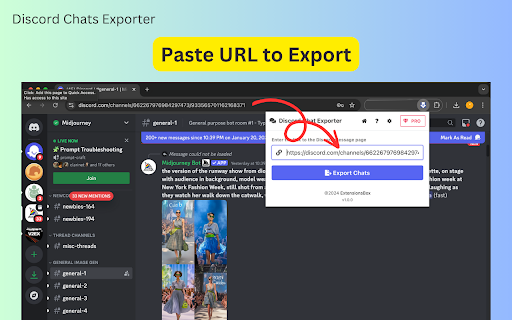
2. Click the "Download Chats" button at the top of the page, or copy the channel's URL into the extension's input box.
3. The extension will begin capturing the chat history automatically.
4. Once the process is complete (or paused), click the "Export Discord Chats" button to download the data in your preferred format.
5. Visit the settings menu to customize your export preferences, including sorting options and file formats (CSV, JSON, or Excel).

Why Choose Discord Chats Exporter?

- Save Time: Automates the process of capturing and organizing Discord chat history.
- Supports Multiple Formats: Export Discord messages to CSV for structured data, JSON for developers, or Excel for easy analysis.
Capture Content and Attachments: This function extracts essential message details such as text content and attachments like images, videos, or files, ensuring no important data is missed.
Works with All Conversations: It is compatible with channels and threads, making it easy to capture everything in one go.
- Beginner-Friendly: Simple setup and easy-to-use interface for users of all skill levels.

Who Is This Extension For?

Discord Chats Exporter is perfect for anyone who needs to save Discord chats for personal, professional, or analytical purposes. Whether you're a community manager, researcher, or casual user, this tool ensures you have full access to your Discord data for archiving, sharing, or analysis.

Start Exporting Your Discord Messages Today

Take control of your Discord data with Discord Chats Exporter. Download the extension now and experience the easiest way to export Discord chat history, complete with message content and attachments for comprehensive data management.


Data Privacy
Your data stays on your device and is not stored or transmitted to our servers. We prioritize keeping your information secure and confidential.

Disclaimer
This extension is an independently developed product by ExtensionsBox and has no association with Discord.
Technical
- Version
- 1.0.2
- Manifest
- V3
- Size
- 2.37MiB
- Min Chrome
- 88
- Languages
- 54
- Featured
- No
Metadata
- ID
- gcickoimlignpaimgekhajcbogfmbpnc
- Developer ID
- ue6a8022d2de1430af88f3c2d4ea8ab5e
- Developer Email
- [email protected]
- Created
- Jan 21, 2025
- Last Updated (Store)
- Mar 27, 2026
- Last Scraped
- Jun 6, 2026
- Website
- —
- Privacy Policy
- https://discordchatexporter.extensionsbox.com/privacy
Similar extensions
Alternatives to Discord Chats Exporter - Capture Messages Attachments in One Click, ranked by description similarity.

Discord Chat Exporter - Export Discord messages and attachments
Discord Chat Exporter helps you save messages as CSV, JSON, or Excel and download media and attachments easily.
448
★ 3.9

Discord Exporter - Chat & Attachment Downloader
Export Discord chats to Excel, CSV, JSON & HTML. Download attachments as ZIP. Filter by date & channel.
107
★ 2.3

Discord Chat Exporter
Export chat messages and attachments from Discord channels.
1.0K
★ 5.0

Discord Chat & Channel Saver
Save and export Discord chat messages and channels to CSV with date filtering
122
★ 5.0

Discord Chat Export Tool
Effortlessly export Discord messages, photos, videos, and all files with just one click!
20.0K
★ 4.7

Discord Chat Exporter - Unlimited
Securely backup and export your Discord server channels and Direct Messages locally.
49

Discord Chat Exporter: Export to HTML/XLSX
Securely archive Discord history to HTML or XLSX. Precise sync with folder organization and date range selection.
10.0K
★ 4.4

Discord Chat Exporter - DiscordKit
Discord chat exporter that lets you export Discord chat logs to CSV, HTML, JSON, and TXT — a fast, local Discord chat exporter.
10.0K
★ 4.6
Data sourced from the Chrome Web Store · last verified Jun 6, 2026.