
Desktop Clock
A resizable, customizable clock for your desktop!
As of May 2026, Desktop Clock has — users and a 3.78/5 rating from 54 reviews.
Usersno change0%
—
—
Ratingno change0%
3.78
54 reviews
Reviewsno change0%
54
Version
1.3.14 prod
Manifest V2
History
1 snapshotsTracking since Apr 26, 2026.
Not enough history yet for this metric — the chart fills in as we collect more snapshots.
View as table
| Date | Users | Rating | Reviews | Version |
|---|---|---|---|---|
| Apr 26, 2026 | — | 3.78 | 54 | 1.3.14 prod |
| Now | — | 3.78 | 54 | 1.3.14 prod |
Permissions & access
- Permissions
- fullscreenalwaysOnTopWindowsstorage
- Host access
- None declared
Screenshots


About
🚨 SEE THE NEW DESKTOP CLOCK, an installable website and web app with even more features and improved customizability at https://desktopclock.app 🚨

Thank you for 20000 users over 121 countries!

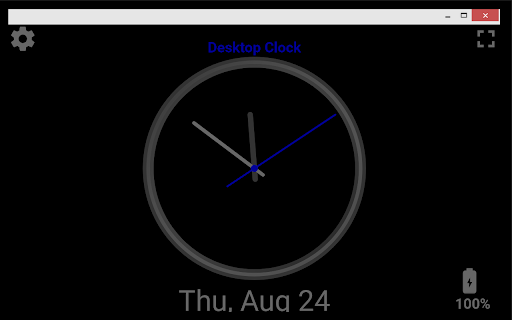
Desktop Clock is a simple, resizable, customizable, clock app.

Check out the updated version at https://desktopclock.app

Options:
 * Ticking, sweeping, or hidden second hand
 * Simple mode
 * Night mode, black background, and 12 themes
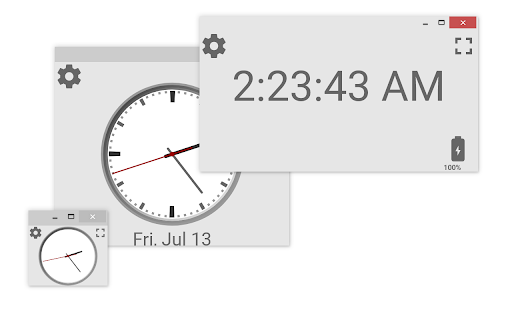
 * Digital and analog displays
 * Display date and/or battery level below clock
 * Option to remove app frame and/or app title
 * Timezones

Features:
 * Completely ad-free!
     And always will be
 * Saves your settings automatically
     And features a reset settings button
 * Doubleclick fullscreen
     Doubleclick to open Desktop Clock in fullscreen
 * Keyboard shortcuts
     Use "N" toggles night mode, "S" opens settings, "M" minimizes
 * Always on top mode
     Keep Desktop Clock open over other apps while you work
 * Open multiple copies of Desktop Clock
     Each can have their own size and settings!
 * Very small file size
     Less than 1 Megabyte. Downloads instantly!
 * Available in English, Spanish, French, German, and Russian

Open in fullscreen to see the time from far away. Great for hosting an event, proctoring an exam, or as a kiosk app. Or make Desktop Clock extremely small; it scales well and can be kept on top of other apps and sit in the corner while you work or browse.

Desktop Clock is a vector, meaning it resizes perfectly on any screen, no matter the size or number of pixels.

NEW: now you can open multiple copies of desktop clock, and you can remove the title as requested, as well as many small visual improvements and bug fixes. NEWER: more visual improvements, some UI updates, and fixed a bug that caused inaccurate time when switching between modes. NEWEST: Added timezones, and added minor display improvements.

For help with chrome apps, go to
https://rgbstudios.org/chrome-app-help/

If you have any suggestions or problems, or would like any help, feel free to contact [email protected]

Remember to rate and share with others :)

If you like Desktop Clock, try our simple Notepad extension: Chrome Notes :)
chrome.google.com/webstore/detail/lnfempckkegmaeleniojhjplemmebgfi

What does a clock do when it gets hungry?
It goes back four seconds :)

V.1.3.13

RGB Studios
rgbstudios.org
rgbstudios.org/desktopclock
facebook.com/rgbstudios.org
[email protected]
Technical
- Version
- 1.3.14 prod
- Manifest
- V2
- Size
- 80.38KiB
- Min Chrome
- 23
- Languages
- 5
- Featured
- No
Metadata
- ID
- fioeniclklclkopakbepllehmbfikpcc
- Developer ID
- uf39226ea279b145277ef4efcbe6af125
- Developer Email
- [email protected]
- Created
- Apr 24, 2015
- Last Updated (Store)
- Mar 5, 2024
- Last Scraped
- May 23, 2026
- Website
- rgbstudios.org
- Support URL
- http://rgbstudios.org/more/chromeAppHelp
- Privacy Policy
- —
Similar extensions
Alternatives to Desktop Clock, ranked by description similarity.
Desktop Clock Mini
A super simple clock for your chrome extension bar
1.0K
★ 5.0

World Clocks
Add any world clock of your choice to remain updated with the time in different locations.
10.0K
★ 4.9
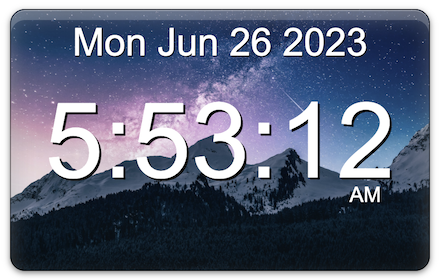
HoverClock
Hover Clock is a beautiful, customizable digital clock for any web page.
Hover Clock Features:
• Clocks settings can be…
1.0K
★ 2.6
Minimal New Tab Clock
A simple, ultra-lightweight clock to replace your tab menu.
10.0K
★ 4.5

panotime
Transform your new tab page into a beautiful world clock dashboard - the elegant way to track time across multiple time zones.
32
★ 4.7

zzllrr Fullscreen Clock-ZFC
An HTML5 Fullscreen Clock(Analog / Digital) APP by zzllrr
1.0K
★ 3.8

New Tab Clock
Displays a digital clock and date on new tab pages.
73
★ 3.5

Simple New Tab ✨: Customizable, Pastel Tabs
Minimalistic new tab with random pastel tab with noise, clock, custom google font, performance settings, and much more.
46
★ 5.0
Data sourced from the Chrome Web Store · last verified May 23, 2026.