
Mark tab manager
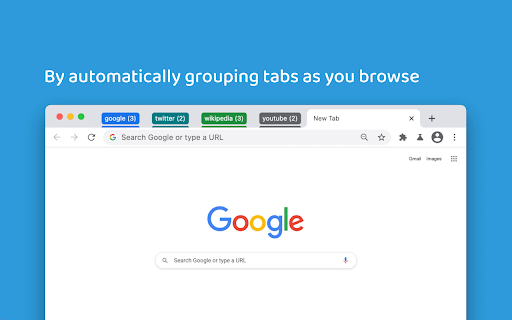
Automatically group tabs by domain
As of May 2026, Mark tab manager has 8,000 users and a 4.38/5 rating from 34 reviews in the Workflow & Planning category.
Usersno change0%
8.0K
8,000
Ratingno change0%
4.38
34 reviews
Reviewsno change0%
34
Version
0.1.46
Manifest V3
History
1 snapshotsTracking since Apr 26, 2026.
View as table
| Date | Users | Rating | Reviews | Version |
|---|---|---|---|---|
| Apr 26, 2026 | 8.0K | 4.38 | 34 | 0.1.46 |
| Now | 8.0K | 4.38 | 34 | 0.1.46 |
Permissions & access
- Permissions
- contextMenusmanagementstoragetabGroupstabs
- Host access
- None declared
Screenshots


About
Mark is a minimalist tab manager that organizes tabs as you browse. With Mark, tabs are automatically grouped by domain and sorted alphabetically so you can easily find them later.

Mark uses the native tab groups feature of Chrome, meaning there’s no learning curve to get started. Simply install Mark and any open and newly created tabs will be grouped and sorted.

Mark can be configured to only group tabs or only sort tabs depending on how you like to browse. Additionally, you can enable Mark to consolidate tabs across windows - meaning you won’t lose a tab because it’s hiding in its own window.

You can pin the extension to your browser toolbar by clicking the puzzle looking icon located in the top right of your toolbar, scrolling down to Mark, and clicking the “Pin” icon. Pinning the icon makes it easily accessible for clicking to manually organize tabs in cleanup mode, which will collapse any open groups.

Change one of the configuration settings by right clicking on the Mark extension icon, navigating to the “Settings” menu, and toggling one of the settings. Depending on the way you would like to browse, customizing some things could make for an even better experience.

If you find yourself more curious about how Mark works or what other options and functionality are available, visit the “Resources” menu at any time by right clicking the Mark extension icon.
Technical
- Version
- 0.1.46
- Manifest
- V3
- Size
- 47.08KiB
- Min Chrome
- 88
- Languages
- 1
- Featured
- Yes
Metadata
- ID
- filgplhfalgafolkffphilkgckdgnona
- Developer ID
- uf692b31104adf3ec371f2534f92530e6
- Developer Email
- [email protected]
- Created
- Jan 21, 2021
- Last Updated (Store)
- Aug 14, 2023
- Last Scraped
- May 23, 2026
- Website
- bradleycushing.com
- Support URL
- —
- Privacy Policy
- —
Similar extensions
Alternatives to Mark tab manager, ranked by description similarity.

GroupMark - Enhanced Tab Groups
Unlock the full potential of Chrome tab groups.
481
★ 3.0

MarkMark
MarkMark is a macOS app designed to help you collect and organize articles, websites, and all kinds of web pages. It's not just a…
123
★ 3.7

Manage Tabs - Auto Group, Sort and Clean
Auto-group tabs by topic, sort quickly, close duplicates, and organize windows faster.
11

Tabby: Minimalist & Automated Tab Manager
Take control of your browsing with Tabby - a fully automated, minimalist tab manager that organizes your tabs as you browse. No…
7
★ 5.0

Tab Groups to Bookmarks
Manage and Save Your Tab Groups
1.0K
★ 4.7

Tagmarks
Tagmarks helps you organize Chrome bookmarks, with customizable tags, making it easier to find and manage your saved pages
1

Group My Tabs
Group tabs by domain in Chrome with one click, enhancing built-in functionality for organized browsing.
26
★ 5.0

Tab Manager
Manage your tabs by organizing them into projects.
60
★ 5.0
Data sourced from the Chrome Web Store · last verified May 23, 2026.