
actiTIME: Time Management Assistant
Track all your online activities automatically to see how much time you spend on different platforms and get accurate time track.
As of May 2026, actiTIME: Time Management Assistant has 1,000 users and a 4.76/5 rating from 17 reviews in the Workflow & Planning category.
Usersno change0%
1.0K
1,000
Ratingno change0%
4.76
17 reviews
Reviewsno change0%
17
Version
1.1.1303
Manifest V3
History
1 snapshotsTracking since Apr 26, 2026.
View as table
| Date | Users | Rating | Reviews | Version |
|---|---|---|---|---|
| Apr 26, 2026 | 1.0K | 4.76 | 17 | 1.1.1303 |
| Now | 1.0K | 4.76 | 17 | 1.1.1303 |
Permissions & access
- Permissions
- idletabsalarmscookies
- Host access
- *://*.actitime.com/
Screenshots


About
Find it hard to remember which tasks you worked on, when, and for how long?

This browser extension automatically tracks all your online activities, so you can see how much time you spend using versatile online platforms and easily get 100% accurate time tracking data whenever you need it.

It also lets you:
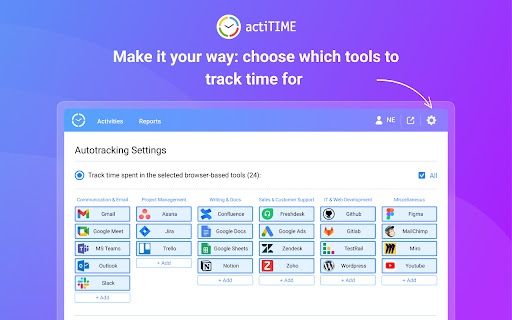
- Limit activity tracking to only specific websites and online apps.
- Divide your activities into different types and categories.
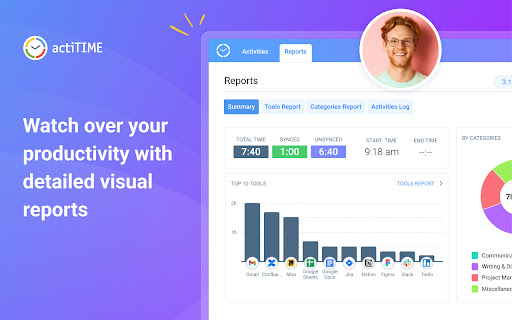
- Analyze the collected data via visual charts and reports.

How to get started?

1. Install Time Management Assistant.
2. Connect it to your actiTIME account or sign up using an email.
3. Indicate which online tools and types of activities you want to track + set exceptions via time tracking settings.
4. Configure your own mapping rules via sync settings to seamlessly export your time tracking data to actiTIME.
5. Start working on your tasks in the selected tools, and the Assistant will begin tracking time for your online activities automatically.
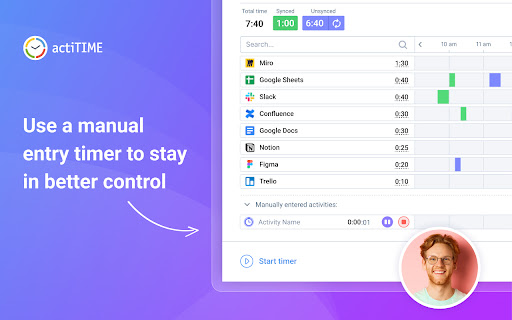
6. If you ever need to make a time entry manually, use the built-in one-click timer at the bottom left corner of the extension’s interface.
7. Open the Reports tab to analyze your time tracking statistics or view the real-time activity log in the Activities tab.
Technical
- Version
- 1.1.1303
- Manifest
- V3
- Size
- 1.91MiB
- Min Chrome
- 88
- Languages
- 1
- Featured
- Yes
Metadata
- ID
- fhmmdobpcofodcpkehjaiodhahbfkkgn
- Developer ID
- ubac67de7cdfe96cc5bf549efc4decb64
- Developer Email
- [email protected]
- Created
- Mar 21, 2023
- Last Updated (Store)
- Feb 8, 2024
- Last Scraped
- May 23, 2026
- Website
- https://www.actitime.com/
- Privacy Policy
- https://www.actitime.com/legal/privacy-policy-full
Similar extensions
Alternatives to actiTIME: Time Management Assistant, ranked by description similarity.

Time Tracker
An easy to use time tracker for keeping track of time. Tracker with sound notification and different settings.
897
★ 5.0

Web Activity Time Tracker - Block Websites, Pomodoro & Web Analytics
Track time of your web activity, limit and block distracting websites. Monitor your web usage.
30.0K
★ 4.7

Toggl Extension
Drop busy. Plan, track, focus.
495
★ 3.0

Web Time Tracker
Take control of your online time with beautiful, insightful analytics
27
★ 5.0

Billed
Billed Time Tracking
16

Time Tracker by slideluxe.com
A simple time tracker to boost productivity
3
Employee Time Tracking
Employee Time Tracking app is a task management software and a time tracker. Calculate hours worked to manage tasks across projects
771
★ 4.9

Site Time Tracker
Track time spent on different websites with monthly report generation for clients
11
Data sourced from the Chrome Web Store · last verified May 23, 2026.