
Web Activity Time Tracker - Block Websites, Pomodoro & Web Analytics
Track time of your web activity, limit and block distracting websites. Monitor your web usage.
As of June 2026, Web Activity Time Tracker - Block Websites, Pomodoro & Web Analytics has 30,000 users and a 4.68/5 rating from 945 reviews in the Workflow & Planning category.
Usersdown 25.0 percent−25.0%
30.0K
30,000
Ratingdown 2.9 percent−2.9%
4.68
945 reviews
Reviewsup 7.3 percent+7.3%
945
Version
2.3.1
Manifest V3
90-day change · In the last 90 days this extension lost 10.0K users, 2 version updates, changed permissions.
History
15 snapshotsTracking since Apr 1, 2026.
View as table
| Date | Users | Rating | Reviews | Version |
|---|---|---|---|---|
| Apr 1, 2026 | 40.0K | 4.82 | 881 | 2.2.5 |
| Apr 21, 2026 | 40.0K | 4.82 | 883 | 2.2.5 |
| May 6, 2026 | 30.0K | 4.82 | 889 | 2.2.5 |
| May 18, 2026 | 30.0K | 4.82 | 900 | 2.2.5 |
| May 21, 2026 | 40.0K | 4.82 | 905 | 2.3.0 |
| May 23, 2026 | 40.0K | 4.82 | 907 | 2.3.1 |
| May 26, 2026 | 40.0K | 4.76 | 920 | 2.3.1 |
| May 29, 2026 | 50.0K | 4.76 | 920 | 2.3.1 |
| Jun 1, 2026 | 50.0K | 4.76 | 921 | 2.3.1 |
| Jun 4, 2026 | 50.0K | 4.75 | 923 | 2.3.1 |
| Jun 6, 2026 | 50.0K | 4.73 | 926 | 2.3.1 |
| Jun 9, 2026 | 50.0K | 4.72 | 933 | 2.3.1 |
| Jun 12, 2026 | 50.0K | 4.71 | 937 | 2.3.1 |
| Jun 16, 2026 | 50.0K | 4.71 | 936 | 2.3.1 |
| Jun 24, 2026 | 40.0K | 4.70 | 940 | 2.3.1 |
| Now | 30.0K | 4.68 | 945 | 2.3.1 |
Changelog
- May 18, 2026description
Web Activity Time Tracker keeps track of how you spend time on the web and presents the stats in a useful and intuitive way.

Take control of your online time with Web Acitivity Time Tracker! Tracking and limiting your use of any website helps you stay productive and focused.

Stay focused and maximize your productivity. Whether you're managing work projects, studying for exams, or simply want to understand your browsing habits better, this tool is your go-to companion.

✦ What is Web Activity Time Tracker?

Web Activity Time Tracker is a powerful Chrome extension designed to help you monitor and optimize your online productivity. Effortlessly track the time you spend on each website, set goals, and get detailed reports to boost efficiency and focus. With a sleek, user-friendly interface and real-time insights, this tool empowers you to make the most of your web browsing. Stay on top of your online habits and achieve your productivity goals with ease!

Web Activity Time Tracker is ad-free and open-source extension. You can set a daily visit limit for sites and block it after the expiration of the limit.

Alternate work and rest times with Pomodoro Mode.

Key Features:

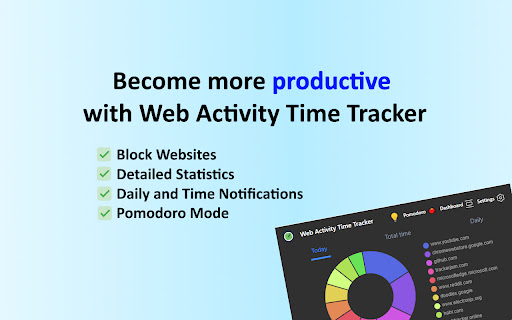
✅ Real-Time Tracking: Get instant insights into the time spent on each website you visit.
✅ Daily and Hourly Reports: Receive summary reports that highlight your browsing habits and patterns. Comparison of time by day
✅ Limit and Block Distracting Websites: Set daily time limits for specific websites to help you stay focused.
✅ Usage Statistics.  Effortlessly monitor the time you spend on different websites.
✅ Notifications for Websites and daily summary notification. Set goals and receive notifications to stay on track.
✅ Pomodoro Mode
✅ Track files in the browser, including .pdf, .png, .json and so on
✅ Export Data to CSV
✅ Privacy Focused: Your data is secure; we don’t share your browsing information.

Web Activity Time Tracker helps you:

🧩 Stay focused
🧠 Understand how you use the internet
👀 Reduce distraction
🛑 Overcome web addiction
⏱️ Self-control
💯 Boost productivity
🚀 Increase your digital wellbeing
💪 Reduce wasted time

Take control of your online habits and make every minute count with Web Activity Time Tracker.

Extension doesn't track any information about you and does not send data anywhere. Chrome Local Storage is used to save your usage data in a simple format.
Web Activity Time Tracker keeps track of how you spend time on the web and presents the stats in a useful and intuitive way.

Take control of your online time! Tracking and limiting your use of any website helps you stay productive and focused.

Stay focused and maximize your productivity. Whether you're managing work projects, studying for exams, or simply want to understand your browsing habits better, this tool is your go-to companion.

✦ What is Web Activity Time Tracker?

Web Activity Time Tracker is a powerful Chrome extension designed to help you monitor and optimize your online productivity. Effortlessly track the time you spend on each website, set goals, and get detailed reports to boost efficiency and focus. With a sleek, user-friendly interface and real-time insights, this tool empowers you to make the most of your web browsing.

You can set a daily visit limit for sites and block them after the expiration of the limit. Alternate work and rest times with Pomodoro Mode.

Key Features:

✅ Real-Time Tracking: Get instant insights into the time spent on each website you visit.
✅ Daily and Hourly Reports: Receive summary reports that highlight your browsing habits and patterns. Comparison of time by day.
✅ Limit and Block Distracting Websites: Set daily time limits for specific websites to help you stay focused.
✅ Usage Statistics: Effortlessly monitor the time you spend on different websites.
✅ Notifications for Websites and daily summary notification. Set goals and receive notifications to stay on track.
✅ Pomodoro Mode
✅ Track files in the browser, including .pdf, .png, .json and so on
✅ Export Data to CSV

Web Activity Time Tracker helps you:

🍀 Stay focused
🧠 Understand how you use the internet
👀 Reduce distraction
🍅 Overcome web addiction
⏲️ Self-control
💯 Boost productivity
🚀 Increase your digital wellbeing
💪 Reduce wasted time

✦ Optional Media IntelliView Banner Widget (v2.3.0+)

This version introduces an OPTIONAL banner widget powered by Media IntelliView. When enabled by the publisher of a participating website, the extension may display a small contextual banner on that website's page.

What is sent over the network when the widget is enabled:
- The page origin (e.g. "https://example.com") — never the full URL or page content
- A randomly generated per-install identifier (no personal data, no account, no login)
- Banner display/click/dismiss event timestamps

The widget is fully described in our prominent disclosure shown on install AND update (Welcome page), and you can disable it at any time in the Options page. Local time tracking and blocking features continue to work exactly as before — they do NOT depend on the widget.

Privacy policy: https://chrome-watt.mediaintelliview.com/privacy.html

Take control of your online habits and make every minute count with Web Activity Time Tracker.
- May 18, 2026host_permissions
(empty)
https://track.mediaintelliview.com/*
Permissions & access
- Permissions
- tabsactiveTabstorageidleunlimitedStoragealarmsnotificationsoffscreen
- Host access
- https://track.mediaintelliview.com/*
Screenshots


About
Web Activity Time Tracker keeps track of how you spend time on the web and presents the stats in a useful and intuitive way.

Take control of your online time! Tracking and limiting your use of any website helps you stay productive and focused.

Stay focused and maximize your productivity. Whether you're managing work projects, studying for exams, or simply want to understand your browsing habits better, this tool is your go-to companion.

✦ What is Web Activity Time Tracker?

Web Activity Time Tracker is a powerful Chrome extension designed to help you monitor and optimize your online productivity. Effortlessly track the time you spend on each website, set goals, and get detailed reports to boost efficiency and focus. With a sleek, user-friendly interface and real-time insights, this tool empowers you to make the most of your web browsing.

You can set a daily visit limit for sites and block them after the expiration of the limit. Alternate work and rest times with Pomodoro Mode.

Key Features:

✅ Real-Time Tracking: Get instant insights into the time spent on each website you visit.
✅ Daily and Hourly Reports: Receive summary reports that highlight your browsing habits and patterns. Comparison of time by day.
✅ Limit and Block Distracting Websites: Set daily time limits for specific websites to help you stay focused.
✅ Usage Statistics: Effortlessly monitor the time you spend on different websites.
✅ Notifications for Websites and daily summary notification. Set goals and receive notifications to stay on track.
✅ Pomodoro Mode
✅ Track files in the browser, including .pdf, .png, .json and so on
✅ Export Data to CSV

Web Activity Time Tracker helps you:

🍀 Stay focused
🧠 Understand how you use the internet
👀 Reduce distraction
🍅 Overcome web addiction
⏲️ Self-control
💯 Boost productivity
🚀 Increase your digital wellbeing
💪 Reduce wasted time

✦ Optional Media IntelliView Banner Widget (v2.3.0+)

This version introduces an OPTIONAL banner widget powered by Media IntelliView. When enabled by the publisher of a participating website, the extension may display a small contextual banner on that website's page.

What is sent over the network when the widget is enabled:
- The page origin (e.g. "https://example.com") — never the full URL or page content
- A randomly generated per-install identifier (no personal data, no account, no login)
- Banner display/click/dismiss event timestamps

The widget is fully described in our prominent disclosure shown on install AND update (Welcome page), and you can disable it at any time in the Options page. Local time tracking and blocking features continue to work exactly as before — they do NOT depend on the widget.

Privacy policy: https://chrome-watt.mediaintelliview.com/privacy.html

Take control of your online habits and make every minute count with Web Activity Time Tracker.
Technical
- Version
- 2.3.1
- Manifest
- V3
- Size
- 1.24MiB
- Min Chrome
- 88
- Languages
- 6
- Featured
- No
Metadata
- ID
- hhfnghjdeddcfegfekjeihfmbjenlomm
- Developer ID
- uccddacdff6395e61de1bae82ec5de629
- Developer Email
- [email protected]
- Created
- Jan 31, 2019
- Last Updated (Store)
- May 18, 2026
- Last Scraped
- Jun 24, 2026
- Support URL
- https://chrome-watt.mediaintelliview.com
Similar extensions
Alternatives to Web Activity Time Tracker - Block Websites, Pomodoro & Web Analytics, ranked by description similarity.

Web Time Tracker
Take control of your online time with beautiful, insightful analytics
27
★ 5.0

Web Activity Tracker
Track website use & screen time. A powerful tool to manage time, understand browsing habits, and improve digital wellbeing.
153
★ 5.0
Web Activity
Use Web Activity tool as your website time tracker to check your screen time, page views and get web based time tracking.
2.0K
★ 4.5

onWebTrack: Track & Optimize Your Web Time
Track and optimize your web activity with insights, time stats & smart charts. Boost productivity and monitor your web usage.
64
★ 4.9

TimeYourWeb Time Tracker
TimeYourWeb: The Ultimate Dashboard for Your Online Life. Unlock insights into your daily web activities with unparalleled precision
46

TimeYourWeb Time Tracker
TimeYourWeb: The Ultimate Dashboard for Your Online Life. Unlock insights into your daily web activities with unparalleled precision
10.0K
★ 4.2

WebControl
Track time spent on websites
12

Website Time Tracker
Track time spent on websites with visual statistics, time limits, and mood tracking
7
Data sourced from the Chrome Web Store · last verified Jun 24, 2026.