
Sound Meter (Noise & Decibel)
Measure the surrounding sound (dB) and noise with your computer's microphone!
As of June 2026, Sound Meter (Noise & Decibel) has 40,000 users and a 3.00/5 rating from 22 reviews in the Productivity category.
Usersdown 20.0 percent−20.0%
40.0K
40,000
Ratingdown 3.2 percent−3.2%
3.00
22 reviews
Reviewsup 4.8 percent+4.8%
22
Version
0.1.7
Manifest V3
90-day change · In the last 90 days this extension lost 10.0K users.
History
4 snapshotsTracking since Apr 1, 2026.
View as table
| Date | Users | Rating | Reviews | Version |
|---|---|---|---|---|
| Apr 1, 2026 | 50.0K | 3.10 | 21 | 0.1.7 |
| Apr 19, 2026 | 40.0K | 3.10 | 21 | 0.1.7 |
| May 4, 2026 | 40.0K | 3.10 | 21 | 0.1.7 |
| Jun 6, 2026 | 50.0K | 3.10 | 21 | 0.1.7 |
| Now | 40.0K | 3.00 | 22 | 0.1.7 |
Permissions & access
- Permissions
- storagecontextMenus
- Host access
- None declared
Screenshots

About
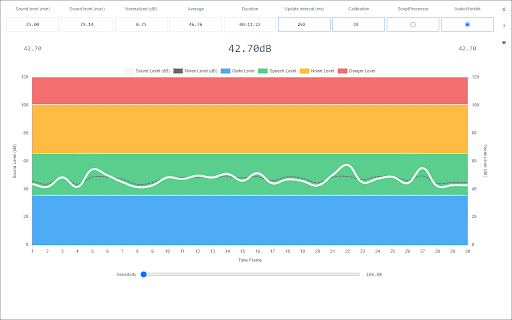
Sound Meter (Noise & Decibel) extension enables you to measure the surrounding sound (dB) and noise with your computer's microphone.

This add-on helps you easily measure some important sound factors, such as the sound level in decibel, noise level, sound average, and normalized sound value. When you open the app for the first time, it may ask you about microphone access. Please accept the dialog box to start the add-on. Also, note that the app may take a few seconds before getting ready. So please be patient while the add-on is getting ready. Once the loader is disappeared, the add-on is ready to use. It uses the microphone in your system to capture the surrounding sound. If your computer does not have a microphone, please attach one to it before using the add-on. On the top toolbar within the interface, you see several pieces of information about the surrounding sound. You can also change the capturing sound API via the buttons at the top-right.

Note: The interface for this app can be opened in a separate window, new tab, or toolbar popup (choose a context from the toolbar button's right-click menu). When you open the app for the first time, please open it in the window or tab to see the microphone permission dialog.

If you see any bug or have a feature request, please fill out the bug report form on the addon's homepage (https://mybrowseraddon.com/sound-meter.html).
Technical
- Version
- 0.1.7
- Manifest
- V3
- Size
- 97.75KiB
- Min Chrome
- 88
- Languages
- 1
- Featured
- Yes
Metadata
- ID
- fhamlklnpkhdfepaipljcngncafnlbfa
- Developer ID
- u71792319a8099b50ea26847bc7c06a55
- Developer Email
- [email protected]
- Created
- Aug 21, 2018
- Last Updated (Store)
- Oct 7, 2025
- Last Scraped
- Jun 6, 2026
- Website
- —
- Support URL
- https://mybrowseraddon.com/sound-meter.html
- Privacy Policy
- —
Similar extensions
Alternatives to Sound Meter (Noise & Decibel), ranked by description similarity.

Light Meter (RGB & Luminance)
Measure the surrounding light (RGB) and luminance with your computer's camera!
3.0K
★ 5.0

Sound Adjustment
Easily adjust various sound settings (volume, balance, etc.) via toolbar popup.
20.0K
★ 4.2

Audio Recorder
Easily record audio from your computer's microphone!
20.0K
★ 1.9

ApplauseMeter
Open ApplauseMeter (Applausometro) in the right language.
26

Mic Check Pro — Instant Microphone Test for Chrome
Ensure your microphone works perfectly! Instant check, real-time volume meter, audio recording. Free, secure, and no setup required.
1.0K
★ 5.0
Audio Equalizer
Stylish audio equalizer in your browser's toolbar popup.
50.0K
★ 4.3

Volume Booster – MAXIMUM LOUDNESS, NO MERCY
Boost the volume of audio in your browser tabs
481
★ 3.3

Sound Control
Boost or reduce volume of any tab up to 600%.
180
★ 5.0
Data sourced from the Chrome Web Store · last verified Jun 6, 2026.