
Volume Booster – MAXIMUM LOUDNESS, NO MERCY
Boost the volume of audio in your browser tabs
As of June 2026, Volume Booster – MAXIMUM LOUDNESS, NO MERCY has 481 users and a 3.33/5 rating from 3 reviews in the Productivity category.
Usersup 57.7 percent+57.7%
481
481
Ratingno change0%
3.33
3 reviews
Reviewsno change0%
3
Version
4.2.0
Manifest V3
History
4 snapshotsTracking since Apr 20, 2026.
View as table
| Date | Users | Rating | Reviews | Version |
|---|---|---|---|---|
| Apr 20, 2026 | 305 | 3.33 | 3 | 4.2.0 |
| May 5, 2026 | 364 | 3.33 | 3 | 4.2.0 |
| May 15, 2026 | 414 | 3.33 | 3 | 4.2.0 |
| Jun 9, 2026 | 428 | 3.33 | 3 | 4.2.0 |
| Now | 481 | 3.33 | 3 | 4.2.0 |
Permissions & access
- Permissions
- activeTabscriptingstorage
- Host access
- <all_urls>
Screenshots

About
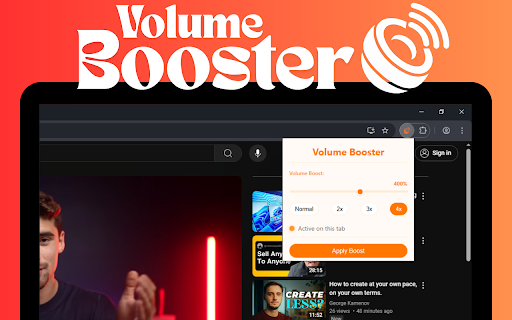
Sound Booster is a simple yet powerful Browser extension that allows you to amplify the volume of any audio or video playing in your browser. With a clean, modern interface, it offers an intuitive way to boost sound up to 6x the original volume.

Features:
• Volume boost from 100% (normal) up to 600%
• Convenient preset buttons (Normal, 2x, 3x, 4x)
• Status indicator showing if boost is active on current tab
• Persistent settings that maintain your preferred volume across page navigation
• Works on most websites with HTML5 audio/video

Perfect for:
• Watching videos with low volume
• Listening to quiet audio content
• Improving audio accessibility
• Using with speakers that have limited volume
• Boosting volume beyond your device's maximum capability

How to use:
1. Click the Sound Booster icon in your toolbar
2. Adjust the volume boost level using the slider or preset buttons
3. Click "Apply Boost" to enhance the audio on your current tab
4. The status indicator will show that boosting is active
5. Enjoy your amplified audio!

Note: Extremely high volume levels may cause audio distortion. For best results, start with a lower boost level and adjust as needed.
Technical
- Version
- 4.2.0
- Manifest
- V3
- Size
- 32.9KiB
- Min Chrome
- 88
- Languages
- 1
- Featured
- No
Metadata
- ID
- jmofknakgiekhhcgegppiaogienmgiic
- Developer ID
- uccd476c7d2a07b1ebfde52eb51bd13fe
- Developer Email
- [email protected]
- Created
- Apr 9, 2025
- Last Updated (Store)
- May 7, 2025
- Last Scraped
- Jun 9, 2026
- Website
- —
- Support URL
- —
Similar extensions
Alternatives to Volume Booster – MAXIMUM LOUDNESS, NO MERCY, ranked by description similarity.

Volume Booster
Boost tab volume up to 600%
3

SoundBlast — Volume Booster Pro
Boost volume up to 600%. Bass, Lo-Fi, Reverb, EQ modes. Works on YouTube, Netflix, Twitch, every site.
167
★ 5.0

Simple Volume Booster
Boost audio volume up to 300% on any website
125
★ 5.0

Sound Booster - Increase audio volume above maximum
Adjust volume in Chrome tabs separately. Boost music volume and video up to 60 lvl.
50.0K
★ 4.4

Volume Booster
Boost the volume of videos and music on any browser tab by up to 600% with Volume Booster.
22

Ultimate Volume Booster
The Ultimate Volume Booster: Boost any tab's audio up to 1000% with premium clarity, safe boost protection, and per-site memory.
178
★ 5.0

Volume Booster - Control your sound
Volume Booster – Boost sound for videos or music on any tab. Enjoy powerful volume control and bass boost right in your browser.
19
★ 4.3

Audio master mini
Volume Booster aids in amplifying video or music sound! Enhances volume and bass, equalizer. Volume control
900.0K
★ 4.8
Data sourced from the Chrome Web Store · last verified Jun 9, 2026.