
Web Developer Sidekick
Allows web developers to recognize immediatley the website environment.
As of June 2026, Web Developer Sidekick has 34 users in the Developer Tools category.
Usersup 9.7 percent+9.7%
34
34
Ratingno change0%
—
— reviews
Reviewsno change0%
—
Version
0.0.30
Manifest V3
History
8 snapshotsTracking since Apr 1, 2026.
View as table
| Date | Users | Rating | Reviews | Version |
|---|---|---|---|---|
| Apr 1, 2026 | 31 | — | — | 0.0.30 |
| Apr 9, 2026 | 35 | — | — | 0.0.30 |
| Apr 20, 2026 | 27 | — | — | 0.0.30 |
| Apr 25, 2026 | 34 | — | — | 0.0.30 |
| May 2, 2026 | 33 | — | — | 0.0.30 |
| May 9, 2026 | 31 | — | — | 0.0.30 |
| May 29, 2026 | 26 | — | — | 0.0.30 |
| Jun 7, 2026 | 30 | — | — | 0.0.30 |
| Now | 34 | — | — | 0.0.30 |
Permissions & access
- Permissions
- activeTabstorage
- Host access
- None declared
Screenshots



About
Please note that this extension is useful for web developers only.

Also available on Firefox Add-ons

Keep Your Website Info at Your Fingertips

As a web developer, you have to work on different projects in parallel. You have to record: database credentials, admin dashboard login info and many other important information. You have to keep all this data for each environment. With this extension (let s call it the assistant) you can display all the required data with a simple click. All you have to do is installing the extension then add the appropriate settings for each your website.

How it Works

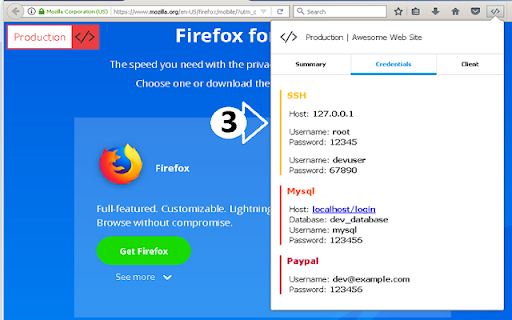
After installing and configuring the assistant, each time you visit a website, it will check if the url of to the website meets any defined rule you have set in the extension options. If it met than you will see a badge announcing which environment you are working. And when you click on the extension icon, the browser will display a popup where you can see the info you entered in the option page.

Note: Be careful when you add credentials for production environment since any one who has access to your browser can see those credentials.

Features:

  + Displays website environment (screenshot 1)
  + Shows useful details (screenshot 2)
  + Extends popup by adding new tabs (screenshots 3 & 4)
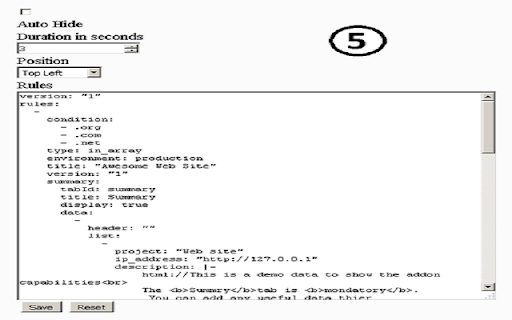
  + Customize the extension behavior (screnshot 5)

For configuration details please check the documentation by following this link
https://soloist.ai/webdevelopersidekick
Technical
- Version
- 0.0.30
- Manifest
- V3
- Size
- 85.82KiB
- Min Chrome
- 88
- Languages
- 1
- Featured
- No
Metadata
- ID
- fglnkelbadkkikkfabnbioejhdhiahbi
- Developer ID
- u785fcec99ec4162a6e9f99b78376bbd2
- Developer Email
- [email protected]
- Created
- Apr 17, 2018
- Last Updated (Store)
- Feb 16, 2026
- Last Scraped
- Jun 7, 2026
- Website
- —
- Privacy Policy
- —
Similar extensions
Alternatives to Web Developer Sidekick, ranked by description similarity.

Personal toolkit
Personal Toolkit with some features for devs
4

Devision – Web Dev & Design Tools
Design, SEO, and development tools for any website. Color picker, SEO checker, CSS inspector, and many more.
76
★ 5.0

Website Security & Domain Details
Analyzes website security features and domain details information including IP address and location
19
★ 5.0

Stage Masks
Visually mark dev, staging, and production environments to avoid costly mistakes in the wrong place.
4
★ 5.0

My Screen Resolution
Instantly check screen resolution, viewport size, device pixel ratio, and color depth. Perfect for web developers.
11

1nsp3ct0rG4dg3t - Web Developer Tools
Web debugging tool for developers. Manage localStorage, sessionStorage, and cookies with inspection and security analysis.
10
★ 5.0

SEOs Audits
Analyze meta tags, schemas, images, Open Graph, and canonical links for on-page SEO optimization. One-click audit.
—

Inspect Buddy
Clear cache/site data and inspect per-site Application storage (localStorage, cookies & more).
3
Data sourced from the Chrome Web Store · last verified Jun 7, 2026.