
Stage Masks
Visually mark dev, staging, and production environments to avoid costly mistakes in the wrong place.
As of June 2026, Stage Masks has 4 users and a 5.00/5 rating from 1 reviews in the Developer Tools category.
Usersno change0%
4
4
Ratingno change0%
5.00
1 reviews
Reviewsno change0%
1
Version
2.1
Manifest V3
History
7 snapshotsTracking since Apr 2, 2026.
View as table
| Date | Users | Rating | Reviews | Version |
|---|---|---|---|---|
| Apr 2, 2026 | 4 | 5.00 | 1 | 2.1 |
| Apr 17, 2026 | 5 | 5.00 | 1 | 2.1 |
| Apr 27, 2026 | 6 | 5.00 | 1 | 2.1 |
| May 7, 2026 | 5 | 5.00 | 1 | 2.1 |
| May 14, 2026 | 6 | 5.00 | 1 | 2.1 |
| May 23, 2026 | 5 | 5.00 | 1 | 2.1 |
| Jun 10, 2026 | 6 | 5.00 | 1 | 2.1 |
| Now | 4 | 5.00 | 1 | 2.1 |
Permissions & access
- Permissions
- storageactiveTab
- Host access
- None declared
Screenshots

About
This extension helps you clearly distinguish between development, staging, testing, and production environments by adding a simple visual marker directly in your browser.

When working with multiple environments that look almost identical, it is easy to forget where you are. A single mistaken click can mean editing production data, triggering real actions, or deploying changes in the wrong place. This extension is designed to prevent exactly that by giving you an immediate visual cue for the current environment.

You define your environments by specifying URL patterns. These can be full URLs, parts of a URL, or regular expressions, giving you full flexibility to match any setup. For each environment, you choose a unique color. When you visit a page that matches one of your defined patterns, the extension displays that color as a visual overlay on the page. The marker can appear as a colored border around the page or as a small colored triangle in one of the corners, making it easy to see at a glance which environment you are currently using.

The visual marking is completely non-intrusive. It does not modify the page content, does not inject styles into the site itself, and does not interfere with page functionality or performance. It is purely an overlay rendered by the extension, ensuring that the behavior of the website remains unchanged.

To make setup fast and effortless, the extension includes a button that lets you add the currently open URL as a new environment entry. This allows you to build your environment list organically as you work, without manually copying and pasting URLs.

By assigning a distinct color to each environment, you build a strong visual association over time. After a short while, you will instantly recognize whether you are on development, staging, or production without having to read the URL or think twice. This reduces cognitive load, speeds up everyday work, and significantly lowers the risk of costly mistakes.

This extension is especially useful for developers, QA engineers, DevOps engineers, product managers, and anyone who regularly works across multiple environments in the browser. It is equally helpful for individuals and teams, whether you are working on small projects or large, complex systems.

If you want a simple, reliable way to always know which environment you are on, and to protect yourself from accidental actions in the wrong place, this extension provides a lightweight and effective solution.
Technical
- Version
- 2.1
- Manifest
- V3
- Size
- 391KiB
- Min Chrome
- 88
- Languages
- 1
- Featured
- No
Metadata
- ID
- eedhbehbajhbldacajcllkdliekidcdn
- Developer ID
- u51f06eda5f4ae973ea37ba41d6ac49b1
- Developer Email
- [email protected]
- Created
- Mar 29, 2023
- Last Updated (Store)
- Jan 17, 2026
- Last Scraped
- Jun 10, 2026
- Website
- —
- Support URL
- —
- Privacy Policy
- —
Similar extensions
Alternatives to Stage Masks, ranked by description similarity.

Environment Switcher
Switch between different environments and languages with ease
8
★ 4.5

Environment Marker
Use the Environment Marker extension and prevent screw-ups with the (programming) environments.
40.0K
★ 4.8

Environment Tagger
Visual indicators for web environments - distinguish between production, test, and development sites with colored favicon overlays
71

EnvBanner - Visually tag environments (PROD/UAT/DEV)
Visually tag environments (PROD/UAT/DEV) with color-coded CSS overrides or floating banners.
7

Environment Reminder
Reminds you if you're on localhost, staging, or production environments.
—

EnvAware
Instantly identify your environment with custom watermark overlays. Supports wildcards, per-site configs, presets, and live preview.
4
★ 5.0

ENV Portal
Handy utility for environments where URL-based navigation is common (like support, development, or operations teams).
17
★ 5.0
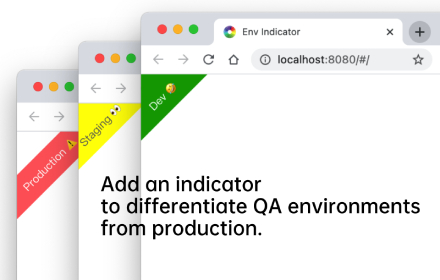
Environment Indicator
Add an environment marker to differentiate QA environments from production. In addition, you can create your own indicator rules
3.0K
★ 4.3
Data sourced from the Chrome Web Store · last verified Jun 10, 2026.