GQueues for Google Calendar
Mark GQueues tasks complete directly in Google Calendar
As of May 2026, GQueues for Google Calendar has 10,000 users and a 5.00/5 rating from 18 reviews in the Workflow & Planning category.
Usersno change0%
10.0K
10,000
Ratingno change0%
5.00
18 reviews
Reviewsno change0%
18
Version
1.2.4
Manifest V3
History
1 snapshotsTracking since Apr 26, 2026.
View as table
| Date | Users | Rating | Reviews | Version |
|---|---|---|---|---|
| Apr 26, 2026 | 10.0K | 5.00 | 18 | 1.2.4 |
| Now | 10.0K | 5.00 | 18 | 1.2.4 |
Permissions & access
- Permissions
- scriptingstorage
- Host access
- https://calendar.google.com/*
Screenshots


About
If you live in Google Calendar, you understand the importance of a timely reminder to get to work, and blocking out meeting-free time so you have space to actually get that work done.

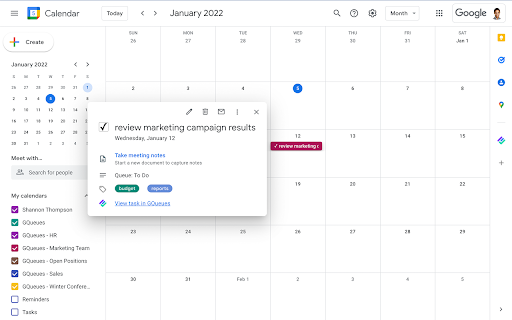
With the GQueues Google Calendar extension, you can view full details for GQueues tasks syncing to Google Calendar, and mark those tasks complete right from the Calendar interface. No switching back and forth between the two apps to keep track of what you’ve accomplished.

If you’ve already activated Calendar syncing for your GQueues account, the next step is to install this extension to push that integration (and your productivity) to the next level.

---------------------------------------------------------------

The GQueues for Google Calendar Chrome Extension requires a GQueues account to work. GQueues is a task management app specifically designed for teams on Google Workspace.

With GQueues you get:
• Deep integration with Google Workspace including Chrome, Gmail, Calendar, and Drive
• Immediate, 2-way task syncing with Google Calendar
• Unlimited, project-based calendars to share with your team
• Simple, intuitive interface
• Core task management including subtasks and repeating tasks
• Robust search and task filters
• Easy collaboration with shared folders and assignments for delegating work
• Mobile apps for Android and iOS

Get more information or sign up at https://www.gqueues.com
Technical
- Version
- 1.2.4
- Manifest
- V3
- Size
- 500KiB
- Min Chrome
- 88
- Languages
- 1
- Featured
- Yes
Metadata
- ID
- fghnmlcmakpmbjgplmcbkhgkeegofhll
- Developer ID
- u39228211c14a755ac20c86dfe1fe86a1
- Developer Email
- [email protected]
- Created
- Jan 9, 2018
- Last Updated (Store)
- Nov 13, 2024
- Last Scraped
- May 23, 2026
- Website
- https://www.gqueues.com/
- Privacy Policy
- https://www.gqueues.com/privacy
Similar extensions
Alternatives to GQueues for Google Calendar, ranked by description similarity.

GQueues for Gmail
Turn emails into actionable tasks with GQueues - the task manager built for teams on Google Workspace.
6.0K
★ 4.3

GQueues Chrome Extension
Easily create tasks for GQueues - the task manager built for teams on Google Workspace.
10.0K
★ 4.5

TeamCal for Google Calendar™
The missing schedule view for Google Calendar
3.0K
★ 3.9

Scheduling Calendar
This Scheduling Calendar: Manage events, calendar reminders & sync calendars. Join video meetings in a shared calendar app.
5.0K
★ 4.5

Arrangr: Meeting Scheduling Software
Arrangr helps you to schedule meetings! Whether virtual or in-person, 1-on-1 or with a group, Arrangr can help.
208
★ 5.0

SideTimeTable
A side panel extension that shows your today's events.
146
★ 5.0

Glidescape - Productivity New Tab
Transform your new tab into a powerful productivity workspace with timeline, tasks, and calendar.
—
★ 5.0

Google Calendar Grouping
Create groups of Google Calendars and switch between them instantly—see only the calendars you want without re-clicking each one.
30
Data sourced from the Chrome Web Store · last verified May 23, 2026.