
Arrangr: Meeting Scheduling Software
Arrangr helps you to schedule meetings! Whether virtual or in-person, 1-on-1 or with a group, Arrangr can help.
As of May 2026, Arrangr: Meeting Scheduling Software has 208 users and a 5.00/5 rating from 4 reviews in the Workflow & Planning category.
Usersdown 5.9 percent−5.9%
208
208
Ratingno change0%
5.00
4 reviews
Reviewsno change0%
4
Version
1.2
Manifest V3
History
2 snapshotsTracking since Apr 25, 2026.
View as table
| Date | Users | Rating | Reviews | Version |
|---|---|---|---|---|
| Apr 25, 2026 | 221 | 5.00 | 4 | 1.2 |
| May 21, 2026 | 214 | 5.00 | 4 | 1.2 |
| Now | 208 | 5.00 | 4 | 1.2 |
Permissions & access
- Permissions
- storagealarmscontextMenus
- Host access
- None declared
Screenshots

About
Arrangr, the leader in hybrid integrated scheduling, allows you to quickly and easily coordinate all the complicated facets of arranging a meeting, from A to Z (date, time, conference or video call info, location, agenda, etc.) By bringing all the components you need into a single clean and intuitive process, we help you eliminate the back and forth, miscommunications, and juggling between different apps.

Whether setting up a quick Zoom or Google Meet call, or just finding a time and place to meet in person for a coffee, Arrangr is simple and fast to use no matter the number of participants. Our proactive, flexible 1-on-1 invitations let you suggest multiple times or time ranges, places or call methods and lets your recipient accept the best option with a single click, all while making sure you don’t double-book. Arrangr’s group event polls smoothly funnel you to the best options for scheduling those impossible-to-coordinate group meetings.

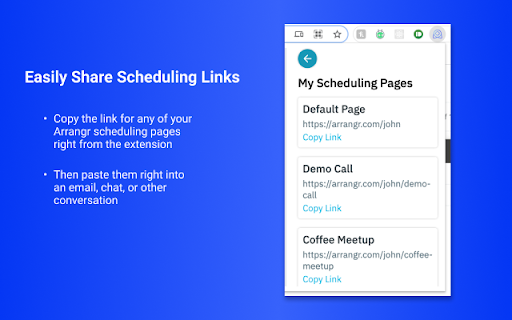
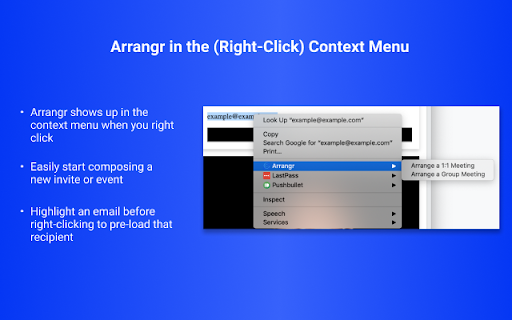
Arrangr’s Chrome extension keeps Arrangr right at your fingertips as you work in Chrome, so you can easily initiate new meeting invites, share scheduling links, and monitor your Arrangr activity.

With Arrangr you can:

- Integrate with multiple calendars, including your Google calendar

- Integrate with your favorite conferencing providers, including Google Meet, Zoom, Microsoft Teams, and more

- Send proactive, flexible 1:1 meeting invitations, suggesting multiple times and places or call methods

- Create polls to find the best time to meet

- Share inbound scheduling links to let others schedule meetings with you

- Search for a place to meet from within Arrangr, even with the ability to help you find places half-way between you and the other party!

Use of our Chrome extension requires an Arrangr account. If you don't already have one, create one for free at https://arrangr.com/sign_up

Learn more about our Chrome extension and how it works here: https://arrangr.freshdesk.com/support/solutions/folders/47000778054
Technical
- Version
- 1.2
- Manifest
- V3
- Size
- 78.14KiB
- Min Chrome
- 88
- Languages
- 1
- Featured
- Yes
Metadata
- ID
- ppgfekehcjmllgmepdamanopkpgjfddi
- Developer ID
- uce765f84e20d9c22863ee51366d9b690
- Developer Email
- [email protected]
- Created
- Aug 4, 2021
- Last Updated (Store)
- Aug 14, 2021
- Last Scraped
- May 21, 2026
- Website
- arrangr.com
- Support URL
- https://arrangr.com/support
- Privacy Policy
- https://arrangr.com/privacy_policy
Similar extensions
Alternatives to Arrangr: Meeting Scheduling Software, ranked by description similarity.

MeetApps: Google Calendar Video Call Links
Quickly start video calls without opening calendar (Zoom, Teams, Meet & 7 others supported)
1.0K
★ 5.0

GoodTime Meet
A meeting scheduling tool for business professionals
3.0K
★ 4.6

AutoMeet
Never miss a meeting!
14

Zoom Chrome Extension For Gov
Schedule Zoom meetings directly from Google Calendar
3.0K

Zoom Chrome Extension
Schedule Zoom meetings directly from Google Calendar
7.0M
★ 3.9

Smart Meeting Scheduler
A powerful tool designed to simplify and streamline the process of scheduling meetings using Google Calendar.
78
★ 5.0

Undock
Instantly schedule meetings without ever having to look at a calendar
916
★ 4.8

Distro
Manage meetings and booking links directly from your browser. Integrates with Google Calendar for seamless scheduling.
3
Data sourced from the Chrome Web Store · last verified May 21, 2026.