
Mapp Cloud Debugger
Debug and test your Mapp Cloud implementation
As of June 2026, Mapp Cloud Debugger has 965 users and a 5.00/5 rating from 5 reviews in the Developer Tools category.
Usersdown 3.5 percent−3.5%
965
965
Ratingno change0%
5.00
5 reviews
Reviewsno change0%
5
Version
1.4.0
Manifest V3
History
4 snapshotsTracking since Apr 21, 2026.
View as table
| Date | Users | Rating | Reviews | Version |
|---|---|---|---|---|
| Apr 21, 2026 | 1.0K | 5.00 | 5 | 1.4.0 |
| May 6, 2026 | 1.0K | 5.00 | 5 | 1.4.0 |
| May 18, 2026 | 999 | 5.00 | 5 | 1.4.0 |
| Jun 1, 2026 | 964 | 5.00 | 5 | 1.4.0 |
| Now | 965 | 5.00 | 5 | 1.4.0 |
Permissions & access
- Permissions
- storagewebRequestscripting
- Host access
- <all_urls>
Screenshots



About
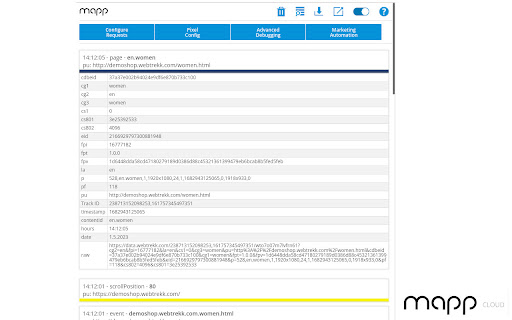
The official Mapp Cloud Debugger allows you to see track-requests, to enable the debug mode of Mapps Smart Pixel, to review Mapp tracking pixel configurations and to review and debug your Marketing Automation implementation. By enabling request tracking, up to 200 Mapp Intelligence track-requests can be listed in the popup window.

Feel free to configure the request list fitting to your needs. Use predefined filters for various request types (teaser, product, events, media and more) or a custom RegEx.

Set the parameters that are displayed for every single request – click on a request to see a table with all parameters and their available values.

Usage examples:

- Enable the decoupled window mode so the window does not disappear when you click on a link and load a new page

or

- Open the window on a browser tab, and monitor the request from a second screen.

The Mapp Cloud Debugger provides a special debug mode for Mapps Smart Pixel technology. Enable the debug mode in the Smart Pixel, and you will see all method calls of Smart Pixel in the JavaScript console. You can even add the stack trace – this way you can easily find out which data is being tracked.

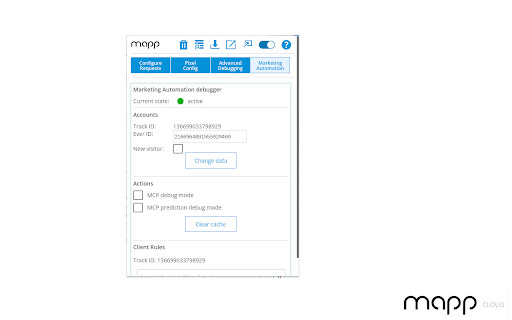
If you have Mapps Marketing Automation implemented on your site, the Mapp Cloud Debugger can help you review running campaigns. Highlight custom HTML containers and re-trigger recommendations and Audience Streams.
Technical
- Version
- 1.4.0
- Manifest
- V3
- Size
- 128KiB
- Min Chrome
- 88
- Languages
- 1
- Featured
- Yes
Metadata
- ID
- ffikelekodkgpfaacgkijigcahkmokfc
- Developer ID
- u3737a705f4e7f2ac6e3b1f42b2707e4f
- Developer Email
- [email protected]
- Created
- Jan 20, 2022
- Last Updated (Store)
- Sep 12, 2025
- Last Scraped
- Jun 1, 2026
- Website
- https://mapp.com/
- Privacy Policy
- https://mapp.com/privacy/
Similar extensions
Alternatives to Mapp Cloud Debugger, ranked by description similarity.

Insighter Debugger - GTM, GA4, Meta Pixel, Google Ads & TikTok
Debug GTM, GA4, Google Ads, Meta & TikTok pixels. DataLayer viewer, consent mode checker, cookie manager + 200+ tech detection.
1.0K
★ 5.0

Trackingplan
Trackingplan helps you debug your analytics live in your browser.
104
★ 5.0

AH Debugger
Debug analytics and marketing pixels in real time with AH Debugger.
156
★ 5.0

Event Tracker
Debug GTM, GA4, Meta Pixel, and TikTok events in real-time. Inspect network requests and dataLayer pushes.
76
★ 5.0

Pixel Checker Pro
Detects marketing and analytics pixels on web pages.
176

AdsDebugger
Debug GAM, Prebid.js, AdX, AdSense, DCM & Pixels. Analyze ad slots, targeting, decoded TCF strings, and header bidding auctions.
92
★ 5.0

Pixel Auditor: Tag, PII & Consent Mode Inspector
Inspect every tracking pixel firing on a page: tag IDs, event payloads, consent-mode signals, cookies, and PII leaks.
64
★ 5.0

Traffic & Cookie Tracking Inspector
Logs HTTP requests in a sidebar with cookie tracking, filtering, and export functionality.
90
Data sourced from the Chrome Web Store · last verified Jun 1, 2026.