
Traffic & Cookie Tracking Inspector
Logs HTTP requests in a sidebar with cookie tracking, filtering, and export functionality.
As of May 2026, Traffic & Cookie Tracking Inspector has 90 users in the Developer Tools category.
Usersup 15.4 percent+15.4%
90
90
Ratingno change0%
—
— reviews
Reviewsno change0%
—
Version
1.0
Manifest V3
History
3 snapshotsTracking since Apr 1, 2026.
View as table
| Date | Users | Rating | Reviews | Version |
|---|---|---|---|---|
| Apr 1, 2026 | 78 | — | — | 1.0 |
| Apr 21, 2026 | 76 | — | — | 1.0 |
| May 6, 2026 | 78 | — | — | 1.0 |
| Now | 90 | — | — | 1.0 |
Permissions & access
- Permissions
- storagetabscookieswebRequestdownloadswebNavigation
- Host access
- <all_urls>, https://webcross.co.uk/*, https://www.google-analytics.com/
Screenshots


About
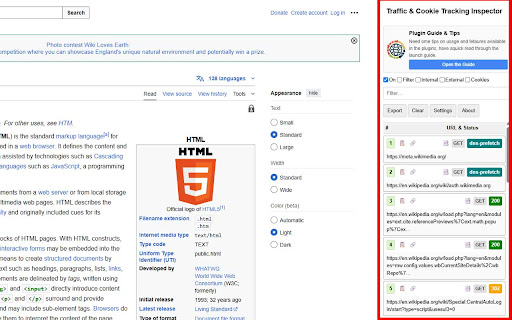
Unleash the power of the Network panel directly in your browser window! The Traffic & Cookie Tracking Inspector is an essential tool for web developers, SEO professionals, digital marketers, and quality assurance testers. It provides a persistent, on-page sidebar that logs all HTTP/S requests, giving you an immediate and clear view of what’s happening under the hood of any website.

Tired of constantly opening and navigating the built-in DevTools? Our inspector lives right on the page, allowing you to monitor traffic, inspect cookies, and debug tracking scripts in real-time as you interact with the site.

KEY FEATURES
✨ Live & Persistent Traffic Logging
See all network requests for the current tab appear in a clean, organized list as they happen. Unlike the standard DevTools, this log persists as you navigate from page to page within the same tab, allowing you to trace a complete user journey without losing valuable data.

🔎 Detailed Request Inspection
Click any request to expand a detailed view including:
- Full URL, Method, Status Code, and Type
- Precise Timings and Filesize (Chunked supported)
- Complete Request and Response Headers
- Initiator and Redirect Information

🍪 Comprehensive Cookie Analysis
Instantly see all cookies associated with a request. Session cookies are automatically highlighted, and expiration dates are clearly displayed.

↪️ Advanced Redirect Tracking
Our inspector goes beyond the standard Network panel by detecting multiple types of redirects:
- Server-Side Redirects: Captures all 301, 302, and other 3xx status codes.
- JavaScript Redirects: Intercepts window.location changes to reveal client-side routing.
-Meta-Refresh Redirects: Automatically detects and logs redirects initiated by <meta> tags.

🎛️ Powerful Filtering System
Quickly isolate the data you need:
- Filter by resource type (Webpages, Images, Scripts, CSS, Video, etc.).
- Show only requests that set or send cookies.
- Isolate traffic to internal (same-site) or external (third-party) domains.
- Live text search to filter requests by URL, status, or method.

📄 One-Click Data Export
Export the entire captured network log to a CSV file with a single click, perfect for analysis, reporting, or sharing with your team.

🔄 Dynamic Remote Configuration
Stay up-to-date with offers and guides loaded dynamically from our servers.

🛡️ CSS-Isolated UI
Built with a Shadow DOM to ensure the extension’s interface is never broken or affected by the host website's styles.

WHO IS THIS FOR?
- Web Developers: Debug network bottlenecks, inspect API requests, and verify header information without leaving the page context.
-SEO Specialists: Easily track redirect chains (including client-side ones), analyze page load resources, and identify third-party scripts impacting performance.
- Digital Marketers: Verify that analytics, marketing, and conversion pixels (Google Tag Manager, Facebook Pixel, etc.) are firing correctly and see what data they are sending.
- QA Testers: Quickly identify failed requests (4xx/5xx errors), analyze resource loading issues, and ensure proper cookie behavior across different user flows.

Stop hunting through the clutter of the standard DevTools. Get the clear, persistent, and powerful network inspector you've always wanted. Install Traffic & Cookie Tracking Inspector today and take control of your web debugging workflow
Technical
- Version
- 1.0
- Manifest
- V3
- Size
- 1.52MiB
- Min Chrome
- 88
- Languages
- 1
- Featured
- No
Metadata
- ID
- behjpglhfclaokfgokdninebdgcfckhp
- Developer ID
- ua415a166a2f303bc57c5a93c26e9efdc
- Developer Email
- [email protected]
- Created
- Jun 16, 2025
- Last Updated (Store)
- Jun 16, 2025
- Last Scraped
- May 31, 2026
- Website
- —
- Support URL
- https://webcross.co.uk/contact-us/
- Privacy Policy
- https://webcross.co.uk/notices/privacy/
Similar extensions
Alternatives to Traffic & Cookie Tracking Inspector, ranked by description similarity.

cURL & WS Capture
cURL & WS Capture help Capture network requests and WebSocket connections.
2.0K
★ 5.0

SparkVault Network Inspector
Search, View and Monitor Your Network Traffic Efficiently.
40
★ 5.0

NetSniffer
Wireshark-inspired network traffic analyzer with cyberpunk FUI
182

Network Request Capturer Pro
Professional network debugging tool. Capture, analyze and export HTTP requests with advanced filtering.
216
★ 5.0

Analytics Auditor
Professional QA & Debugging tool for digital analytics. Real-time validation, smart alerts and multi-tab support.
40
★ 5.0

Tiny HTTP/S Logger
Command & Code Labs: View and filter HTTP/HTTPS requests made by the current site.
50

Cookie Manager Pro
View, edit, delete, export, and manage cookies with one click. Save cookie profiles, monitor changes, and protect cookies.
2.0K
★ 5.0

Tag Inspector
Analyze scripts, links, iframes, and meta tags. Track performance, validate tags, detect issues, and export data.
75
Data sourced from the Chrome Web Store · last verified May 31, 2026.