
Productivity Dashboard
The Productivity Dashboard is a customizable web application that combines multiple productivity tools into a single, cohesive…
As of June 2026, Productivity Dashboard has 10 users in the Workflow & Planning category.
Usersup 66.7 percent+66.7%
10
10
Ratingno change0%
—
— reviews
Reviewsno change0%
—
Version
1.1.1
Manifest V3
History
3 snapshotsTracking since Apr 21, 2026.
View as table
| Date | Users | Rating | Reviews | Version |
|---|---|---|---|---|
| Apr 21, 2026 | 6 | — | — | 1.1.1 |
| May 6, 2026 | 7 | — | — | 1.1.1 |
| Jun 1, 2026 | 8 | — | — | 1.1.1 |
| Now | 10 | — | — | 1.1.1 |
Permissions & access
- Permissions
- storagetabs
- Host access
- None declared
Screenshots


About
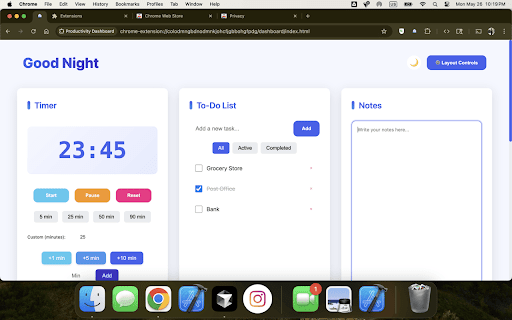
The Productivity Dashboard is a customizable web application that combines multiple productivity tools into a single, cohesive interface. It features a clean, modern design with both light and dark mode support, adjustable font size, custom color theme options, and allows users to personalize their workspace by showing/hiding and reordering sections. Also supports displaying individual sections in full screen.
Key Features:
Layout Controls
Access via the "⚙️ Layout Controls" button in the header
Drag and drop to reorder sections
Toggle visibility of each section
Preferences are automatically saved
Music Player:
Embedded YouTube player
Enter YouTube URL or video ID to load content
Full-screen capability
Timer:
Pomodoro-style timer with preset options (5, 25, 50, 90 minutes)
Custom time input
Quick add buttons (+1, +5, +10 minutes)
Start, pause, and reset controls
Visual notifications when timer completes
Bookmarks
Save and organize frequently visited websites
Add bookmarks with custom names
One-click access to saved links
Delete unwanted bookmarks
Notes
Simple text editor for quick notes
Clear all notes option
Persistent storage across sessions
To-Do List
Add, complete, and delete tasks
Filter tasks by status (All/Active/Completed)
Clear completed tasks
Task counter
Persistent storage
Theme Support
Toggle between light and dark mode
Theme preference is saved
Automatically matches system preferences on first visit
Responsive Design
Adapts to different screen sizes
Grid layout adjusts automatically
All user preferences, including:
Section visibility
Section order
Theme preference
Notes content
Bookmarks
To-do items
Timer settings
are automatically saved to the browser's localStorage, ensuring your dashboard remains personalized across sessions.
To get started:
Click the toolbar icon to open the dashboard in your browser
Use the layout controls to customize your workspace
Add your preferred YouTube content to the music player
Set up your bookmarks and to-do items
Choose your preferred theme
Start using the timer for focused work sessions
The dashboard is designed to be intuitive and requires no setup beyond your initial customization. All features are immediately available and ready to use.
Technical
- Version
- 1.1.1
- Manifest
- V3
- Size
- 43.94KiB
- Min Chrome
- 88
- Languages
- 1
- Featured
- No
Metadata
- ID
- ffejagiblonjflppklafdgmilokbjhlm
- Developer ID
- ucbc7e9cf0d946d2e5c5451db442cb59d
- Developer Email
- [email protected]
- Created
- May 27, 2025
- Last Updated (Store)
- Jun 6, 2025
- Last Scraped
- Jun 1, 2026
- Website
- —
- Support URL
- —
- Privacy Policy
- —
Similar extensions
Alternatives to Productivity Dashboard, ranked by description similarity.

Pro Dashboard New Tab
A beautiful productivity dashboard for your new tab with focus tools, notes, tasks, and quick links.
5

Priority Zero
Master your day with a visual timeline, Eisenhower task matrix, and deep work tracking on a beautiful, glassmorphic new tab page.
4

Daily Docket
Make your to-do list actionable-Choose a task, set a timer, crush it, rest well, and repeat.
2
★ 4.5

Pomodoro & Todo Focus
Beautiful Pomodoro timer with Todo list, website blocker & ambient focus sounds. Boost your productivity with the new tab experience
—

StyloDash
Turn your Chrome New Tab and everyday browsing into a powerful productivity workspace. Widgets, Automation, Customization, and more.
9
★ 5.0

BaseTab - Productive New Tab
Transform your new tab into a beautiful productivity dashboard with tasks, Pomodoro timer, weather, quotes & stunning backgrounds.
18

Focus Dashboard
A premium minimalist productivity dashboard with real-time clock and dynamic backgrounds.
5
★ 5.0
BonsaiDash - Your productivity tab
Your productivity tab
69
★ 5.0
Data sourced from the Chrome Web Store · last verified Jun 1, 2026.