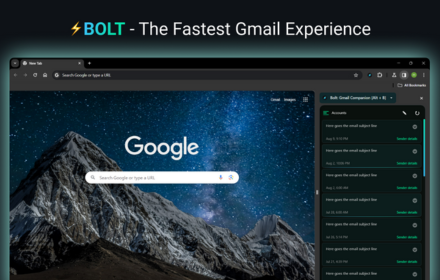
Gmail Inbox
A blazingly-fast Gmail Inbox Client that loads your Gmail Inbox before the blink of an eye!⚡
As of June 2026, Gmail Inbox has 1,000 users and a 4.00/5 rating from 2 reviews in the Productivity category.
Usersno change0%
1.0K
1,000
Ratingno change0%
4.00
2 reviews
Reviewsno change0%
2
Version
1.0.2
Manifest V3
History
1 snapshotsTracking since Apr 21, 2026.
View as table
| Date | Users | Rating | Reviews | Version |
|---|---|---|---|---|
| Apr 21, 2026 | 1.0K | 4.00 | 2 | 1.0.2 |
| Now | 1.0K | 4.00 | 2 | 1.0.2 |
Permissions & access
- Permissions
- sidePanelunlimitedStoragestoragebackgroundcontextMenusdeclarativeNetRequest
- Host access
- https://*.google.com/*
Screenshots

About
Gmail Inbox Chrome Extension - Open Gmail faster than you can sip coffee!

In today's world, efficiency is everything.

A McKinsey study shows knowledge workers spend 28 percent of each day on email. Every extra loading second chips focus and mood. You tap the desk, refresh, curse the spinning circle, and drift. Multiply that pause by hundreds of checks a month and you lose days each year. Fast email is not luxury. Fast email is freedom.

Meet Gmail Inbox:
Gmail Inbox is a lightweight Chrome extension that opens Gmail in under 400 milliseconds on a typical broadband line. Blink. Your inbox waits. No setup maze. No learning curve. Just click and go.

How Gmail Inbox kills the wait
- Pre-fetch engine: It pulls Gmail HTML before you even think to click, so the page sits ready.
- Smart caching: It stores core assets locally, trimming network calls by up to seventy percent.
- Lazy script loading: It defers heavy code until after the first paint, so content appears sooner.
- Memory guard: It caps RAM near seventy-five megabytes, keeping older laptops smooth.
- Code footprint: The install package stays under two-hundred kilobytes, preventing bloat.

Internal benchmarks run in April 2025 with Chrome 126 on a hundred-megabit line prove the gains: first-contentful paint drops from 1.8 seconds to 0.35 seconds. Total load time slides from 3.4 seconds to 0.6 seconds. Tab memory falls from 140 megabytes to 74 megabytes. Five spared seconds feel small once. Repeat the credit 120 times daily and you pocket ten fresh work hours each month.

The one-click routine
Click the green lightning icon.

A new tab appears.

You breathe and already read new mail.

No training videos. No dashboards. It “just works.”

People who feel the upgrade
• Sales reps jump between prospect threads without awkward silence on calls.
• Support agents shave average handle time and calm angry customers sooner.
• Freelancers load briefs over café Wi-Fi that drops every other minute.
• Students grab professor updates between lectures and still catch the elevator.

If you touch Gmail, you gain time. The cause and effect are clear.

Light on resources, heavy on trust
Many extensions hog CPU or spawn hidden pop-ups. Gmail Inbox refuses. Background use stays under two percent CPU, and the fans stay quiet. The code lives on GitHub for public audit. It requests read-only access to mail data and never pipes information to third-party servers.

Installation
Open the Chrome Web Store page.

Click Add to Chrome.

Pin the icon beside the address bar.

That’s it. No reboot. No sign-in ritual.

Common questions answered:

Does it change how Gmail looks?
Never. You keep labels, themes, and shortcuts. Gmail Inbox only shortens loading and scrolling time.

Can Google disable it?
The extension uses public, documented APIs and stays within terms of service.

Will my settings sync to other computers?
Yes. Chrome sync carries the flag automatically.

Is a Firefox version coming?
A WebExtensions port is on the roadmap. A waitlist link appears in the options pop-up.


Pricing that respects your wallet
Personal use stays free forever. Teams of five or more can unlock priority support and quarterly performance clinics for two dollars per seat each month—less than the latte you now drink while emails load.

Why keep losing seconds?
Time thieves work silently. They sneak in through those small gaps after every click. Gmail Inbox slams that door. Install it today. Feel the snap tomorrow morning. Drink your coffee hot, read mail cold, and spend rescued hours where they count.

Speed today. Focus forever.
Technical
- Version
- 1.0.2
- Manifest
- V3
- Size
- 461KiB
- Min Chrome
- 114
- Languages
- 1
- Featured
- Yes
Metadata
- ID
- ffajkdgeelnaminkehobmmpiclbpcnfm
- Developer ID
- u7200c62c409f8a704b152dffa8635a2a
- Developer Email
- [email protected]
- Created
- Dec 4, 2023
- Last Updated (Store)
- Jun 30, 2025
- Last Scraped
- Jun 1, 2026
- Website
- getbolt.app
- Privacy Policy
- —
Similar extensions
Alternatives to Gmail Inbox, ranked by description similarity.

Gmail Inbox
Gmail Inbox - manage multiple accounts, get notifications, read, or delete emails without opening Gmail app.
399
★ 5.0
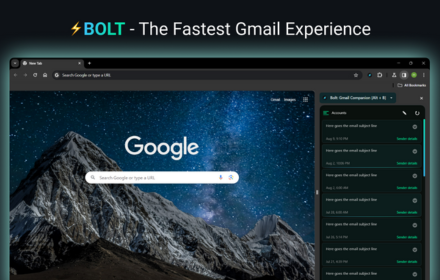
Bolt: The Fastest Gmail Experience ⚡
Bolt is a blazingly-fast Gmail client that loads your Gmail updates before the blink of an eye!⚡
61
★ 4.7

CMDK - Read Receipts, Split Inbox, Hotkeys & Reminders for Gmail
Simplehuman is now CMDK. Supercharge Gmail with 25+ new hotkeys, natural language snooze, split inbox, read receipts & more.
1.0K
★ 4.9

Mailto → Gmail
Opens Gmail compose for every mailto: link.
98

Declutter my Gmail
an extension to help you free up gmail space
57

Email Checker for Gmail
Get real‑time unread counts and desktop notifications for Gmail.
87

PDFMailer – Send to Gmail
Convert any webpage to PDF and send via Gmail in one click.
10

Gmail Footer Cleaner
Automatically hides Gmail’s Upgrade pill and footer clutter. No permissions. No data collection.
4
Data sourced from the Chrome Web Store · last verified Jun 1, 2026.