
PagePixels Screenshots
Automate screenshots & send them anywhere. Take Full Page and single element screenshots, with flexible scheduling and replay.
As of June 2026, PagePixels Screenshots has 211 users and a 5.00/5 rating from 1 reviews in the Productivity category.
Usersup 15.9 percent+15.9%
211
211
Ratingno change0%
5.00
1 reviews
Reviewsno change0%
1
Version
0.9.1
Manifest V3
History
3 snapshotsTracking since Apr 1, 2026.
View as table
| Date | Users | Rating | Reviews | Version |
|---|---|---|---|---|
| Apr 1, 2026 | 182 | 5.00 | 1 | 0.9.1 |
| May 3, 2026 | 192 | 5.00 | 1 | 0.9.1 |
| Jun 2, 2026 | 202 | 5.00 | 1 | 0.9.1 |
| Now | 211 | 5.00 | 1 | 0.9.1 |
Permissions & access
- Permissions
- activeTabstoragetabsalarms
- Host access
- <all_urls>
Screenshots


About
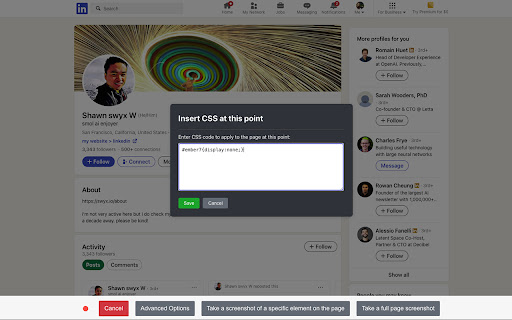
PagePixels Screenshots – The easiest way to capture, schedule, and automate screenshots directly from your browser.

What It Does:

🖼️ Captures Full-Page & Element Screenshots – Grab the entire page or just focus on a specific element with one click.

🔄 Records & Replays Actions – PagePixels remembers your clicks, form inputs, and scrolling, then replays them for perfectly retaken screenshots. Events are stored on your computer and are never shared with PagePixels.

⏰ Automated Scheduling – Set screenshots to run on your schedule, with options for specific days and time windows.

🚀 Seamless Integration – Works with Make and Zapier just like our API and web interface, so you can trigger screenshots, automate workflows, and send results anywhere.

🔒 Secure & Private – Uses secure OAuth login with no stored passwords. Your screenshots are linked to your account and never shared.

Why Install?

⚡ Save Time – No more manual captures—automate and focus on what matters.

🎯 Consistent Results – Retake identical screenshots with replayed actions for precision.

🔗 Works With Your Workflow – Connects effortlessly with PagePixels, Make, and Zapier for powerful automation.

✅ Simple & Fast – Lightweight, easy to use, and runs quietly in the background.

📩 Install now and capture smarter with PagePixels Screenshots.
Technical
- Version
- 0.9.1
- Manifest
- V3
- Size
- 6.96MiB
- Min Chrome
- 88
- Languages
- 1
- Featured
- No
Metadata
- ID
- ffahdnkifpahdjbpojkgpklikbjghnhm
- Developer ID
- u08c3a6425c1b16bb60aa02e77c695480
- Developer Email
- [email protected]
- Created
- Mar 4, 2025
- Last Updated (Store)
- Mar 28, 2025
- Last Scraped
- Jun 2, 2026
- Website
- pagepixels.com
- Support URL
- https://pagepixels.com/support
- Privacy Policy
- https://pagepixels.com/privacy
Similar extensions
Alternatives to PagePixels Screenshots, ranked by description similarity.

PixelGrab - Screenshot & Screen Capture Tool
Capture full-page, visible area, and element screenshots. Edit, download, and manage your screenshots with ease.
8

EasySnap – capture your screen fast!
Capture and save screenshots instantly. Quick, easy, and efficient—perfect for work, study, or sharing moments
215
★ 5.0

PixelPerfect Capture
Capture ultra high-resolution screenshots
15

PixelCapture
A screen capture tool that allows you to capture specific areas of webpages.
52

Full Page Screen Capture (Simple)
A simplified full page screen capture extension.
9

Full Page Snap - Capture Full Page Screenshots
Quickly capture entire web pages with Full Page Snap. Save full-page screenshots as high-quality images easily.
820
★ 4.5

ScreenCapture Light - Screenshot Tool with Annotation & Scroll Capture
Capture full page, visible area, or regions with editing, annotations, cropping, and watermarks. Simple and powerful.
35

Pure Screenshot | FullPage
Capture full-page, partial, or visible-area screenshots with zero permission warnings. No tracking, no bloat.
4
Data sourced from the Chrome Web Store · last verified Jun 2, 2026.