
Pure Screenshot | FullPage
Capture full-page, partial, or visible-area screenshots with zero permission warnings. No tracking, no bloat.
As of June 2026, Pure Screenshot | FullPage has 4 users in the Productivity category.
Usersno change0%
4
4
Ratingno change0%
—
— reviews
Reviewsno change0%
—
Version
1.1.0
Manifest V3
90-day change · In the last 90 days this extension 1 version update.
History
6 snapshotsTracking since Apr 3, 2026.
View as table
| Date | Users | Rating | Reviews | Version |
|---|---|---|---|---|
| Apr 3, 2026 | — | — | — | 1.0.0 |
| Apr 17, 2026 | — | — | — | 1.1.0 |
| Apr 24, 2026 | 1 | — | — | 1.1.0 |
| May 25, 2026 | 2 | — | — | 1.1.0 |
| Jun 1, 2026 | 4 | — | — | 1.1.0 |
| Jun 7, 2026 | — | — | — | 1.1.0 |
| Now | 4 | — | — | 1.1.0 |
Changelog
- Apr 3, 2026description
Capture full-page, partial, or visible-area screenshots with one click. No account needed, no data collected, no permission warnings.

Pure Screenshot automatically scrolls and stitches entire web pages into a single image - including tricky layouts like single-page apps, documentation sites, and pages with inner-scrolling containers.

THREE CAPTURE MODES
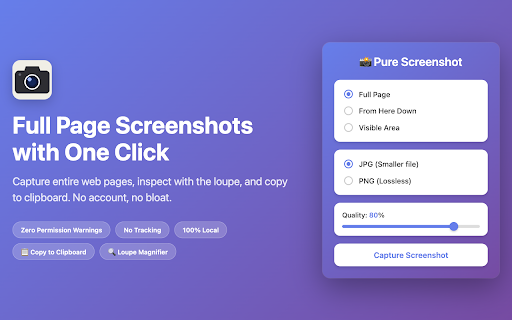
- Full Page: Scrolls from top to bottom and stitches everything into one image
- From Here Down: Start capturing from your current scroll position (skip headers, cookie banners, etc.)
- Visible Area: Instant screenshot of exactly what you see in the browser

SMART FEATURES
- Automatic scroll detection that handles SPAs, dashboards, and inner-scrolling layouts
- Fixed element handling: hides sticky headers and footers during capture to avoid duplicates
- Preview before download: review your screenshot and retake if needed
- JPG and PNG output with adjustable quality slider
- Canvas limit protection: warns you when a page exceeds the browser's maximum image size

PRIVACY FIRST
- Zero data collection - nothing is uploaded, ever
- Zero permission warnings on install
- Zero trackers or analytics
- No account, no sign-up, no login
- 100% local processing - all capture and stitching happens in your browser
- No third-party libraries, APIs, or services
- Only two Chrome permissions: activeTab (access current tab when you click the icon) and scripting (inject capture scripts)

Pure Screenshot is built for people who want a screenshot tool that does one thing well, without the bloat. No cloud uploads, no subscription, no AI upsells - just screenshots.
Capture full-page, partial, or visible-area screenshots with one click. No account needed, no data collected, no permission warnings.

Pure Screenshot automatically scrolls and stitches entire web pages into a single image - including tricky layouts like single-page apps, documentation sites, and pages with inner-scrolling containers.

THREE CAPTURE MODES
- Full Page: Scrolls from top to bottom and stitches everything into one image
- From Here Down: Start capturing from your current scroll position (skip headers, cookie banners, etc.)
- Visible Area: Instant screenshot of exactly what you see in the browser

SMART FEATURES
- Automatic scroll detection that handles SPAs, dashboards, and inner-scrolling layouts
- Fixed element handling: hides sticky headers and footers during capture to avoid duplicates
- Full preview overlay: every capture opens in a full-screen preview before you decide what to do with it
- Loupe magnifier: hover over the preview to inspect fine details before downloading or copying
- Copy to clipboard: copy a full-resolution PNG with one click — ready to paste anywhere
- JPG and PNG output with adjustable quality slider
- Canvas limit protection: warns you when a page exceeds the browser's maximum image size

PRIVACY FIRST
- Zero data collection - nothing is uploaded, ever
- Zero permission warnings on install
- Zero trackers or analytics
- No account, no sign-up, no login
- 100% local processing - all capture and stitching happens in your browser
- No third-party libraries, APIs, or services
- Only two Chrome permissions: activeTab (access current tab when you click the icon) and scripting (inject capture scripts)

Pure Screenshot is built for people who want a screenshot tool that does one thing well, without the bloat. No cloud uploads, no subscription, no AI upsells - just screenshots.
Permissions & access
- Permissions
- activeTabscripting
- Host access
- None declared
Screenshots


About
Capture full-page, partial, or visible-area screenshots with one click. No account needed, no data collected, no permission warnings.

Pure Screenshot automatically scrolls and stitches entire web pages into a single image - including tricky layouts like single-page apps, documentation sites, and pages with inner-scrolling containers.

THREE CAPTURE MODES
- Full Page: Scrolls from top to bottom and stitches everything into one image
- From Here Down: Start capturing from your current scroll position (skip headers, cookie banners, etc.)
- Visible Area: Instant screenshot of exactly what you see in the browser

SMART FEATURES
- Automatic scroll detection that handles SPAs, dashboards, and inner-scrolling layouts
- Fixed element handling: hides sticky headers and footers during capture to avoid duplicates
- Full preview overlay: every capture opens in a full-screen preview before you decide what to do with it
- Loupe magnifier: hover over the preview to inspect fine details before downloading or copying
- Copy to clipboard: copy a full-resolution PNG with one click — ready to paste anywhere
- JPG and PNG output with adjustable quality slider
- Canvas limit protection: warns you when a page exceeds the browser's maximum image size

PRIVACY FIRST
- Zero data collection - nothing is uploaded, ever
- Zero permission warnings on install
- Zero trackers or analytics
- No account, no sign-up, no login
- 100% local processing - all capture and stitching happens in your browser
- No third-party libraries, APIs, or services
- Only two Chrome permissions: activeTab (access current tab when you click the icon) and scripting (inject capture scripts)

Pure Screenshot is built for people who want a screenshot tool that does one thing well, without the bloat. No cloud uploads, no subscription, no AI upsells - just screenshots.
Technical
- Version
- 1.1.0
- Manifest
- V3
- Size
- 18.86KiB
- Min Chrome
- 88
- Languages
- 1
- Featured
- No
Metadata
- ID
- iemgbohpjeghdeccpclolifcdpfalpjd
- Developer ID
- u71477087d9a75c2173e0719b01d1c226
- Developer Email
- [email protected]
- Created
- Mar 18, 2026
- Last Updated (Store)
- Apr 2, 2026
- Last Scraped
- Jun 7, 2026
- Website
- —
- Privacy Policy
- https://mindmatter.nl/projects/pure-screenshot/privacy/
Similar extensions
Alternatives to Pure Screenshot | FullPage, ranked by description similarity.

Full Page Screenshot
Capture full page screenshots with one click. Smart fixed element handling for clean, seamless results.
80
★ 5.0

Full Page Capture
Capture the entire scrollable page as a single PNG image.
7

Fullpage Capture
Capture entire webpages with a single click and manage them in a modern side panel.
6
★ 5.0

FullSnap - Full Page Screenshot
Capture full page screenshots with one click. Download or copy to clipboard instantly.
7

Screen Capture & Editor - Go Full Page
Screen capture any area or go full page to grab the entire website, then edit and export in seconds.
10.0K
★ 3.4

Full Page Screenshot (Scroll)
Capture a full-page screenshot seamlessly by scrolling down.
27

Screenshot Full Page - Professional
Capture and download full page screenshot in PNG, JPG, WebP and PDF file formats. Quick, private, reliable and works in offline too!
8
★ 5.0

Full Page Screen Capture (Simple)
A simplified full page screen capture extension.
9
Data sourced from the Chrome Web Store · last verified Jun 7, 2026.