
Mr.Jimaku
Show your caption on the YouTube
As of May 2026, Mr.Jimaku has 122 users and a 5.00/5 rating from 1 reviews in the Productivity category.
Usersup 0.8 percent+0.8%
122
122
Ratingno change0%
5.00
1 reviews
Reviewsno change0%
1
Version
1.2
Manifest V3
History
2 snapshotsTracking since Apr 25, 2026.
View as table
| Date | Users | Rating | Reviews | Version |
|---|---|---|---|---|
| Apr 25, 2026 | 121 | 5.00 | 1 | 1.2 |
| May 21, 2026 | 105 | 5.00 | 1 | 1.2 |
| Now | 122 | 5.00 | 1 | 1.2 |
Permissions & access
- Permissions
- None declared
- Host access
- None declared
Screenshots
About
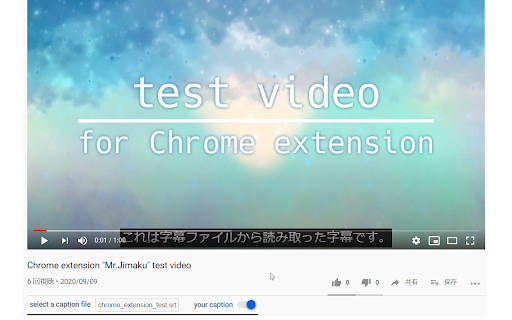
- If you have a caption file, you can watch the video with the caption
- Of course, you can also use files that were given by someone else
- You can turn on or off the display of the caption

**⚠ We're assuming UTF-8 character set for the caption file.**

1. View YouTube video page in chrome
2. Select a caption file in the box under the title

You can turn off the caption by pressing the switch next to the box.


Here's how to write a caption file. It's the format of the srt file.

```text
1
00:00:00,000 --> 00:00:07,560
これは字幕ファイルから読み取った字幕です。

2
00:00:10,230 --> 00:00:14,700
This is a test video
```

1. Write timestamp for start time and end time of the text to be displayed
2. Write the text one line below the timestamp

Timestamp is written like `hh:mm:ss,sss --> hh:mm:ss,sss`.
`hh` is the hour, `mm` is the minute, `ss` is second, and `sss` is millisecond.
`:` is a delimiter for `hh`, `mm` and `ss`,
and `,` is a delimiter for `hh:mm:ss` and `sss`.
Start time, ` --> `, and end time, in that order.

Actually, if it's written in this format,
you don't have to worry about the file extension.
Technical
- Version
- 1.2
- Manifest
- V3
- Size
- 66.84KiB
- Min Chrome
- 88
- Languages
- 1
- Featured
- Yes
Metadata
- ID
- ffadhemlfiofmghlenfnaemclojffkpd
- Developer ID
- uac9dbc2cefd3fdabffe21e33f0b61ddb
- Developer Email
- [email protected]
- Created
- Sep 11, 2020
- Last Updated (Store)
- May 10, 2024
- Last Scraped
- May 21, 2026
- Website
- eiji.page
- Support URL
- —
- Privacy Policy
- —
Similar extensions
Alternatives to Mr.Jimaku, ranked by description similarity.

Captions+
Add local subtitles (SRT, VTT, SRV3, XML) to YouTube. Features: Drag & Drop, Sync, Custom Styles, and Sidebar Browser.
3

YouCaption: YouTube Captions Fully Customizable
Customize YouTube captions with YouCaption.
1.0K
★ 3.9

Youtube Closed Caption Exporter
Caption Exporter: Your Go-To Tool for Effortless Caption Capture
How to Use Caption Exporter:
1. Download the Extension:
Begin…
444

YouTube Caption
YouTube Caption assistant.
10.0K
★ 4.2

Youtube AI translation
Translate the subtitles to whatever target language you want.
You can even use auto generated subtitle to translate.
In addition,…
55
★ 5.0

vCaptions – Video Caption List
Add smart captions lists to any website video. Supports YouTube and Bilibili with translation, chapters and AI summaries.
30.0K
★ 4.6

CC Scout for YouTube
Your ultimate tool to effortlessly detect captions in YouTube videos!
30

Real-Time Bilingual Video & Audio Translation – SonicCaption
Real-time dual subtitles & AI captions for any tab. Live video & audio translation in 60+ languages with low latency
6.0K
★ 3.8
Data sourced from the Chrome Web Store · last verified May 21, 2026.