
Youtube Closed Caption Exporter
Caption Exporter: Your Go-To Tool for Effortless Caption Capture How to Use Caption Exporter: 1. Download the Extension: Begin…
As of May 2026, Youtube Closed Caption Exporter has 444 users in the Productivity category.
Usersup 2.5 percent+2.5%
444
444
Ratingno change0%
—
— reviews
Reviewsno change0%
—
Version
1.0
Manifest V3
History
3 snapshotsTracking since Apr 1, 2026.
View as table
| Date | Users | Rating | Reviews | Version |
|---|---|---|---|---|
| Apr 1, 2026 | 433 | — | — | 1.0 |
| Apr 30, 2026 | 440 | — | — | 1.0 |
| May 29, 2026 | 455 | — | — | 1.0 |
| Now | 444 | — | — | 1.0 |
Permissions & access
- Permissions
- activeTab
- Host access
- https://*.youtube.com/*
Screenshots


About
Caption Exporter: Your Go-To Tool for Effortless Caption Capture

How to Use Caption Exporter:

1. Download the Extension:

Begin by downloading 'Caption Exporter' from the Chrome Web Store.

2. Enable and Pin the Extension:

Once installed, enable the extension in your Chrome browser. For easy access, consider pinning it to your browser's toolbar.

3. Open YouTube (or Your Preferred Video Site):

Navigate to YouTube or any other video website where you want to capture captions.

4. Enable Closed Captions (CC):

Start playing your chosen video and enable the Closed Captions (CC) feature. This is crucial for the extension to capture the captions.

5. Export Captions:

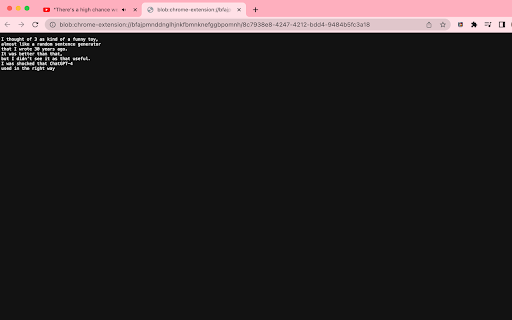
After you're done watching, or whenever you're ready, click on the 'Caption Exporter' icon and select 'Export to Text'.
The exported text will automatically open in a new tab for your convenience.

Important Notes:

The extension requires Closed Captions (CC) to be active on the video for it to capture and export text.
While 'Caption Exporter' works on youtube, some sites' Closed Captions may not be compatible with the extension.
With these simple steps, you can easily capture and export video captions, enhancing your viewing experience and accessibility!


About the Extension:
Ever found yourself wishing you could grab those quick captions from a video tutorial, webinar, or your favorite YouTube series? Caption Exporter makes that wish a reality. It's a simple yet powerful Chrome extension designed to seamlessly capture and export live captions from virtually any video you come across online.

Why You'll Love Caption Exporter:

Live Capture Magic: Snag every word from live captions without breaking a sweat.
Export in a Snap: One click, and your captions turn into a neat, easy-to-read text file.
Designed for Simplicity: A clean, user-friendly interface that doesn’t need a manual.
Make It Yours: Customizable to fit your captioning needs, whether it's for work, study, or play.
Never Miss a Beat: Captions are captured with high accuracy – say goodbye to missing key info.
Universal Compatibility: Works like a charm on various platforms, be it educational sites or entertainment hubs.
Here's How It Rolls:

Head to a video with live captions.
Fire up Caption Exporter and hit ‘Start’.
Sit back as it diligently records the captions.
Click ‘Export to Text’ and voilà, your transcript is ready!
Perfect for:

Students jotting down lecture notes.
Professionals keeping track of meeting details.
Content creators and journalists on the lookout for quotes.
Language enthusiasts practicing with native content.
Accessibility-focused users who prefer reading over listening.
And honestly, anyone who loves having text versions of their video content.
Ready to Transform Your Video Experience?
Dive into the world of hassle-free caption exporting. With Caption Exporter, every word from your favorite videos is just a click away. Try it out and bring the convenience of easy captioning to your browser!
Technical
- Version
- 1.0
- Manifest
- V3
- Size
- 369KiB
- Min Chrome
- 88
- Languages
- 1
- Featured
- Yes
Metadata
- ID
- cclmbpinaehffdnkbbmfdfbdmgojjdfh
- Developer ID
- u6e6b2f0f458d44095423db7ef5c5a9d9
- Developer Email
- [email protected]
- Created
- Nov 23, 2023
- Last Updated (Store)
- Nov 23, 2023
- Last Scraped
- May 29, 2026
- Website
- —
- Support URL
- —
Similar extensions
Alternatives to Youtube Closed Caption Exporter, ranked by description similarity.

YouTube Caption
YouTube Caption assistant.
10.0K
★ 4.2

YouCaption: YouTube Captions Fully Customizable
Customize YouTube captions with YouCaption.
1.0K
★ 3.9

Transcript Youtube Video
Use Transcript Youtube Video to summarize youtube content. Get accurate youtube transcription and full video summary easily.
465
★ 3.7

YouTube Transcript
Instant YouTube video transcripts you can view, copy, or download.
138
★ 5.0

Simple YouTube Transcript
As a simple extension, it allows you to instantly show or hide subtitles on YouTube videos, enhancing the viewing experience.
142
★ 4.0

YouTube Transcription
Use YouTube Transcription to transcribe video to text and effortlessly obtain a transcript of YouTube videos.
10.0K
★ 3.4

Youtube Video to Text
Transcribe YouTube to text easily. Extract Youtube transcript for study or research. Get text of Youtube video.
3.0K
★ 3.4

YouTube Transcript Downloader
Download YouTube video transcripts with one click
246
★ 5.0
Data sourced from the Chrome Web Store · last verified May 29, 2026.