
GitZip for github
It can make the sub-directories and files of github repository as zip and download it
As of June 2026, GitZip for github has 100,000 users and a 4.13/5 rating from 188 reviews in the Developer Tools category.
Usersno change0%
100.0K
100,000
Ratingdown 0.2 percent−0.2%
4.13
188 reviews
Reviewsup 1.6 percent+1.6%
188
Version
1.0.5
Manifest V3
90-day change · In the last 90 days this extension 1 version update.
History
3 snapshotsTracking since Apr 25, 2026.
View as table
| Date | Users | Rating | Reviews | Version |
|---|---|---|---|---|
| Apr 25, 2026 | 100.0K | 4.14 | 185 | 1.0.4 |
| May 21, 2026 | 100.0K | 4.14 | 185 | 1.0.4 |
| May 24, 2026 | 100.0K | 4.14 | 187 | 1.0.5 |
| Now | 100.0K | 4.13 | 188 | 1.0.5 |
Changelog
- May 21, 2026description
Why GitZip:
 - You DO NOT have to download the whole project just for those few files/folders you need.

Usage:
  1. Browse any Github repository page.
  2. Two ways to download:
     2.1. Choose the items:
        2.1.1. In default, you can double click on items or check the checkbox on the front of items.
        2.1.2. Click download button at the bottom-right of the page.
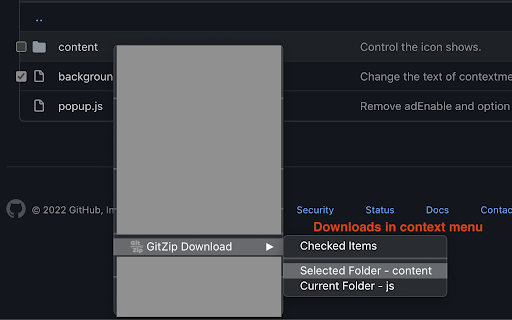
     2.2. In context menu:
        2.2.1. Click "GitZip Download" >  "Whole Repository" or "Current Folder".
        2.2.2. Move the mouse cursor on the item and click "GitZip Download" > "Selected Folder/File".
        2.2.3. Click "GitZip Download" >  "Checked Items" after doing 2-1-1.
  3. See the progress dashboard and wait for browser trigger download.
  4. Get the ZIP file.

Options:
   "How to select" for item selecting behaviour and "theme" for dark or light themes.

Get Token:
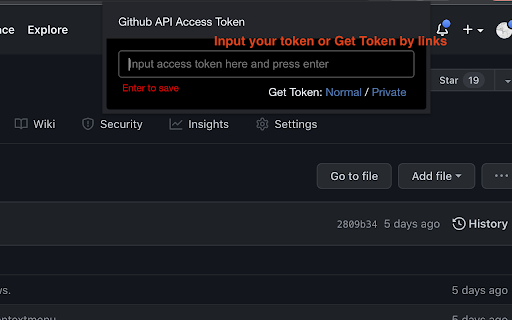
 - If you see the "Rate Limit" warning message on progress dashboard, you should get the Github API access token for upgrade rate limit. GitZip provide a convenient way for it:
  1. Click GitZip Extension icon on your browser.
  2. Click "Normal" or "Private" link beside "Get Token".
  3. Authorize GitZip permission on Github auth page.
  4. Back to repo page automatically.
  5. Continue to use.

About GA usage:
  Default GA (Google Analytics) collection. Technically, now we are unable to collect any other informations in Manifest V3 spec.

Support Us by donate:
  https://www.buymeacoffee.com/gitzip

Revision:
   1.0.4:
      1. Fix item selection in root view.
      2. Disable whole project download in contextmenu.

   1.0.3:
     Fix checkbox position in table cell.

   1.0.2:
     1. Compatible with new UI (In feature preview called: New Code Search and Code View)
     2. Fix a bug about saving personal token.

   1.0.1:
     1. Enhance popstate detection.
     2. Deprecate ".repository-content" selector for items detection.

   1.0.0:
     1. More download ways in context menu.
     2. Can change settings in options page for item selecting  behaviour and theme.
     3. Can use checkbox to select item.
     4. Migrate to Manifest V3 spec.
Why GitZip: - You DO NOT have to download the whole project just for those few files/folders you need. Usage: 1. Browse any Github repository page. 2. Two ways to download: 2.1. Choose the items: 2.1.1. In default, you can double click on items or check the checkbox on the front of items. 2.1.2. Click download button at the bottom-right of the page. 2.2. In context menu: 2.2.1. Click "GitZip Download" > "Whole Repository" or "Current Folder". 2.2.2. Move the mouse cursor on the item and click "GitZip Download" > "Selected Folder/File". 2.2.3. Click "GitZip Download" > "Checked Items" after doing 2-1-1. 3. See the progress dashboard and wait for browser trigger download. 4. Get the ZIP file. Options: "How to select" for item selecting behaviour and "theme" for dark or light themes. Get Token: - If you see the "Rate Limit" warning message on progress dashboard, you should get the Github API access token for upgrade rate limit. GitZip provide a convenient way for it: 1. Click GitZip Extension icon on your browser. 2. Click "Normal" or "Private" link beside "Get Token". 3. Authorize GitZip permission on Github auth page. 4. Back to repo page automatically. 5. Continue to use. About GA usage: Default GA (Google Analytics) collection. Technically, now we are unable to collect any other informations in Manifest V3 spec. Support Us by donate: https://www.buymeacoffee.com/gitzip Revision: 1.0.5: Fix branch detection errors (if it contains slashes). 1.0.4: 1. Fix item selection in root view. 2. Disable whole project download in contextmenu. 1.0.3: Fix checkbox position in table cell. 1.0.2: 1. Compatible with new UI (In feature preview called: New Code Search and Code View) 2. Fix a bug about saving personal token. 1.0.1: 1. Enhance popstate detection. 2. Deprecate ".repository-content" selector for items detection. 1.0.0: 1. More download ways in context menu. 2. Can change settings in options page for item selecting behaviour and theme. 3. Can use checkbox to select item. 4. Migrate to Manifest V3 spec.
Permissions & access
- Permissions
- storagecontextMenus
- Host access
- https://api.github.com/*
Screenshots



About
Why GitZip:
 - You DO NOT have to download the whole project just for those few files/folders you need.

Usage:
  1. Browse any Github repository page.
  2. Two ways to download:
     2.1. Choose the items:
        2.1.1. In default, you can double click on items or check the checkbox on the front of items.
        2.1.2. Click download button at the bottom-right of the page.
     2.2. In context menu:
        2.2.1. Click "GitZip Download" >  "Whole Repository" or "Current Folder".
        2.2.2. Move the mouse cursor on the item and click "GitZip Download" > "Selected Folder/File".
        2.2.3. Click "GitZip Download" >  "Checked Items" after doing 2-1-1.
  3. See the progress dashboard and wait for browser trigger download.
  4. Get the ZIP file.

Options:
   "How to select" for item selecting behaviour and "theme" for dark or light themes.

Get Token:
 - If you see the "Rate Limit" warning message on progress dashboard, you should get the Github API access token for upgrade rate limit. GitZip provide a convenient way for it:
  1. Click GitZip Extension icon on your browser.
  2. Click "Normal" or "Private" link beside "Get Token".
  3. Authorize GitZip permission on Github auth page.
  4. Back to repo page automatically.
  5. Continue to use.

About GA usage:
  Default GA (Google Analytics) collection. Technically, now we are unable to collect any other informations in Manifest V3 spec.

Support Us by donate:
  https://www.buymeacoffee.com/gitzip

Revision:
   1.0.5:
     Fix branch detection errors (if it contains slashes).
   1.0.4:
      1. Fix item selection in root view.
      2. Disable whole project download in contextmenu.

   1.0.3:
     Fix checkbox position in table cell.

   1.0.2:
     1. Compatible with new UI (In feature preview called: New Code Search and Code View)
     2. Fix a bug about saving personal token.

   1.0.1:
     1. Enhance popstate detection.
     2. Deprecate ".repository-content" selector for items detection.

   1.0.0:
     1. More download ways in context menu.
     2. Can change settings in options page for item selecting  behaviour and theme.
     3. Can use checkbox to select item.
4. Migrate to Manifest V3 spec.Technical
- Version
- 1.0.5
- Manifest
- V3
- Size
- 365KiB
- Min Chrome
- 88
- Languages
- 1
- Featured
- Yes
Metadata
- ID
- ffabmkklhbepgcgfonabamgnfafbdlkn
- Developer ID
- uabda5e3b55187d2f61331d2acd53d6a4
- Developer Email
- [email protected]
- Created
- Jun 28, 2017
- Last Updated (Store)
- May 6, 2026
- Last Scraped
- Jun 16, 2026
- Website
- gitzip.org
- Support URL
- https://github.com/GitZip/chrome-extension
- Privacy Policy
- —
Similar extensions
Alternatives to GitZip for github, ranked by description similarity.

Gitd Download Manager
Download at Github,Bitbucket,Gitlab,Gitea,Gitee repo selected files,folders as a zip file with a single click, without api token.
1.0K
★ 5.0

Github Aid - displays repo file sizes
Displays github repository file and folder sizes. Supports GraphQL and REST api modes. Also mobile friendly.
67

GitNav - GitHub Repository Navigator
Analyze any GitHub repository with interactive visualizations, dependency analysis, and smart insights. Navigate codebases faster.
37
★ 5.0

Zetta Smart GitHub Extension
GitHub smart bookmarks sidebar with quick add, rename, reorder, keyboard shortcuts, and SPA persistence (React + Zustand).
10

Gitako - GitHub file tree
File tree for GitHub, and more than that.
9.0K
★ 4.9

Enhanced GitHub
Display repo size, size of each file, download link and option to copy file contents
40.0K
★ 4.5

GitHub to Plain Text Converter
Convert GitHub repositories to plain text files easily. Transform code into a single formatted text file.
52

Hugging Face — Download Repo as ZIP
Adds a 'Download as ZIP' option to Hugging Face repository pages. Download entire repos as ZIP files directly from the browser.
607
Data sourced from the Chrome Web Store · last verified Jun 16, 2026.