
Github Aid - displays repo file sizes
Displays github repository file and folder sizes. Supports GraphQL and REST api modes. Also mobile friendly.
As of June 2026, Github Aid - displays repo file sizes has 67 users in the Developer Tools category.
Usersup 15.5 percent+15.5%
67
67
Ratingno change0%
—
— reviews
Reviewsno change0%
—
Version
0.1.2
Manifest V3
History
3 snapshotsTracking since Apr 1, 2026.
View as table
| Date | Users | Rating | Reviews | Version |
|---|---|---|---|---|
| Apr 1, 2026 | 58 | — | — | 0.1.2 |
| May 2, 2026 | 57 | — | — | 0.1.2 |
| Jun 1, 2026 | 56 | — | — | 0.1.2 |
| Now | 67 | — | — | 0.1.2 |
Permissions & access
- Permissions
- storage
- Host access
- None declared
Screenshots

About
This is an open source extension that lets you view the sizes of Github repository content. In the future, it will also let you download multiple files from within your browser.


Features:
- Preview a Repository's entire Disk Space usage (which includes git history)
- Preview the sizes of individual files and folders under the directory
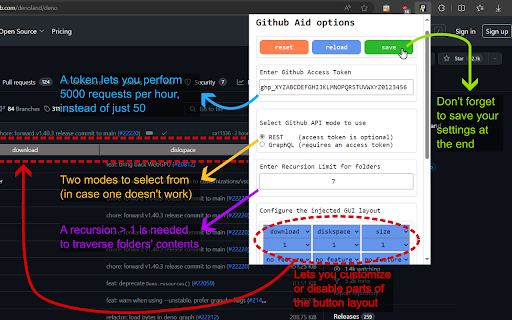
- Ability to choose between github's REST api, or GraphQL api
- Ability to set an Access Token to view your private repository stats
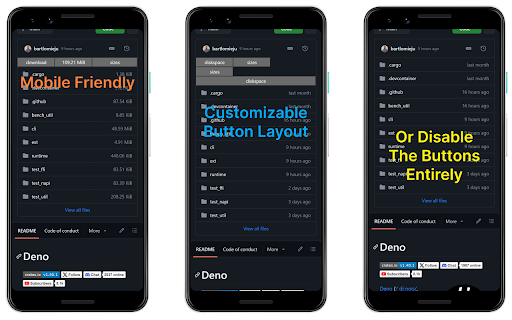
- Buttons that are added to the page are customizable (and can be turned off)
- Display is optimized for both mobile and desktop browsers
- Open source: checkout the source code on github: https://github.com/omar-azmi/github_aid_ts

Planned features:
- Add support for selecting files and folders, then queuing them for download in a ".tar.gz" archive
- Add support for defaulting to REST api and disabling access token in Incognito mode

Permissions required:
- Access to running background javascript in all github.com pages
- Access to storage for storing your access token, and saving your configuration settings


Problems you may encounter:

1) The buttons are not appearing
- Refresh the page. Github is an SPA (single-page application), so there are times when the background script does not get reloaded upon navigation from one page to another.
- Make sure that you did not disable all buttons in the option page's layout section. If you're having touble, consider clicking on the red "reset" button to clear any misconfigurations and return to factory settings.
- Make sure that storage permission has been granted to this extension, otherwise the script will fail to load the default configuration, and terminate fatally.

2) One of the buttons flashes in red, and nothing happens.
- This is because the request query sent to github's server has failed, possibly due to one of the following reasons:
- Github's server is overloaded, and it decided to reject your request (quite common). In this case, try switching your api method in the options page, and reload your webpage and retry.
- You are viewing a private repo, and the access token that you have (or may lack) is not authorized for pulling up data of that private repository
- Your Github Access Token key is invalid, or has expired
- You (and your Token) have reached their per hour request limit, or that you've been sending too many requests too quickly. The request data rate for github is: 50 requests per hour for non-authorized tokenless users, and 5000 per hour for authorized users. Moreover, the REST api in this extension used 2 requests for fetching file and folder sizes
- There might be a bug in the code, or github's api might have changed. In that case, I'd appreciate if you could open up an issue on github: https://github.com/omar-azmi/github_aid_ts/issues


Guide on how to get a Github Access Token:

1) First of all, you'll need to be logged into your github account.
2) Navigate to github's "Generate new token (classic)" page: https://github.com/settings/tokens/new
3) Set an "Expiration" date, (you'll probably want to choose "No expiration")
4) In the "Select scopes" section, under the "repo" checkbox:
- enable only the "public_repo" checkbox if you will NOT be viewing your private repository's stats
- enable the whole "repo" group checkbox otherwise
5) Scroll to the bottom and click on the "Generate token" button
6) You will now be presented with the access token. Make sure to copy and save it securely! This is a one time preview of you key, and it disappear forever after you've closed the dialog
7) Paste the token into this browser extension

For a visual guide, see one of:
- https://www.geeksforgeeks.org/how-to-generate-personal-access-token-in-github/
- https://docs.github.com/en/authentication/keeping-your-account-and-data-secure/managing-your-personal-access-tokens

But remember NOT to check any scope boxes besides the "repo" one.
Having anything else checked is dangerous if your access key gets leaked from your browser storage, and someone decides to maliciously delete your projects.
Technical
- Version
- 0.1.2
- Manifest
- V3
- Size
- 195KiB
- Min Chrome
- 88
- Languages
- 1
- Featured
- No
Metadata
- ID
- abfbcnoemiciiljhpngefacedfgebdcn
- Developer ID
- uf521254a9ef24834a9281ae2d09a2587
- Developer Email
- [email protected]
- Created
- Jan 27, 2024
- Last Updated (Store)
- Feb 7, 2024
- Last Scraped
- Jun 1, 2026
- Website
- —
- Privacy Policy
- —
Similar extensions
Alternatives to Github Aid - displays repo file sizes, ranked by description similarity.

GitHub Repo Size
Show size summaries of GitHub repos
3.0K
★ 4.4

Enhanced GitHub
Display repo size, size of each file, download link and option to copy file contents
40.0K
★ 4.5

GitHub File Size Viewer
Displays file and folder sizes on GitHub repositories (accurate folder size calculation included)
23
★ 5.0

GitHub to Plain Text Converter
Convert GitHub repositories to plain text files easily. Transform code into a single formatted text file.
52

Github Code Counter
A Chrome extension to count lines of code in a GitHub repository.
149
★ 4.0

GitHub Stats Enhancer
Enhance GitHub profiles with additional statistics and insights
1

Repo Data Fetcher
Fetches data from a GitHub repository using the API. Choose attributes via dropdown and download them in a structured format.
2

GitHub Repo Code Stats
Elevate your GitHub browsing experience with the Github Repo Code Stats Chrome extension!
What does it do?
When you're viewing a…
29
Data sourced from the Chrome Web Store · last verified Jun 1, 2026.