ChatGPT assistant for Google Meet
Google Meet ChatGPT-4 assistant for instant answers and speech explanations during calls on the Google Meet platform.
As of May 2026, ChatGPT assistant for Google Meet has 2,000 users and a 4.33/5 rating from 39 reviews in the Workflow & Planning category.
Usersno change0%
2.0K
2,000
Ratingup 1.9 percent+1.9%
4.33
39 reviews
Reviewsdown 2.5 percent−2.5%
39
Version
0.1.20
Manifest V3
History
1 snapshotsTracking since Apr 25, 2026.
View as table
| Date | Users | Rating | Reviews | Version |
|---|---|---|---|---|
| Apr 25, 2026 | 2.0K | 4.25 | 40 | 0.1.20 |
| Now | 2.0K | 4.33 | 39 | 0.1.20 |
Permissions & access
- Permissions
- None declared
- Host access
- None declared
Screenshots

About
No more internet searching for unfamiliar questions during calls. With Ask_me, get instant answers and explanations exactly when you need them. Whether it's a job interview, standup, requirements meeting, sales call, team gathering, online class, customer interview, product research, presentation, or masterclass, Ask_me has got you covered! 🙌

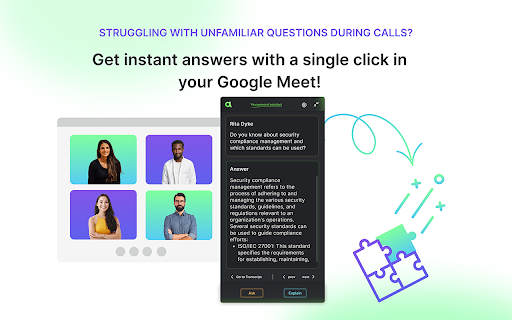
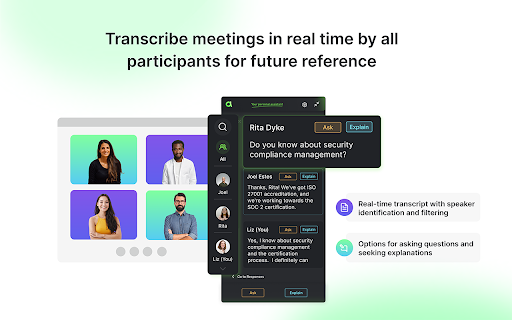
How does Ask_me work? During your Google Meet call, Ask_me diligently records all spoken words by all participants, creating a detailed transcript. If there are unfamiliar topics being discussed on the call, with just one simple click, you can ask Ask_me for assistance, and it will quickly provide you with clear and concise answers. We use OpenAI ChatGPT-4 to generate these responses, and your data remains entirely private, never used to enhance the models. Ask_me serves as your personal assistant, visible only to you; no other meeting participants can see or hear it.

Try Ask_me today for more productive and efficient meetings 💪

🔎 WHAT YOU CAN DO WITH ASK_ME:

    1. Record Google Meet Live Captions
    2. Get a transcript with speaker identification and timestamps(For privacy protection and to focus on delivering real-time answers and explanations, we do not save meeting transcripts)
    3. Search the transcript by Google Meet participants
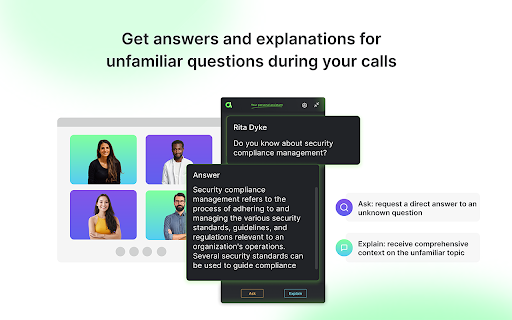
    4. Get instant answers to any questions you might have during the call


🤙 HOW TO USE ASK_ME ON GOOGLE MEET:

    1. Download Ask_me Chrome extension (it's free forever for meeting transcription and captions)
    2. Join your Google Meet meeting
    3. Record and follow meeting transcript in real-time
    4. If you need answer on any question during the call, select the relevant message in the transcript, and choose one of two options:
        - Ask: Request a direct answer to your question.
        - Explain: Receive a comprehensive explanation for more context on the topic.
    5. Ask_me currently supports English language conversations.


⭐️ USE ASK_ME FOR:

    - Interview Meetings
    - Online classes/lectures
    - Team Meetings
    - Client Meetings
    - Webinars
    - Remote Workshops & Conferences
    - Training Sessions
    - Sales Presentations


🔓 PRIVACY POLICY:

    - We do not store or process any data from your conversationsOpenAI does not use data submitted via the API to train OpenAI models


💜 HELP & FEEDBACK:

if you have any questions or suggestions to enhance your Ask_me experience, feel free to reach out to us at [email protected].
Technical
- Version
- 0.1.20
- Manifest
- V3
- Size
- 442KiB
- Min Chrome
- 88
- Languages
- 9
- Featured
- No
Metadata
- ID
- fejabnggkpabpiidogafkakidocellai
- Developer ID
- ub7fc2e8a973647b791c68ed28541f17a
- Developer Email
- [email protected]
- Created
- Aug 17, 2022
- Last Updated (Store)
- Mar 18, 2025
- Last Scraped
- May 21, 2026
- Website
- amadeo.app
- Support URL
- —
- Privacy Policy
- https://amadeo.tech/privacy-policy.html
Similar extensions
Alternatives to ChatGPT assistant for Google Meet, ranked by description similarity.

MeetGeek: AI Meeting Notes, Transcripts & Screen Recording
Get automatic recordings, transcripts, and summaries for online meetings on Google Meet, Zoom, and Teams.
10.0K
★ 4.5

MeetMan
Meetman provides seamless real-time chat during and after meetings to talk to your meetings.
21
★ 5.0

Meet Buddy
Easily record your microphone audio during Google Meet sessions and upload it securely for transcription or review.
3
★ 5.0

Scribbl: AI Note Taker for Google Meet, Zoom, and MS Teams
Record, transcribe, & take notes with our bot-free AI note taker for Google Meet, Zoom, & MS Teams
40.0K
★ 5.0

Tactiq: AI note taker for Google Meet, Zoom and MS Teams
Meeting note taker and AI transcription for Google Meet, Zoom, and MS Teams.
1.0M
★ 4.8

ByMeeet AI - AI Meeting Assistant
Record and transcribe your meetings with AI Meeting Assistant
29
★ 5.0

Call Copilot: Live Transcription & AI Meeting Notes
Real-time transcription, AI summaries, and chat for Google Meet, Zoom, Teams. No bot joins your call. Privacy-first.
759
★ 5.0

Looppanel - Record & Transcribe Video
Automatically record & transcribe Google Meet & Zoom calls
365
★ 5.0
Data sourced from the Chrome Web Store · last verified May 21, 2026.