
Word Editor
A free & easy-to-use word editor extension for your browser.
As of June 2026, Word Editor has 5,000 users and a 3.73/5 rating from 11 reviews in the Productivity category.
Usersno change0%
5.0K
5,000
Ratingdown 6.8 percent−6.8%
3.73
11 reviews
Reviewsup 10.0 percent+10.0%
11
Version
0.1.6
Manifest V3
History
2 snapshotsTracking since Apr 16, 2026.
View as table
| Date | Users | Rating | Reviews | Version |
|---|---|---|---|---|
| Apr 16, 2026 | 5.0K | 4.00 | 10 | 0.1.6 |
| Apr 27, 2026 | 5.0K | 4.00 | 10 | 0.1.6 |
| Now | 5.0K | 3.73 | 11 | 0.1.6 |
Permissions & access
- Permissions
- storagedownloadscontextMenus
- Host access
- None declared
Screenshots


About
Word Editor, is a free and open-source text/document editor extension for your browser.

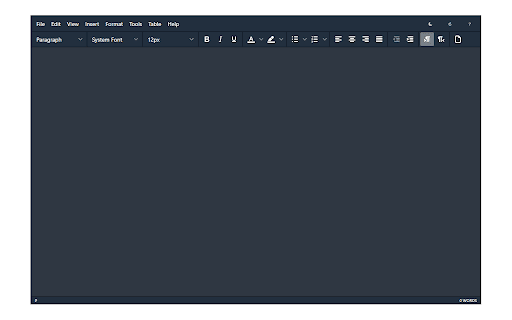
Word Editor is very similar to popular word processor apps available in the market, except, it works inside your browser without the need for any external plug-ins or software. You can open any text or HTML document with this add-on, and save the result in HTML format.

Please note that this add-on works with HTML document extension, in other words, all the input/output files need to be in the HTML format. Currently, it does not support other famous document formats such as .doc, .docx or etc. However, you can copy text from other software (such as MS word, webpage, etc.) and paste it in the add-on (preserving all the styles).

Since extensions, in general, do not have access to the hard drive in order to save files, this add-on uses the download API to gain file I/O access. Therefore, all the operations related to file storage are happening in the default download folder in your browser. If you want to change this folder, please head to the extensions tab in your browser, search for download settings and update the default folder to where you prefer.

Word Editor is built on top of the famous TinyMCE JavaScript library (https://github.com/tinymce/tinymce). Once you open the app for the first time, you will see a blank screen with a toolbar on top. Simply type or paste your document, and at the end, click on the save button (File > Save) to download the document as an HTML file in your system (default download location).

If you have a feature request or found a bug to report, please fill the bug report form on the addon's homepage (https://mybrowseraddon.com/word-editor.html).
Technical
- Version
- 0.1.6
- Manifest
- V3
- Size
- 1.79MiB
- Min Chrome
- 88
- Languages
- 1
- Featured
- Yes
Metadata
- ID
- fehbhooigaekgcjecehkiflmflofpdke
- Developer ID
- ud622040a07dfd01f85a8ff1591da667e
- Developer Email
- [email protected]
- Created
- May 2, 2019
- Last Updated (Store)
- Feb 21, 2026
- Last Scraped
- Jun 2, 2026
- Website
- —
- Support URL
- https://mybrowseraddon.com/word-editor.html
- Privacy Policy
- https://mybrowseraddon.com/privacy-policy/keller.html
Similar extensions
Alternatives to Word Editor, ranked by description similarity.

Text Editor
A free, highly customizable text and code editor extension for your browser.
30.0K
★ 4.0

Online Text Editor
Quick online notepad that can open, edit, and save plain text files.
77
LibreOffice writer online
Create and edit documents with a word processing application for rich text formatting
4.0K
★ 4.6

LaTeX Editor
A lite, free & flexible LaTeX editor app for your browser.
20.0K
★ 4.3

Word Saver
Quickly save and manage words or notes while browsing.
4
★ 5.0

Html to Word
Clip articles from the web, process them with AI, and save as Word documents.
209
★ 4.0

Markdown Editor
A lite, free & flexible Markdown editor app for your browser.
468
★ 2.0

Express Editor — Quick Notes & Links
A simple yet powerful editor for personal notes, links, and discussions. Saved locally with auto-save and no account required.
5
★ 5.0
Data sourced from the Chrome Web Store · last verified Jun 2, 2026.