
OrbitNote
Create, convert, connect: take your digital documents to the next level with OrbitNote.
As of June 2026, OrbitNote has 4,000,000 users and a 2.94/5 rating from 140 reviews in the Accessibility category.
Usersno change0%
4.0M
4,000,000
Ratingdown 0.3 percent−0.3%
2.94
140 reviews
Reviewsup 0.7 percent+0.7%
140
Version
7.0.4
Manifest V3
History
8 snapshotsTracking since Apr 3, 2026.
View as table
| Date | Users | Rating | Reviews | Version |
|---|---|---|---|---|
| Apr 3, 2026 | — | 2.95 | 139 | 7.0.4 |
| Apr 8, 2026 | 7.0M | 2.95 | 139 | 7.0.4 |
| Apr 18, 2026 | 6.0M | 2.95 | 139 | 7.0.4 |
| Apr 28, 2026 | 7.0M | 2.95 | 139 | 7.0.4 |
| May 8, 2026 | — | 2.95 | 139 | 7.0.4 |
| May 16, 2026 | 7.0M | 2.95 | 139 | 7.0.4 |
| May 25, 2026 | 7.0M | 2.94 | 140 | 7.0.4 |
| Jun 4, 2026 | — | 2.94 | 140 | 7.0.4 |
| Now | 4.0M | 2.94 | 140 | 7.0.4 |
Permissions & access
- Permissions
- webRequestscriptingtabsgcmidlealarmswebNavigationstorageidentityidentity.email
- Host access
- https://www.google-analytics.com/, https://*/*, http://*/*
Screenshots


About
Create, convert, connect: take your digital documents to the next level with OrbitNote.

Searching for a way to make digital documents accessible, dynamic and more collaborative?

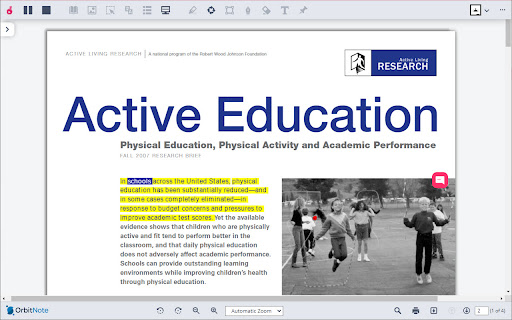
Download OrbitNote to transform and interact with digital documents in a completely different way! With OrbitNote you can make digital documents accessible and actionable, while demonstrating and giving feedback in multiple formats. It’s a great tool to boost productivity, connections and collaboration!

Open digital documents in Google Drive, OneDrive, on the web app, in your LMS (Google Classroom and Schoology), or on your local device, then use OrbitNote to:

• Collaborate in real-time within digital documents
• Read text, including math & science equations, aloud with easy-to-follow dual color highlighting
• Type text on top of your PDFs with the Text feature
• Highlight and extract information with colored highlighters
• Add text and voice comments or use pushpins for helpful hints or instructions
• Use freehand or shape drawing to scribble and draw on your digital documents
• And more!


Try OrbitNote today to check out all of the above features for a limited time. We have much more planned for this tool later in the year. As OrbitNote grows and new features are added, a premium version requiring a subscription will be introduced.

Premium Read&Write users can enjoy access to a version of OrbitNote as part of their Read&Write subscription.

Get more information on OrbitNote’s features and future plans at https://www.texthelp.com/products/orbitnote/

For any technical questions, contact us at: [email protected]
Technical
- Version
- 7.0.4
- Manifest
- V3
- Size
- 980KiB
- Min Chrome
- 88
- Languages
- 1
- Featured
- Yes
Metadata
- ID
- feepmdlmhplaojabeoecaobfmibooaid
- Developer ID
- udd81a3971a991bb92a8457b50cb5d976
- Developer Email
- [email protected]
- Created
- Feb 22, 2017
- Last Updated (Store)
- Feb 3, 2026
- Last Scraped
- Jun 4, 2026
- Website
- https://orbit.texthelp.com/
- Support URL
- —
Similar extensions
Alternatives to OrbitNote, ranked by description similarity.

Read&Write for Google Chrome™
Boost reading and writing confidence across all types of content and devices, in class, at work, and at home.
9.0M
★ 3.4

Helperbird: Accessibility & Productivity App
Improve your reading, writing & accessibility. Including Immersive Reader, Summarize, Dyslexia support and more.
300.0K
★ 4.6
ClaroRead Chrome
Speaks aloud text in web pages
70.0K
★ 3.3

Enhancer 4 Google
Improves the UI of various Google services, taking these already user-friendly services to the next level.
80.0K
★ 4.8

Highlight - Little Helper
Highlight text, draw shapes, add sticky notes, and capture screenshots on any webpage.
15

ReadWriteMadeSimple
Allows students, children, teachers, or any individual with disabilities to enable accessibility of any website.
194
★ 5.0

Voice Out: Text to Speech Voice Reader
Use text to speech to read any webpage, Google Doc, PDF, or book with natural sounding voices.
40.0K
★ 4.2

LucidRead
Free reading accessibility by Jim Tyler. Typography, overlays, reader mode, TTS, dictionary, and classroom tools — all private.
33
Data sourced from the Chrome Web Store · last verified Jun 4, 2026.