
Lenso.ai Reverse Image Search
Search by image, text or selection with lenso.ai reverse image search.
As of June 2026, Lenso.ai Reverse Image Search has 6,000 users and a 3.56/5 rating from 16 reviews in the Productivity category.
Usersup 20.0 percent+20.0%
6.0K
6,000
Ratingno change0%
3.56
16 reviews
Reviewsno change0%
16
Version
1.2
Manifest V3
90-day change · In the last 90 days this extension gained 1.0K users.
History
4 snapshotsTracking since Apr 21, 2026.
View as table
| Date | Users | Rating | Reviews | Version |
|---|---|---|---|---|
| Apr 21, 2026 | 5.0K | 3.56 | 16 | 1.2 |
| May 6, 2026 | 10.0K | 3.56 | 16 | 1.2 |
| May 18, 2026 | 9.0K | 3.56 | 16 | 1.2 |
| Jun 1, 2026 | 7.0K | 3.56 | 16 | 1.2 |
| Now | 6.0K | 3.56 | 16 | 1.2 |
Permissions & access
- Permissions
- contextMenusactiveTabcookies
- Host access
- https://lenso.ai/*
Screenshots


About
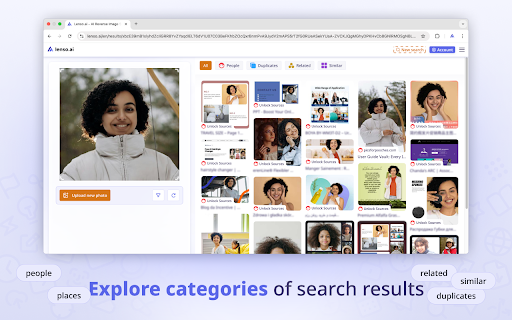
This is the official lenso.ai Chrome extension. Lenso.ai is an AI-powered reverse image search tool. With lenso.ai’s image search extension, you can quickly find people, places, duplicates, and similar or related images without leaving the website. You can also use this tool to find images based on text.
📷 How to use the extension?
The lenso.ai extension adds the following features to your browser, accessible from the context menu:
• Search by image: Right-click any image on a website and select “Search by image with lenso.ai.”
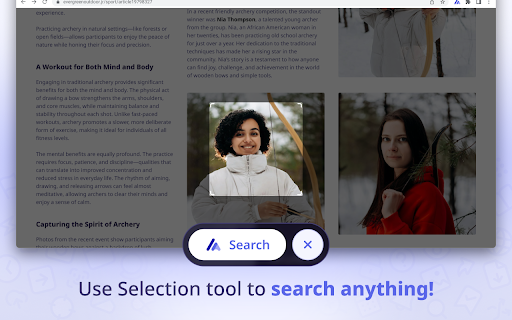
• Search by selection: Left-click the extension icon or choose “search by selection with lenso.ai” from the context menu to perform a reverse image search on any selected area on the website.
• Search by text: Select any text on a website, right-click, and choose “search by text with lenso.ai.”
👉 With this extension, there’s no need to save or copy content — you can quickly search for images without leaving the website.

📷 Manage search results on lenso.ai

On lenso.ai you can search for:
• People
• Duplicates (copyright image search)
• Places
• Related images
• Similar images

📷 Use filter/sorting options to narrow your search on lenso.ai:

👉 Filter by:
• Text - search by keywords; upload a blue mug and try the keyword “red” to find red mugs
• URL - search only on a specific website by providing its URL

👉 Sort by:
• Newest/Oldest - sort pictures based on the date of indexing
• Best/Worst match - sort based on how well the image matches the pictures in the index
• Random - sort randomly for more diverse results
• Show diverse results - find the same people or places in different arrangements.

👉 You can create an Alert for a specific image and receive email notifications about new results and save images to Collections for future references!

👉 There is also an API available on lenso.ai. Easily grow your business by implementing the best reverse image search API!


Start reverse image search with lenso.ai!
Technical
- Version
- 1.2
- Manifest
- V3
- Size
- 217KiB
- Min Chrome
- 88
- Languages
- 1
- Featured
- No
Metadata
- ID
- fdlopgpbkloofphfpbikfcdhfalkmpmp
- Developer ID
- uf62568b5c198f4193cad2d5fe90a916d
- Developer Email
- [email protected]
- Created
- Jun 3, 2025
- Last Updated (Store)
- Jun 18, 2025
- Last Scraped
- Jun 1, 2026
- Website
- —
- Support URL
- —
- Privacy Policy
- https://lenso.ai/legal/privacy-policy
Similar extensions
Alternatives to Lenso.ai Reverse Image Search, ranked by description similarity.

Reversely.ai – Powerful Reverse Image Tool
Search by image with Reversely.ai – Powerful Reverse Image Search Tool
91
★ 2.6

Reverse Image Search Tool
Search by image using Google, Bing, Yandex, and Lenso.ai. Upload, paste a URL, or right-click any image to search instantly.
546
★ 4.6

Face Search AI
AI-Powered Facial Recognition & Reverse Image Search for Enhanced Privacy
228
★ 3.0
Reverse Image Search
a powerful capturing reverse image search tool built on top of TinEye/Google Images engines
5.0K
★ 3.3

Aliexpress Search by image
Search goods on Aliexpress by image
200.0K
★ 4.0

FaceSeek.online Reverse Image Search
Right-click an image to search the face on FaceSeek.
38
★ 1.0

Reverse Image Search Tools
Instantly search by image using all major reverse image search tools — Google, Bing, Yandex & TinEye.
1.0K
★ 4.2

Image More Like This
Adds a smart tooltip to images for finding similar images on Google.
11
★ 5.0
Data sourced from the Chrome Web Store · last verified Jun 1, 2026.