
Newtion
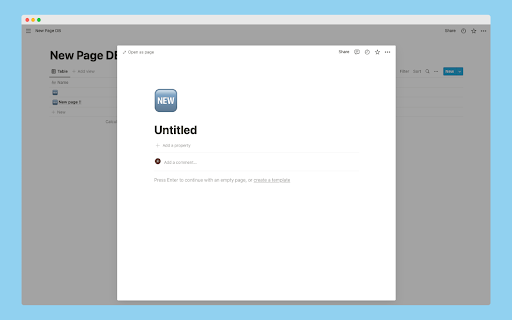
You can use New Page shortcut of Notion in web browser.
As of May 2026, Newtion has 48 users in the Workflow & Planning category.
Usersup 2.1 percent+2.1%
48
48
Ratingno change0%
—
— reviews
Reviewsno change0%
—
Version
0.1.1
Manifest V3
History
2 snapshotsTracking since Apr 25, 2026.
View as table
| Date | Users | Rating | Reviews | Version |
|---|---|---|---|---|
| Apr 25, 2026 | 47 | — | — | 0.1.1 |
| May 21, 2026 | 40 | — | — | 0.1.1 |
| Now | 48 | — | — | 0.1.1 |
Permissions & access
- Permissions
- storage
- Host access
- https://*/*
Screenshots
About
This chrome extension makes it possible to use new-page shortcut for Notion in web browser.

## Feature

### Open Source Software

The source code is publicly available and MIT license.

### Use safely

This Chrome extension requires Notion's official API, but the only permissions required are to insert data and no user information is required.

## Shortcuts


- `Cmd/Ctrl+Shift+L`
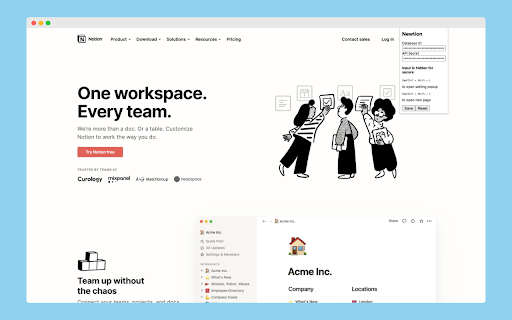
  - Open setting popup
- `Cmd/Ctrl+Shift+I`
  - Create & open new notion page

## Install

You also need set Newtion in the next section.

Access to [chrome web store](https://chrome.google.com/webstore/detail/newtion/fdjjmpjjbhhepdakdifipaehpcgojkgf).

Please wait for browser extensions other than GoogleChrome.

## How to use

You need 3 step settings. Please follow below.

### 1. Prepare Notion Integrations from setting page

- Access to [https://www.notion.so/my-integrations](https://www.notion.so/my-integrations) and click `+ New Integration`
- Input basic information
  - name
  - logo(optional)
  - Associated workspace
  - Capabilities
    - check Insert Content
    - check No user Information
- then, submit and copy `Internal Integration Token` (use later)

### 2. Prepare Notion Database

- Access to [https://www.notion.so/](https://www.notion.so/)
- Create new page with full screen database
- Delete `Tags` colomn (Optional)
- **💡 Set leftmost colomn name to `Name` (default in English)**
  - This will be updated to customizable...
- Get database id and copy (use later)
  - `https://www.notion.so/YOUR_DOMAIN/DATABASE_ID`
  - `DATABASE_ID` is database id
- Invite your Integrations
  - Click share button in header
  - Then, Select an integration you created some time ago

### 3. Set up Newtion

- Input `Cmd/Ctrl + Shift + L` to open setting popup
  - or click `Newtion` in list of chrome extensions
- Input Database ID and API Secret (char is hidden)

### Let's use Newtion Shortcut

Congratulations!

Input `Cmd/Ctrl + Shift + I` to create and open new page!

## Usecase

I assume the following cases.

- When you are searching a Web site and want to summarize the information in Notion
- Having trouble finding a shortcut to open a new page in the browser version of Notion.
- Opening a new page in Notion causes the number of pages in the sidebar to increase.

## Developer

Hi, I'm japanese university student.

## Links

- [Home page](https://cohu-dev.github.io/newtion/)
- [Privacy Policy](https://cohu-dev.github.io/chrome-privacy-policy/)
Technical
- Version
- 0.1.1
- Manifest
- V3
- Size
- 645KiB
- Min Chrome
- 88
- Languages
- 1
- Featured
- No
Metadata
- ID
- fdjjmpjjbhhepdakdifipaehpcgojkgf
- Developer ID
- u367058db26d3d989a9d82429bd790a75
- Developer Email
- [email protected]
- Created
- Jun 18, 2022
- Last Updated (Store)
- Jun 24, 2022
- Last Scraped
- May 21, 2026
- Website
- cohu.dev
- Support URL
- https://github.com/cohu-dev/newtion/issues
- Privacy Policy
- https://cohu-dev.github.io/chrome-privacy-policy/
Similar extensions
Alternatives to Newtion, ranked by description similarity.

Notion Edit & Clip in Side Panel
Open and edit Notion pages in side panel to copy-paste from browser, manage notes. A powerful Notion Web Clipper alternative.
154
★ 3.0

Shortcut to Notion
Browser extension to save your Shortcut stories to Notion database
1

Push to Notion
A Chrome extension to send web pages to multiple Notion databases.
4

Notion Tweaks
For Notion. Development of this extension is in stop.
193
★ 5.0

NoteFlow
Clip pages and highlights into your Notion workspace with tags and organization
—

Notion Saver — URL & Summary
Send current page URL + locally summarized content to Notion.
5
★ 5.0

Tabtion - Notion New Tab Page
Tabtion New Tab allows you to customize your New Tab page with your favorite Notion page
84
★ 1.0

Save to Notion
Save the Web to Notion
400.0K
★ 4.3
Data sourced from the Chrome Web Store · last verified May 21, 2026.