
Duolingo Sound Controls
Provides fine-grained sound controls for Duolingo.
As of May 2026, Duolingo Sound Controls has 1,000 users and a 4.44/5 rating from 9 reviews in the fun category.
Usersno change0%
1.0K
1,000
Ratingdown 4.1 percent−4.1%
4.44
9 reviews
Reviewsup 12.5 percent+12.5%
9
Version
1.8.0
Manifest V3
History
2 snapshotsTracking since Apr 25, 2026.
View as table
| Date | Users | Rating | Reviews | Version |
|---|---|---|---|---|
| Apr 25, 2026 | 1.0K | 4.63 | 8 | 1.8.0 |
| May 21, 2026 | 1.0K | 4.63 | 8 | 1.8.0 |
| Now | 1.0K | 4.44 | 9 | 1.8.0 |
Permissions & access
- Permissions
- activeTabstorage
- Host access
- https://*.duolingo.com/
Screenshots

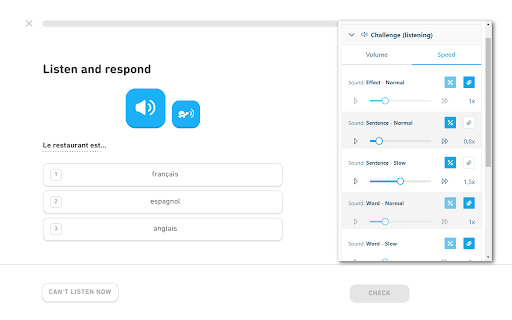
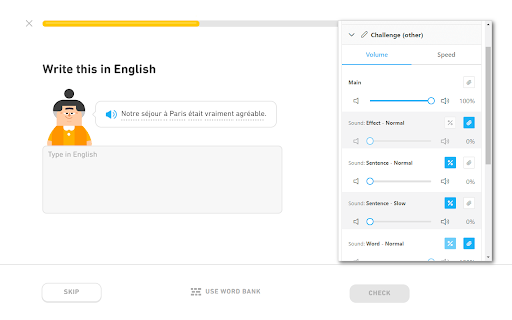

About
For more detailed information, screenshots, or if you have any support request, visit the development page of the extension here:
https://github.com/blmage/duolingo-sound-controls

[Usage]

Click on the extension icon in the browser's toolbar (you may have to pin it first) to open the extension popup and customize the sound settings. New settings will be applied from the next sound played.

[Features]

- Allows defining different volume and speed settings for each type of sound:
      - effects,
      - normal and slow sentences,
      - words,
      - and other sounds,
  depending on the context in which it is played:
      - listening challenges,
      - other challenges,
      - stories,
      - guidebooks,
      - characters,
      - forum discussions,
      - and other contexts.
- All settings can be defined relative to the original settings, or override them entirely (useful if you do not want story sentences to be slowed down on subsequent playbacks, for example).
- Default settings can be defined for each sound type, and reused across multiple contexts.
- A main volume setting is available to quickly adjust the volume of all sounds in a given context.

[Compatibility]

If you are using the Duolingo TTS Controls extension, the corresponding settings will take precedence over those from this extension.

The extension should be compatible with all others out of the box:
settings applied to sounds by other extensions are treated in the same way as the original Duo settings.

[Limitations]

- The extension is deeply tied to the inner workings of Duolingo, meaning that significant changes on their side could (temporarily) break it. If that happens, you can either:
    - wait for me to fix it (you can open an issue on the support page if there is none about it yet),
    - if you're a developer, try to fix it yourself, then open a related PR on the development page.
- Due to technical constraints, the volume of the sounds can not be raised over 100%.
Technical
- Version
- 1.8.0
- Manifest
- V3
- Size
- 247KiB
- Min Chrome
- 88
- Languages
- 1
- Featured
- Yes
Metadata
- ID
- fdgmdpdkmbmoikgppbpdkcagdnhgkiih
- Developer ID
- u63938f566be2c79e33e4742216cb1fa0
- Developer Email
- [email protected]
- Created
- Oct 14, 2021
- Last Updated (Store)
- May 30, 2024
- Last Scraped
- May 21, 2026
- Website
- —
- Privacy Policy
- —
Similar extensions
Alternatives to Duolingo Sound Controls, ranked by description similarity.

Duolingo TTS Controls
Provides playback controls for some of the challenges on Duolingo.
572
★ 4.5

Volume Control
Audio volume control for Chrome™. Set sound level for each tab separately with audio control and sound booster.
100.0K
★ 4.3

Duolingo Word Bank Dnd
Enables the drag'n'drop of words in the word-bank answers on Duolingo.
429
★ 5.0

Volume Sizzler
Volume Manipulator!. This extension can be used to amplify, adjust bass, and as well as adjust treble. Have fun! Enjoy.
143
★ 4.6

YouTube Default Playback Speed
Set the default playback speed for YouTube videos! Complete with hotkeys to manipulate the current video speed.
3.0K
★ 3.6

Duolingo Solution Viewer
Provides access to the lists of solutions for Duolingo's translation / listening challenges, and restores the correction of typos.
3.0K
★ 3.9

SAL
To stop those annoying sounds
15
★ 5.0

Volume Controller
Audio Volume Controller for Chrome. Set sound level for each tab separately with audio sound booster
20.0K
★ 4.2
Data sourced from the Chrome Web Store · last verified May 21, 2026.