
Snip - Remove Web Elements
Remove any element from any website with just one click
As of June 2026, Snip - Remove Web Elements has 6,000 users and a 4.06/5 rating from 67 reviews in the Workflow & Planning category.
Usersup 20.0 percent+20.0%
6.0K
6,000
Ratingup 0.7 percent+0.7%
4.06
67 reviews
Reviewsup 4.7 percent+4.7%
67
Version
2.18
Manifest V3
90-day change · In the last 90 days this extension gained 1.0K users.
History
4 snapshotsTracking since Apr 1, 2026.
View as table
| Date | Users | Rating | Reviews | Version |
|---|---|---|---|---|
| Apr 1, 2026 | 5.0K | 4.03 | 64 | 2.18 |
| Apr 16, 2026 | 5.0K | 4.03 | 65 | 2.18 |
| May 23, 2026 | 5.0K | 4.03 | 65 | 2.18 |
| May 27, 2026 | 6.0K | 4.05 | 66 | 2.18 |
| Now | 6.0K | 4.06 | 67 | 2.18 |
Permissions & access
- Permissions
- storagecontextMenusidentityscripting
- Host access
- <all_urls>
Screenshots


About
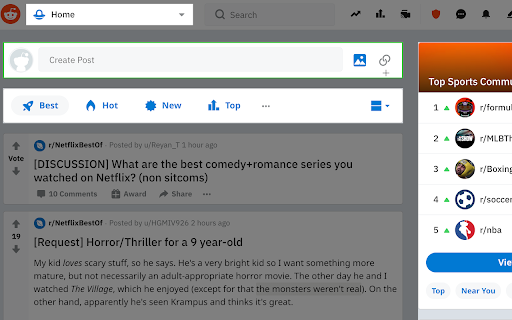
With Snip you can remove any element from any website with just one click. So it only shows what you want to see.

You choices are saved. So next time when you visit the same page those elements will be gone as well.

With Snip you can undo or redo recent changes. You can also review all removed elements and revert any of them.

If you login with your Google account, your choices will be synced to all your devices using that same account.

Version 2.10 changes:
-Add the feature to snip an area of a web page.

Version 2.9 changes:
-Temporarily remove the login button.

Version 2.6 changes:
-Fixed that some elements cannot be snipped.

Version 2.5 changes:
-Fixed some layout issue

Version 2.4 changes:
-Migration to Manifest V3.

Version 2.3 changes:
-Handle the case when first using Snip and the rules don't exist.

Version 2.2 changes:
- Fix the issue that removed elements will appear for a few seconds when reloading the page.

Version 2.1 changes:
- Improve performance when analyzing the page.
Technical
- Version
- 2.18
- Manifest
- V3
- Size
- 62.39KiB
- Min Chrome
- 88
- Languages
- 11
- Featured
- Yes
Metadata
- ID
- fcnadghcijkmdhjdgiehgfpadojilfoa
- Developer ID
- u67ff35ddcd5063ec53f326d5a738250d
- Developer Email
- [email protected]
- Created
- Feb 12, 2021
- Last Updated (Store)
- Feb 26, 2026
- Last Scraped
- Jun 5, 2026
- Website
- getsnip.cc
- Support URL
- —
- Privacy Policy
- https://getsnip.cc/privacy-policy
Similar extensions
Alternatives to Snip - Remove Web Elements, ranked by description similarity.

Clipity: Bookmarks, Clip with Highlight
Capture short clips from your favorite website and store them in an easy to use interface.
117
★ 5.0

Checkvist Web Clipper
Collect bookmarks and web clippings from email, Jira, GitHub, Zendesk, annotate and organize into flexible (todo) lists.
744
★ 4.5

Snippit
Grab screenshots easy from your browser!
3.0K
★ 5.0

snipit
SnipIt makes web pages afraid again. Find and remove DOM elements as you see fit!
70

TabSnip
Make beautiful screenshots in seconds!
21
★ 5.0

Clipper Snipper
Save highlighted text to a list
80

Element Zapper
Zap/remove any element
1.0K
★ 3.9

MarkSnip - Webpage to Markdown Clipper
One-click Markdown web clipper. Save articles, docs, code & tables as clean Markdown for AI agents & LLMs. Supports Obsidian & more.
20.0K
★ 4.6
Data sourced from the Chrome Web Store · last verified Jun 5, 2026.