
FontViz: Inspect fonts with ease
Easily inspect and validate the fonts used on any website or web application
As of May 2026, FontViz: Inspect fonts with ease has 2,000 users and a 4.98/5 rating from 46 reviews in the Developer Tools category.
Usersno change0%
2.0K
2,000
Ratingno change0%
4.98
46 reviews
Reviewsdown 4.2 percent−4.2%
46
Version
1.0.11
Manifest V3
History
1 snapshotsTracking since Apr 30, 2026.
View as table
| Date | Users | Rating | Reviews | Version |
|---|---|---|---|---|
| Apr 30, 2026 | 2.0K | 4.98 | 48 | 1.0.11 |
| Now | 2.0K | 4.98 | 46 | 1.0.11 |
Permissions & access
- Permissions
- activeTabscripting
- Host access
- None declared
Screenshots
About
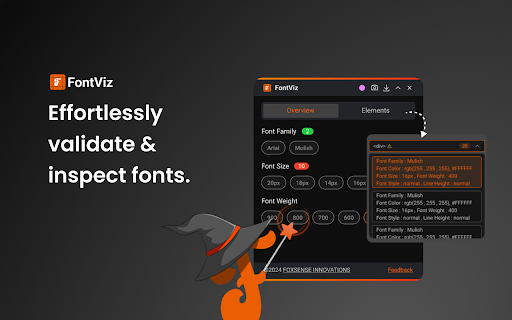
Introducing FontViz, the game-changing extension that revolutionises font validation for web designers, developers, and QA professionals. Say goodbye to the tedious and time-consuming process of manual font inspections – FontViz empowers you to streamline your web typography workflows like never before.

With FontViz, you can effortlessly inspect and validate every aspect of the fonts used on any website or web application. From font sizes and families to HTML tags and rendering consistency, this powerful tool equips you with a comprehensive suite of features to ensure pixel-perfect typography across your web projects.

Key Features:

One-Click Font Inspection:
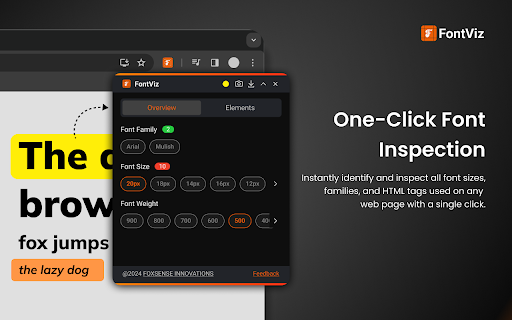
Instantly identify and inspect all font sizes, families, and HTML tags used on a web page with a single click. No more squinting at tiny text or endlessly toggling between windows – FontViz consolidates all the information you need in a user-friendly interface.

Intelligent Text Highlighting:
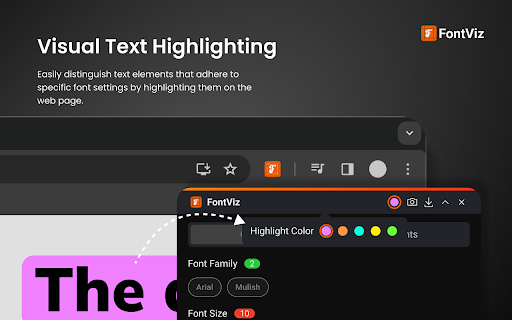
Easily distinguish text elements that adhere to specific font settings by highlighting them directly on the web page. This feature enables you to quickly spot inconsistencies and ensure compliance with design specifications, saving you valuable time and effort.

Side-by-Side Font Comparison:
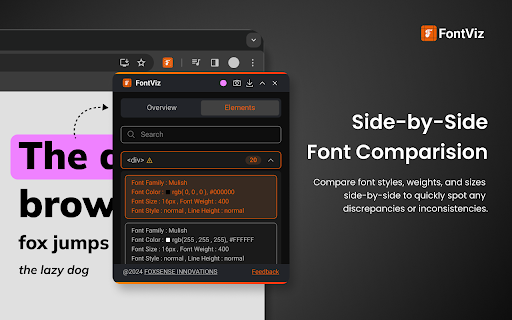
Compare font styles, weights, and sizes side-by-side to identify any discrepancies or inconsistencies with unparalleled ease. FontViz's visual comparison tools empower you to make informed decisions and maintain consistent typography across your projects.

Font Metrics Analysis:
Gain detailed insights into font metrics, including character widths, line heights, and kerning values. Fine-tune your typography for optimal readability and aesthetics, ensuring a polished and professional user experience.

SEO-Friendly HTML Tag Analysis:
Optimize your web content for search engines and accessibility by leveraging FontViz's HTML tag analysis feature. Segregate textual content based on HTML tags to validate the proper usage of headings and text elements, streamlining the process of identifying and addressing tag implementation issues.

Whether you're a web designer perfecting your typography, a developer ensuring consistent font rendering, or a QA professional meticulously validating font implementation, FontViz is your ultimate companion. Embrace effortless font validation and unlock a new level of efficiency, precision, and collaboration in your web projects.

Don't settle for anything less than pixel-perfect typography. Get FontViz today and elevate your web design and quality assurance processes to new heights!
Technical
- Version
- 1.0.11
- Manifest
- V3
- Size
- 923KiB
- Min Chrome
- 88
- Languages
- 1
- Featured
- Yes
Metadata
- ID
- fajapbpfjjnjggnlemjommpopjnijajn
- Developer ID
- u3e776c1709c8cad4eabb46563e0f3083
- Developer Email
- [email protected]
- Created
- Mar 30, 2024
- Last Updated (Store)
- Mar 20, 2025
- Last Scraped
- May 29, 2026
- Website
- fontviz.app
- Support URL
- —
- Privacy Policy
- https://fontviz.app/privacy-policy/
Similar extensions
Alternatives to FontViz: Inspect fonts with ease, ranked by description similarity.

Font Analyzer
Use Font Analyzer to analyze font type and style on any page. Website font identifier answering what font is this.
150
★ 5.0

FontUsed - Font Audit Tool
Discover and analyze all fonts used on any webpage with interactive highlighting.
77
★ 5.0

PeekFont
Live font inspector! Hover to identify fonts & styles. Instantly copy element details & CSS. Your essential typography tool.
76
★ 5.0

Font Inspector
Font Inspector — Instantly Identify Fonts on Any Website
760
★ 4.0

Font Detective
Hover over text to see font style, size, weight, and other typography details
5

Font Finder - Typography Inspector
Highlight text to see font details instantly. Perfect for designers and developers!
8

Font Master
Inspect any font on any website. Hover to see font details, click to lock and copy CSS.
4

Font Detector
Detects font details on any webpage to find Fonr family, height and more
77
★ 1.0
Data sourced from the Chrome Web Store · last verified May 29, 2026.