
X / Twitter Web Clipper: Save Threads & Articles to Markdown, PDF, Obsidian
Export X (Twitter) threads, tweets, and articles to clean Markdown or PDF. Send to Obsidian or save locally. Free, no API.
As of June 2026, X / Twitter Web Clipper: Save Threads & Articles to Markdown, PDF, Obsidian has 185 users and a 5.00/5 rating from 4 reviews in the Productivity category.
Usersup 320.5 percent+320.5%
185
185
Ratingno change0%
5.00
4 reviews
Reviewsup 100.0 percent+100.0%
4
Version
2.0.3
Manifest V3
90-day change · In the last 90 days this extension 6 version updates, changed permissions.
History
11 snapshotsTracking since Apr 1, 2026.
View as table
| Date | Users | Rating | Reviews | Version |
|---|---|---|---|---|
| Apr 1, 2026 | 44 | 5.00 | 2 | 1.1.0 |
| Apr 10, 2026 | 47 | 5.00 | 2 | 1.1.0 |
| Apr 20, 2026 | 52 | 5.00 | 3 | 1.1.0 |
| Apr 26, 2026 | 57 | 5.00 | 3 | 1.2.1 |
| May 4, 2026 | 70 | 5.00 | 3 | 1.2.1 |
| May 10, 2026 | 71 | 5.00 | 3 | 1.2.1 |
| May 15, 2026 | 90 | 5.00 | 3 | 1.2.1 |
| May 21, 2026 | 99 | 5.00 | 3 | 1.4.1 |
| May 27, 2026 | 105 | 5.00 | 4 | 1.6.0 |
| Jun 3, 2026 | 127 | 5.00 | 4 | 1.6.1 |
| Jun 9, 2026 | 173 | 5.00 | 4 | 1.8.0 |
| Now | 185 | 5.00 | 4 | 2.0.3 |
Changelog
- Jun 9, 2026description
tweet2md is an open-source Chrome extension that turns X/Twitter threads, posts, and articles into clean Markdown for Obsidian, research, AI workflows, and offline archiving.

Export content in one click:

- Save as Markdown
- Copy Markdown to clipboard
- Send directly to Obsidian
- Download images locally alongside your .md file

Works entirely locally in your browser. No API keys, no accounts, no tracking, no analytics.

Key features:

- Export tweets, threads, quote tweets, nested threads, and X Articles (formerly Notes)
- Clean Markdown that works with Obsidian, Logseq, Notion, Hugo, and other Markdown-based workflows
- One-click "Add to Obsidian" support via the obsidian:// URI scheme
- Rich YAML frontmatter with author, handle, dates, source URL, content type, and engagement stats
- Optional Obsidian-friendly frontmatter: wikilinked [[@handle]] authors, Dataview-friendly metadata, and synthesized titles and descriptions
- Download embedded images locally to prevent link rot
- Capture link cards with title, source domain, and preview image
- Capture polls with choices, result percentages, and the vote total/status line
- Preserve quote tweet structure and attribution
- Export a single tweet or an entire thread
- Inline export button directly inside x.com, plus toolbar popup and right-click context menu
- Custom filename templates using placeholders like {date}, {handle}, {slug}, and {type}
- Optional vault targeting and vault subfolder support for Obsidian
- Optional downloads subfolder for exported Markdown and media
- Multi-language UI: English, Spanish, German, French, Italian, Russian, Japanese, Portuguese (Brazil), Chinese (Simplified), Hindi, Arabic, and Persian
- Light and dark mode support

Great for:

- Obsidian and PKM workflows
- Research and reference archiving
- AI prompts and RAG pipelines
- Building a searchable second brain
- Preserving long-form X content offline

Current limitations:

- Videos and GIFs are not exported as playable media files
- Some functionality may break if x.com changes its page structure significantly
- If you install or update the extension while an x.com tab is already open, reload the tab before exporting — this is intentional, to avoid silent failures on an uninitialized page

Open source:
https://github.com/zendegani/tweet2md

Changelog:
https://github.com/zendegani/tweet2md/blob/main/CHANGELOG.md

tweet2md is an independent open-source project and is not affiliated with X or Twitter.
XClipper is a free, open-source web clipper for X (Twitter) — a Chrome extension that downloads threads, posts, and articles as PDF or clean Markdown for Obsidian, research, AI workflows, and offline archiving. Works entirely in your browser: no API keys, no accounts, no tracking. Export content in one click: - Save as Markdown - Export as PDF (selectable text, clickable links, no rasterization) - Copy Markdown to clipboard - Send directly to Obsidian - Download images locally alongside your .md file Everything runs locally on your machine. No backend service, no telemetry, no external requests beyond x.com itself. Key features: - Export tweets, threads, quote tweets, nested threads, and X Articles (formerly Notes) - PDF export with selectable text, clickable links, and proper rendering of emoji and non-ASCII characters - Clean Markdown that works with Obsidian, Logseq, Notion, Hugo, and other Markdown-based workflows - One-click "Add to Obsidian" support via the obsidian:// URI scheme - Rich YAML frontmatter with author, handle, dates, source URL, content type, and engagement stats - Optional Obsidian-friendly frontmatter: wikilinked [[@handle]] authors, Dataview-friendly metadata, and synthesized titles and descriptions - Download embedded images locally to prevent link rot - Capture link cards with title, source domain, and preview image - Capture polls with choices, result percentages, and the vote total/status line - Preserve quote tweet structure and attribution - Export a single tweet or an entire thread - Inline export button directly inside x.com, plus toolbar popup and right-click context menu - Custom filename templates using placeholders like {date}, {handle}, {slug}, and {type} - Optional vault targeting and vault subfolder support for Obsidian - Optional downloads subfolder for exported Markdown and media - Multi-language UI: English, Arabic, Chinese (Simplified), French, German, Hindi, Italian, Japanese, Persian, Portuguese (Brazil), Russian, and Spanish - Light and dark mode support Great for: - Obsidian and PKM workflows - Research and reference archiving - AI prompts and RAG pipelines - Building a searchable second brain - Preserving long-form X content offline Current limitations: - Videos and GIFs are not exported as playable media files - Some functionality may break if x.com changes its page structure significantly - If you install or update the extension while an x.com tab is already open, reload the tab before exporting — this is intentional, to avoid silent failures on an uninitialized page Open source: https://github.com/zendegani/xclipper Changelog: https://github.com/zendegani/xclipper/blob/main/CHANGELOG.md XClipper is an independent open-source project and is not affiliated with X or Twitter. - Jun 9, 2026short_description
Export X (Twitter) threads, tweets, and articles to clean Markdown — send to Obsidian or save locally. No API required.
Export X (Twitter) threads, tweets, and articles to clean Markdown or PDF. Send to Obsidian or save locally. Free, no API.
- Jun 9, 2026name
X Threads Articles to Markdown or Obsidian
X / Twitter Web Clipper: Save Threads & Articles to Markdown, PDF, Obsidian
- Jun 3, 2026description
tweet2md is an open-source Chrome extension that turns x.com content into production-ready Markdown for research, note-taking, AI workflows, and offline archiving. What's new? See the latest updates and releases: https://github.com/zendegani/tweet2md/blob/main/CHANGELOG.md Key features: - Three ways to trigger: toolbar popup, inline download button on every tweet's action bar, or right-click context menu (Save / Copy as Markdown / Add to Obsidian) - Copy Markdown to clipboard, download as a file, or hand off to Obsidian - One-click Add to Obsidian button — opens Obsidian via the obsidian:// URI scheme with the rendered Markdown prefilled; optional vault name to target a specific vault - Optional vault subfolder for the Obsidian handoff so notes land inside a specific folder (e.g. Tweets or Inbox/Tweets) — leave blank to use the vault root - Obsidian-friendly frontmatter (opt-in): wikilinked [[@handle]] author for instant backlinks, synthesized title, published/created date split, prose description snippet, and a tags array — plus all the existing engagement metadata for Dataview queries - Capture link cards from tweets: title, source domain, and the Open Graph preview image - Full support for long-form X Articles (formerly Notes) with headings, lists, and code blocks - Extract tweets, nested threads, and quote tweets into clean Markdown - Preserve quoted-post structure and context — including the original author's name and handle - Multi-view popup: primary actions stay focused up front, set-once preferences live in a Settings panel behind a gear icon - Show or hide the inline button via a toggle if it conflicts with another extension's icon - Inline button can be configured to copy to clipboard instead of download - Optional auto-close of new tabs opened via the inline button or context menu after export - Download embedded X media locally alongside your md file to prevent link rot - Optional Downloads subfolder so Markdown files and images land inside a chosen subfolder of your Downloads folder, instead of cluttering the root - Rich YAML frontmatter with author, handle, date, source URL, content type, and engagement stats (likes, reposts, replies, bookmarks, views) - Optional X-style engagement row directly in the Markdown body (likes, reposts, replies, bookmarks, views) — toggle independently of the YAML frontmatter - Automatically expand truncated posts and strip engagement buttons, follow prompts, and trackers - Multi-language UI: English, Spanish, German, French, Japanese, Portuguese (Brazil), Chinese (Simplified), Arabic, and Persian. Content extraction works on any language regardless of UI translation - Light and dark mode popup, matching your system preferences Great for: - Importing X content into Obsidian, Notion, Logseq, Hugo, or any Markdown-based PKM system - Exporting clean text for LLM prompts, RAG pipelines, or AI training workflows - Archiving research threads, news references, and long-form articles offline - Building a searchable Second Brain from your Twitter/X activity - Preparing source material for writing, translation, or summarization Why use it: - One-click workflow from any tweet, thread, or article page — popup, inline icon, or right-click menu - First-class Obsidian path: hit Add to Obsidian and the note lands in your vault, no plugin or sync setup required - Clean, well-structured Markdown output that is easy to edit and index - Local image archiving so your saved content never has broken links - Zero-API architecture — works directly in your browser with no API keys or accounts - Processes everything locally on your device. No analytics, no tracking, no data leaves your machine. Current limitations: - Focused on x.com content extraction - Videos and GIFs are not exported as playable media files - Requires a page reload if the extension was installed or updated after opening the tab. This is intentional to avoid silent failures and ensure content is extracted reliably from a properly initialized page. - Some content may stop working if x.com changes its page structure significantly This is an open-source project. tweet2md is an independent tool and is not affiliated with X or x.com.
tweet2md is an open-source Chrome extension that turns X/Twitter threads, posts, and articles into clean Markdown for Obsidian, research, AI workflows, and offline archiving. Export content in one click: - Save as Markdown - Copy Markdown to clipboard - Send directly to Obsidian - Download images locally alongside your .md file Works entirely locally in your browser. No API keys, no accounts, no tracking, no analytics. Key features: - Export tweets, threads, quote tweets, nested threads, and X Articles (formerly Notes) - Clean Markdown that works with Obsidian, Logseq, Notion, Hugo, and other Markdown-based workflows - One-click "Add to Obsidian" support via the obsidian:// URI scheme - Rich YAML frontmatter with author, handle, dates, source URL, content type, and engagement stats - Optional Obsidian-friendly frontmatter: wikilinked [[@handle]] authors, Dataview-friendly metadata, and synthesized titles and descriptions - Download embedded images locally to prevent link rot - Capture link cards with title, source domain, and preview image - Capture polls with choices, result percentages, and the vote total/status line - Preserve quote tweet structure and attribution - Export a single tweet or an entire thread - Inline export button directly inside x.com, plus toolbar popup and right-click context menu - Custom filename templates using placeholders like {date}, {handle}, {slug}, and {type} - Optional vault targeting and vault subfolder support for Obsidian - Optional downloads subfolder for exported Markdown and media - Multi-language UI: English, Spanish, German, French, Italian, Russian, Japanese, Portuguese (Brazil), Chinese (Simplified), Hindi, Arabic, and Persian - Light and dark mode support Great for: - Obsidian and PKM workflows - Research and reference archiving - AI prompts and RAG pipelines - Building a searchable second brain - Preserving long-form X content offline Current limitations: - Videos and GIFs are not exported as playable media files - Some functionality may break if x.com changes its page structure significantly - If you install or update the extension while an x.com tab is already open, reload the tab before exporting — this is intentional, to avoid silent failures on an uninitialized page Open source: https://github.com/zendegani/tweet2md Changelog: https://github.com/zendegani/tweet2md/blob/main/CHANGELOG.md tweet2md is an independent open-source project and is not affiliated with X or Twitter. - May 21, 2026description
tweet2md is an open-source Chrome extension that turns x.com content into production-ready Markdown for research, note-taking, AI workflows, and offline archiving. No X API key required. What's new? See the latest updates and releases: https://github.com/zendegani/tweet2md/blob/main/CHANGELOG.md Key features: - Three ways to trigger: toolbar popup, inline download button on every tweet's action bar, or right-click context menu (Save / Copy as Markdown) - Copy Markdown to clipboard or download as a file - Full support for long-form X Articles (formerly Notes) with headings, lists, and code blocks - Extract tweets, nested threads, and quote tweets into clean Markdown - Preserve quoted-post structure and context — including the original author's name and handle - Show or hide the inline button via a toggle if it conflicts with another extension's icon - Inline button can be configured to copy to clipboard instead of download - Optional auto-close of new tabs opened via the inline button or context menu after export - Download embedded X media locally alongside your md file to prevent link rot - Rich YAML frontmatter with author, handle, date, source URL, content type, and engagement stats (likes, reposts, replies, bookmarks, views) - Optional X-style engagement row directly in the Markdown body (likes, reposts, replies, bookmarks, views) — toggle independently of the YAML frontmatter - Automatically expand truncated posts and strip engagement buttons, follow prompts, and trackers - Multi-language UI: English, Spanish, German, French, Japanese, Portuguese (Brazil), Chinese (Simplified), Arabic, and Persian. Content extraction works on any language regardless of UI translation - Light and dark mode popup, matching your system preferences Great for: - Importing X content into Obsidian, Notion, Logseq, Hugo, or any Markdown-based PKM system - Exporting clean text for LLM prompts, RAG pipelines, or AI training workflows - Archiving research threads, news references, and long-form articles offline - Building a searchable Second Brain from your Twitter/X activity - Preparing source material for writing, translation, or summarization Why use it: - One-click workflow from any tweet, thread, or article page — popup, inline icon, or right-click menu - Clean, well-structured Markdown output that is easy to edit and index - Local image archiving so your saved content never has broken links - Zero-API architecture — works directly in your browser with no API keys or accounts - Processes everything locally on your device. No analytics, no tracking, no data leaves your machine. Current limitations: - Focused on x.com content extraction - Videos and GIFs are not exported as playable media files - Requires a page reload if the extension was installed or updated after opening the tab. This is intentional to avoid silent failures and ensure content is extracted reliably from a properly initialized page. - Some content may stop working if x.com changes its page structure significantly This is an open-source project. tweet2md is an independent tool and is not affiliated with X or x.com.
tweet2md is an open-source Chrome extension that turns x.com content into production-ready Markdown for research, note-taking, AI workflows, and offline archiving. What's new? See the latest updates and releases: https://github.com/zendegani/tweet2md/blob/main/CHANGELOG.md Key features: - Three ways to trigger: toolbar popup, inline download button on every tweet's action bar, or right-click context menu (Save / Copy as Markdown / Add to Obsidian) - Copy Markdown to clipboard, download as a file, or hand off to Obsidian - One-click Add to Obsidian button — opens Obsidian via the obsidian:// URI scheme with the rendered Markdown prefilled; optional vault name to target a specific vault - Optional vault subfolder for the Obsidian handoff so notes land inside a specific folder (e.g. Tweets or Inbox/Tweets) — leave blank to use the vault root - Obsidian-friendly frontmatter (opt-in): wikilinked [[@handle]] author for instant backlinks, synthesized title, published/created date split, prose description snippet, and a tags array — plus all the existing engagement metadata for Dataview queries - Capture link cards from tweets: title, source domain, and the Open Graph preview image - Full support for long-form X Articles (formerly Notes) with headings, lists, and code blocks - Extract tweets, nested threads, and quote tweets into clean Markdown - Preserve quoted-post structure and context — including the original author's name and handle - Multi-view popup: primary actions stay focused up front, set-once preferences live in a Settings panel behind a gear icon - Show or hide the inline button via a toggle if it conflicts with another extension's icon - Inline button can be configured to copy to clipboard instead of download - Optional auto-close of new tabs opened via the inline button or context menu after export - Download embedded X media locally alongside your md file to prevent link rot - Optional Downloads subfolder so Markdown files and images land inside a chosen subfolder of your Downloads folder, instead of cluttering the root - Rich YAML frontmatter with author, handle, date, source URL, content type, and engagement stats (likes, reposts, replies, bookmarks, views) - Optional X-style engagement row directly in the Markdown body (likes, reposts, replies, bookmarks, views) — toggle independently of the YAML frontmatter - Automatically expand truncated posts and strip engagement buttons, follow prompts, and trackers - Multi-language UI: English, Spanish, German, French, Japanese, Portuguese (Brazil), Chinese (Simplified), Arabic, and Persian. Content extraction works on any language regardless of UI translation - Light and dark mode popup, matching your system preferences Great for: - Importing X content into Obsidian, Notion, Logseq, Hugo, or any Markdown-based PKM system - Exporting clean text for LLM prompts, RAG pipelines, or AI training workflows - Archiving research threads, news references, and long-form articles offline - Building a searchable Second Brain from your Twitter/X activity - Preparing source material for writing, translation, or summarization Why use it: - One-click workflow from any tweet, thread, or article page — popup, inline icon, or right-click menu - First-class Obsidian path: hit Add to Obsidian and the note lands in your vault, no plugin or sync setup required - Clean, well-structured Markdown output that is easy to edit and index - Local image archiving so your saved content never has broken links - Zero-API architecture — works directly in your browser with no API keys or accounts - Processes everything locally on your device. No analytics, no tracking, no data leaves your machine. Current limitations: - Focused on x.com content extraction - Videos and GIFs are not exported as playable media files - Requires a page reload if the extension was installed or updated after opening the tab. This is intentional to avoid silent failures and ensure content is extracted reliably from a properly initialized page. - Some content may stop working if x.com changes its page structure significantly This is an open-source project. tweet2md is an independent tool and is not affiliated with X or x.com.
- May 21, 2026short_description
Export X (Twitter) threads, tweets, and articles to clean Markdown with images and metadata. No API required.
Export X (Twitter) threads, tweets, and articles to clean Markdown — send to Obsidian or save locally. No API required.
- May 21, 2026name
tweet2md: X Threads Articles to Markdown
X Threads Articles to Markdown or Obsidian
- May 15, 2026description
tweet2md is an open-source Chrome extension that turns x.com content into production-ready Markdown for research, note-taking, AI workflows, and offline archiving. No X API key required. Key features: - Full support for long-form X Articles (formerly Notes) with headings, lists, and code blocks - Extract tweets, nested threads, and quote tweets into clean Markdown - Preserve quoted-post structure and context in a reusable format - Download all embedded images locally alongside your md file to prevent link rot - Rich YAML frontmatter with author, handle, date, source URL, content type, and engagement stats (likes, reposts, replies, bookmarks, views) - Copy Markdown to clipboard or download as a file - Automatically expand truncated posts and strip engagement buttons, follow prompts, and trackers - Multi-language UI: English, Spanish, German, French, Japanese, Portuguese (Brazil), Chinese (Simplified), Arabic, and Persian. Content extraction works on any language regardless of UI translation - Light and dark mode popup, matching your system preferences Great for: - Importing X content into Obsidian, Notion, Logseq, Hugo, or any Markdown-based PKM system - Exporting clean text for LLM prompts, RAG pipelines, or AI training workflows - Archiving research threads, news references, and long-form articles offline - Building a searchable Second Brain from your Twitter/X activity - Preparing source material for writing, translation, or summarization Why use it: - One-click workflow from any tweet, thread, or article page - Clean, well-structured Markdown output that is easy to edit and index - Local image archiving so your saved content never has broken links - Zero-API architecture — works directly in your browser with no API keys or accounts - Processes everything locally on your device. No analytics, no tracking, no data leaves your machine. Current limitations: - Focused on x.com content extraction - Videos and GIFs are not exported as playable media files - Requires a page reload if the extension was installed or updated after opening the tab. This is intentional to avoid silent failures and ensure content is extracted reliably from a properly initialized page. - Some content may stop working if x.com changes its page structure significantly This is an open-source project. Source code: https://github.com/zendegani/tweet2md Changelog: https://github.com/zendegani/tweet2md/CHANGELOG.md tweet2md is an independent tool and is not affiliated with X or x.com.
tweet2md is an open-source Chrome extension that turns x.com content into production-ready Markdown for research, note-taking, AI workflows, and offline archiving. No X API key required. What's new? See the latest updates and releases: https://github.com/zendegani/tweet2md/blob/main/CHANGELOG.md Key features: - Three ways to trigger: toolbar popup, inline download button on every tweet's action bar, or right-click context menu (Save / Copy as Markdown) - Copy Markdown to clipboard or download as a file - Full support for long-form X Articles (formerly Notes) with headings, lists, and code blocks - Extract tweets, nested threads, and quote tweets into clean Markdown - Preserve quoted-post structure and context — including the original author's name and handle - Show or hide the inline button via a toggle if it conflicts with another extension's icon - Inline button can be configured to copy to clipboard instead of download - Optional auto-close of new tabs opened via the inline button or context menu after export - Download embedded X media locally alongside your md file to prevent link rot - Rich YAML frontmatter with author, handle, date, source URL, content type, and engagement stats (likes, reposts, replies, bookmarks, views) - Optional X-style engagement row directly in the Markdown body (likes, reposts, replies, bookmarks, views) — toggle independently of the YAML frontmatter - Automatically expand truncated posts and strip engagement buttons, follow prompts, and trackers - Multi-language UI: English, Spanish, German, French, Japanese, Portuguese (Brazil), Chinese (Simplified), Arabic, and Persian. Content extraction works on any language regardless of UI translation - Light and dark mode popup, matching your system preferences Great for: - Importing X content into Obsidian, Notion, Logseq, Hugo, or any Markdown-based PKM system - Exporting clean text for LLM prompts, RAG pipelines, or AI training workflows - Archiving research threads, news references, and long-form articles offline - Building a searchable Second Brain from your Twitter/X activity - Preparing source material for writing, translation, or summarization Why use it: - One-click workflow from any tweet, thread, or article page — popup, inline icon, or right-click menu - Clean, well-structured Markdown output that is easy to edit and index - Local image archiving so your saved content never has broken links - Zero-API architecture — works directly in your browser with no API keys or accounts - Processes everything locally on your device. No analytics, no tracking, no data leaves your machine. Current limitations: - Focused on x.com content extraction - Videos and GIFs are not exported as playable media files - Requires a page reload if the extension was installed or updated after opening the tab. This is intentional to avoid silent failures and ensure content is extracted reliably from a properly initialized page. - Some content may stop working if x.com changes its page structure significantly This is an open-source project. tweet2md is an independent tool and is not affiliated with X or x.com.
- May 15, 2026name
tweet2md: Export X (Twitter) Threads, Tweets & Articles to Markdown
tweet2md: X Threads Articles to Markdown
- May 15, 2026permissions
activeTab, downloads, storage
activeTab, contextMenus, downloads, storage
- Apr 20, 2026description
🌟 Open Source & Privacy First! Want to contribute or report a bug? Open an issue on GitHub: https://github.com/zendegani/tweet2md/issues The ultimate Thread Downloader & Post Extractor for X / Twitter. tweet2md converts posts, long articles, and massive, nested threads into beautifully clean Markdown files in just one click. ✨ Key Features: - Thread Downloader: Seamlessly extracts complex threads, nested quotes, and inline replies. - Save Images Locally: Download embedded images directly alongside your .md file. - Tweet Metadata: Include engagement stats (likes, views, reposts) as YAML frontmatter. - Article Extraction: Converts long-form X Notes with perfect Markdown formatting. - Clean Output: Automatically strips away engagement buttons, follow prompts, and trackers. 🎯 Perfect for: - Archiving deep research and massive thread discussions. - Seamlessly importing posts into Obsidian, Notion, Logseq, or any Markdown editor. 🔒 100% Private & Secure: tweet2md runs entirely in your browser. Your data never leaves your device. No analytics or telemetry.
tweet2md is an open-source Chrome extension that turns x.com content into production-ready Markdown for research, note-taking, AI workflows, and offline archiving. No X API key required. Key features: - Full support for long-form X Articles (formerly Notes) with headings, lists, and code blocks - Extract tweets, nested threads, and quote tweets into clean Markdown - Preserve quoted-post structure and context in a reusable format - Download all embedded images locally alongside your md file to prevent link rot - Rich YAML frontmatter with author, handle, date, source URL, content type, and engagement stats (likes, reposts, replies, bookmarks, views) - Copy Markdown to clipboard or download as a file - Automatically expand truncated posts and strip engagement buttons, follow prompts, and trackers - Multi-language UI: English, Spanish, German, French, Japanese, Portuguese (Brazil), Chinese (Simplified), Arabic, and Persian. Content extraction works on any language regardless of UI translation - Light and dark mode popup, matching your system preferences Great for: - Importing X content into Obsidian, Notion, Logseq, Hugo, or any Markdown-based PKM system - Exporting clean text for LLM prompts, RAG pipelines, or AI training workflows - Archiving research threads, news references, and long-form articles offline - Building a searchable Second Brain from your Twitter/X activity - Preparing source material for writing, translation, or summarization Why use it: - One-click workflow from any tweet, thread, or article page - Clean, well-structured Markdown output that is easy to edit and index - Local image archiving so your saved content never has broken links - Zero-API architecture — works directly in your browser with no API keys or accounts - Processes everything locally on your device. No analytics, no tracking, no data leaves your machine. Current limitations: - Focused on x.com content extraction - Videos and GIFs are not exported as playable media files - Requires a page reload if the extension was installed or updated after opening the tab. This is intentional to avoid silent failures and ensure content is extracted reliably from a properly initialized page. - Some content may stop working if x.com changes its page structure significantly This is an open-source project. Source code: https://github.com/zendegani/tweet2md Changelog: https://github.com/zendegani/tweet2md/CHANGELOG.md tweet2md is an independent tool and is not affiliated with X or x.com.
- Apr 20, 2026short_description
The ultimate Thread Downloader & Post Extractor. Convert posts, articles, and complex threads to clean Markdown.
Export X (Twitter) threads, tweets, and articles to clean Markdown with images and metadata. No API required.
- Apr 20, 2026name
tweet2md
tweet2md: Export X (Twitter) Threads, Tweets & Articles to Markdown
Permissions & access
- Permissions
- activeTabcontextMenusdownloadsstorage
- Host access
- None declared
Screenshots


About
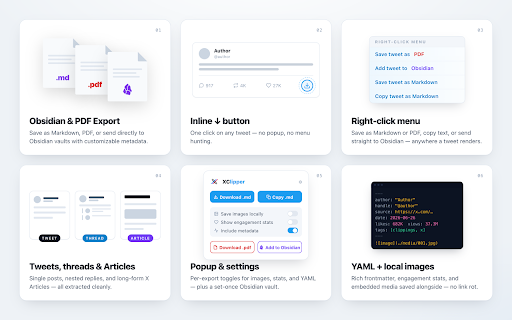
XClipper is a free, open-source web clipper for X (Twitter) — a Chrome extension that downloads threads, posts, and articles as PDF or clean Markdown for Obsidian, research, AI workflows, and offline archiving. Works entirely in your browser: no API keys, no accounts, no tracking.

Export content in one click:

- Save as Markdown
- Export as PDF (selectable text, clickable links, no rasterization)
- Copy Markdown to clipboard
- Send directly to Obsidian
- Download images locally alongside your .md file

Everything runs locally on your machine. No backend service, no telemetry, no external requests beyond x.com itself.

Key features:

- Export tweets, threads, quote tweets, nested threads, and X Articles (formerly Notes)
- PDF export with selectable text, clickable links, and proper rendering of emoji and non-ASCII characters
- Clean Markdown that works with Obsidian, Logseq, Notion, Hugo, and other Markdown-based workflows
- One-click "Add to Obsidian" support via the obsidian:// URI scheme
- Rich YAML frontmatter with author, handle, dates, source URL, content type, and engagement stats
- Optional Obsidian-friendly frontmatter: wikilinked [[@handle]] authors, Dataview-friendly metadata, and synthesized titles and descriptions
- Download embedded images locally to prevent link rot
- Capture link cards with title, source domain, and preview image
- Capture polls with choices, result percentages, and the vote total/status line
- Preserve quote tweet structure and attribution
- Export a single tweet or an entire thread
- Inline export button directly inside x.com, plus toolbar popup and right-click context menu
- Custom filename templates using placeholders like {date}, {handle}, {slug}, and {type}
- Optional vault targeting and vault subfolder support for Obsidian
- Optional downloads subfolder for exported Markdown and media
- Multi-language UI: English, Arabic, Chinese (Simplified), French, German, Hindi, Italian, Japanese, Persian, Portuguese (Brazil), Russian, and Spanish
- Light and dark mode support

Great for:

- Obsidian and PKM workflows
- Research and reference archiving
- AI prompts and RAG pipelines
- Building a searchable second brain
- Preserving long-form X content offline

Current limitations:

- Videos and GIFs are not exported as playable media files
- Some functionality may break if x.com changes its page structure significantly
- If you install or update the extension while an x.com tab is already open, reload the tab before exporting — this is intentional, to avoid silent failures on an uninitialized page

Open source:
https://github.com/zendegani/xclipper

Changelog:
https://github.com/zendegani/xclipper/blob/main/CHANGELOG.md

XClipper is an independent open-source project and is not affiliated with X or Twitter.Technical
- Version
- 2.0.3
- Manifest
- V3
- Size
- 84.9KiB
- Min Chrome
- 88
- Languages
- 12
- Featured
- No
Metadata
- ID
- epmmehilhbpkgcjbcohgkmihlalagkho
- Developer ID
- uce5894eeb2a54d5009dde0b5a2197cab
- Developer Email
- [email protected]
- Created
- Feb 18, 2026
- Last Updated (Store)
- Jun 7, 2026
- Last Scraped
- Jun 9, 2026
- Website
- —
- Support URL
- https://github.com/zendegani/xclipper/issues
Similar extensions
Alternatives to X / Twitter Web Clipper: Save Threads & Articles to Markdown, PDF, Obsidian, ranked by description similarity.

Markdown It
Copy any webpage as Markdown with a single click
29
★ 5.0

Get Markdown
Convert web pages to Markdown format with reader mode extraction and preview
277
★ 5.0

Web2MD - Web to Markdown for AI
Web to Markdown for AI — send to ChatGPT, Claude, NotebookLM. AI agents batch-convert via MCP. One click or automated.
535
★ 5.0

Save2MD
Save any web page as a clean Markdown file. Right-click to save with optional image support and automatic ad filtering.
10

Web2Markdown
Convert current webpage to Markdown format
18

HTML to Markdown Converter
Convert HTML to Markdown with right-click menu and popup interface
47

Xidian
Capture X/Twitter posts to Obsidian as clean markdown
2

ExtractMD
Extract and copy content as Markdown from any webpage. Built-in support for YouTube, Hacker News, and articles.
29
Data sourced from the Chrome Web Store · last verified Jun 9, 2026.