
URL MULTITABBER
Open multiple URLs at once.
As of May 2026, URL MULTITABBER has 29 users in the Workflow & Planning category.
Usersdown 6.5 percent−6.5%
29
29
Ratingno change0%
—
— reviews
Reviewsno change0%
—
Version
1.0
Manifest V3
History
3 snapshotsTracking since Apr 1, 2026.
View as table
| Date | Users | Rating | Reviews | Version |
|---|---|---|---|---|
| Apr 1, 2026 | 31 | — | — | 1.0 |
| Apr 30, 2026 | 30 | — | — | 1.0 |
| May 29, 2026 | 32 | — | — | 1.0 |
| Now | 29 | — | — | 1.0 |
Permissions & access
- Permissions
- clipboardRead
- Host access
- None declared
Screenshots
About
Multi Tabber: An Essential Chrome Extension for Efficient Browsing
What is Multi Tabber?
Multi Tabber is a powerful Chrome extension designed to enhance your web browsing experience by enabling the bulk opening of multiple URLs simultaneously. Whether you need to open a series of web pages for research, manage multiple social media accounts, or streamline your workflow, Multi Tabber simplifies the process, saving you time and effort.

Key Features of Multi Tabber
Bulk URL Opening:

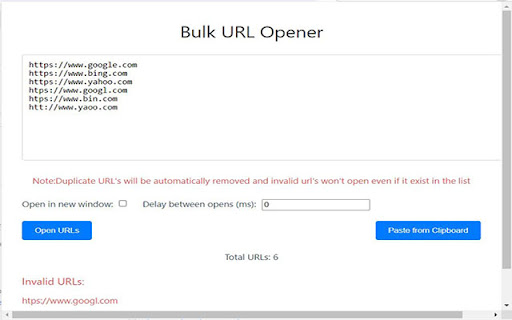
Open multiple URLs at once by pasting them into a single input field.
Support for both opening URLs in new tabs within the same window or in separate new windows.
Clipboard Integration:

Quickly paste URLs directly from your clipboard with a single button click, bypassing the need for manual copying and pasting.
Duplicate URL Management:

Automatically removes duplicate URLs to ensure each link is opened only once.
URL Validation:

Checks each URL for validity before attempting to open it, ensuring that only properly formatted web addresses are processed.
Delay Customization:

Set a delay interval between opening each URL, preventing browser overload and improving load times.
Invalid URL Notification:

Provides a list of invalid URLs that couldn’t be processed, allowing you to correct them easily.
Why Users Should Install Multi Tabber
Efficiency and Time Savings:

Opening multiple URLs manually can be tedious and time-consuming. Multi Tabber automates this process, enabling you to focus on more important tasks.
Enhanced Productivity:

Ideal for researchers, marketers, and anyone who needs to access multiple web pages quickly. Multi Tabber streamlines your workflow by handling the repetitive task of opening URLs.
User-Friendly Interface:

The simple and intuitive interface makes it easy for users of all technical levels to take advantage of the extension's features.
Customizable Options:

With features like delay settings and the choice between new tabs or new windows, Multi Tabber can be tailored to fit your specific needs.
Clipboard Convenience:

The integration with your clipboard means you can seamlessly paste a list of URLs, further speeding up the process of opening multiple sites.
Error Handling:

The extension notifies you of any invalid URLs, allowing you to fix issues promptly and avoid frustration.
How to Use Multi Tabber
Install the Extension:

Add Multi Tabber to your Chrome browser from the Chrome Web Store.
Input URLs:

Paste your list of URLs into the provided textarea. You can do this manually or use the "Paste from Clipboard" button for quick input.
Customize Your Settings:

Choose whether to open URLs in new tabs or new windows, and set the desired delay between openings.
Open URLs:

Click the "Open URLs" button to start the process. The extension will handle the rest, opening each URL according to your specified settings.
Review Invalid URLs:

If any URLs are invalid, they will be listed for you to review and correct.
Conclusion
Multi Tabber is an indispensable tool for anyone who frequently works with multiple web pages. Its ability to streamline the process of opening multiple URLs, combined with its user-friendly features and customization options, makes it a must-have extension for boosting productivity and efficiency in your daily browsing activities. Install Multi Tabber today and transform the way you manage your web pages!
Technical
- Version
- 1.0
- Manifest
- V3
- Size
- 34.91KiB
- Min Chrome
- 88
- Languages
- 1
- Featured
- No
Metadata
- ID
- eomnaahgfepmknbhilnkdhiemlmcjpjn
- Developer ID
- uc9af501e60679c2d50b7a9d092ca2ccd
- Developer Email
- [email protected]
- Created
- May 24, 2024
- Last Updated (Store)
- May 24, 2024
- Last Scraped
- May 29, 2026
- Website
- —
- Support URL
- —
- Privacy Policy
- —
Similar extensions
Alternatives to URL MULTITABBER, ranked by description similarity.

Multiple URL Manager
Open multiple URLs at once and save all open tabs to a file
31

Open Multiple URLs
Open multiple URLs [Bulk URL Opener] at once with customizable settings
151
★ 5.0

Chiku Linker - Open Links in Tab
ChikuLinker: Enhance Chrome lead gen! Open word-related links quickly for productivity. Optimize workflow and ace lead gen.
48
★ 5.0

Bulk URL Opener - Open Multiple URLs Instantly
Open multiple URLs instantly in one click. Clean, organize, and launch bulk links fast for maximum productivity.
145
★ 5.0

Open Multiple Links - Full Featured
Quickly open links! Remove duplicates, randomize order, export/import text files, bookmark lists. Boost your browsing efficiency!
40
★ 3.0

Copy All URLs - Tab URL Manager
Professional tab URL management tool by StartAndGrow.co. Copy URLs from all open tabs with a single click.
623
★ 5.0

All URLs Opener: Open Multiple URLs Effortlessly
The All URLs Opener Chrome extension is an essential tool for users who frequently work with multiple URLs, simplifying the process…
919
★ 5.0

Bulk Link Grabber: Copy, Extract & Open Multiple URLs
Grab, copy & open multiple links fast. Extract URLs from tabs or drag-selects. Export to CSV/TXT. The ultimate bulk URL opener tool.
247
★ 5.0
Data sourced from the Chrome Web Store · last verified May 29, 2026.