
Workflow Email invalidator (Salesforce)
It will update the ccEmail Address to invalid for all Email ALerts for any SObject in your Sandbox
As of May 2026, Workflow Email invalidator (Salesforce) has 2 users in the Developer Tools category.
Usersno change0%
2
2
Ratingno change0%
—
— reviews
Reviewsno change0%
—
Version
1.0.0
Manifest V3
History
1 snapshotsTracking since May 28, 2026.
Not enough history yet for this metric — the chart fills in as we collect more snapshots.
View as table
| Date | Users | Rating | Reviews | Version |
|---|---|---|---|---|
| May 28, 2026 | — | — | — | 1.0.0 |
| Now | 2 | — | — | 1.0.0 |
Permissions & access
- Permissions
- storage
- Host access
- None declared
Screenshots
About
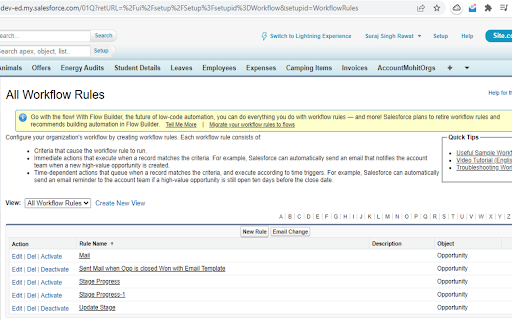
A simple way to change the ccEmail address of Email Alert used in Workflow Rules is to ensure your email data is protected and no test email is sent to the customers. You can use this Google extension both in Lightning and Classic Experience in Salesforce.

In Classic, you just need to open the WorkflowRules URL page. In which you will see the Email Change Button. Click on it and your ccEmail address will be changed successfully.

In Lightning, you just need to open the WorkflowRules URL page. You will see Authorize button click on it and after some time you will see the Email Change Button. Click on it and your ccEmail address will be changed successfully.
Technical
- Version
- 1.0.0
- Manifest
- V3
- Size
- 12.56KiB
- Min Chrome
- 88
- Languages
- 1
- Featured
- No
Metadata
- ID
- enlnkjkdlkonaphmkjpemfobdoaepogb
- Developer ID
- u682f060baa741c82e34272960c37fc25
- Developer Email
- [email protected]
- Created
- Nov 30, 2022
- Last Updated (Store)
- Mar 29, 2023
- Last Scraped
- May 28, 2026
- Website
- —
- Support URL
- —
- Privacy Policy
- —
Similar extensions
Alternatives to Workflow Email invalidator (Salesforce), ranked by description similarity.

Switch2Classic: Click Once. Go Salesforce Classic.
Instantly switch from Salesforce Lightning to Classic with one click. Fast, simple, and reliable.
49
★ 5.0

Salesforce advanced Code searcher
By using the advanced quick find you can get your code few clicks shorter. Also, you can search any string your code
60.0K
★ 4.4

Lightning Web Runtime (LWR) Build Info
For Salesforce Experience Cloud. Learn, Demo & Build Great LWR Sites. Get detailed information about components on the page.
390
★ 3.0

Open ID in Salesforce
This will helps you to open a selected ID in configured salesforce domain
26
★ 5.0

Salesforce Fix Highlight Panel Fields
Updates CSS to fix the highlight panel fields.
19
★ 5.0

Find in Salesforce
Quickly search for records by ID using the URL bar. Not officially supported by Salesforce.
26
★ 5.0

test
test
—

Salesforce CLT
This is an extension for Salesforce developers/admins, its powerful, highly customizable and flexible.
3
Data sourced from the Chrome Web Store · last verified May 28, 2026.