
Remove HTML Elements
Easily remove desired HTML5 elements with just one click!
As of June 2026, Remove HTML Elements has 3,000 users and a 3.85/5 rating from 20 reviews in the Productivity category.
Usersno change0%
3.0K
3,000
Ratingno change0%
3.85
20 reviews
Reviewsno change0%
20
Version
0.1.6
Manifest V3
History
1 snapshotsTracking since Apr 16, 2026.
View as table
| Date | Users | Rating | Reviews | Version |
|---|---|---|---|---|
| Apr 16, 2026 | 3.0K | 3.85 | 20 | 0.1.6 |
| Now | 3.0K | 3.85 | 20 | 0.1.6 |
Permissions & access
- Permissions
- storageactiveTabscripting
- Host access
- None declared
Screenshots
About
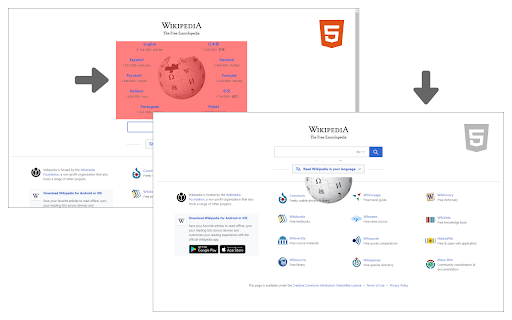
Remove HTML Elements add-on let you easily remove desired elements in any HTML5 webpage.

Simply click on the toolbar button to activate the add-on. Please note that this add-on requires "user action" to be activated. Once it is active, please hover on any element within the page with your mouse. When the mouse pointer is over any HTML5 element, it will highlighted with red color. Now, when you click on the highlighted element, it will be removed from the page.

Please note that, this add-on does not delete the elements from the page, instead, it changes the display property to "none". The add-on supports undo operation via (Ctrl + Z) keyboard combination.

If you found a bug to report, or have a feature request in mind, please fill out the bug report form in the add-on's homepage (https://mybrowseraddon.com/remove-html-elements.html).
Technical
- Version
- 0.1.6
- Manifest
- V3
- Size
- 32.7KiB
- Min Chrome
- 88
- Languages
- 1
- Featured
- Yes
Metadata
- ID
- enegojdnkeicfoiknhfjaedhlckeahmf
- Developer ID
- u945d559d572e22612b859d592da9a903
- Developer Email
- [email protected]
- Created
- Nov 26, 2018
- Last Updated (Store)
- Feb 17, 2026
- Last Scraped
- Jun 5, 2026
- Website
- —
Similar extensions
Alternatives to Remove HTML Elements, ranked by description similarity.

Select & Copy HTML Text
Select part of an HTML document and copy the underlying text to the clipboard!
2.0K
★ 3.0

Remove Overlays
Remove annoying overlays.
268
★ 5.0

HTML Elements Screenshot
Easily remove desired HTML5 elements with just one click!
10.0K
★ 3.8

Magnifying Glass (Hover Zoom)
Press on the toolbar button to see the magnifying glass on the current page.
80.0K
★ 4.4

Browser Cleaner
Easily clear your browser's data and speedup browsing via toolbar popup.
2.0K
★ 4.0

Auto Webpage Element Remover
Automatically removes unwanted elements like ads or popups from specific websites.
11

ElementHider
Hide page elements with a DevTools-like picker
2

Allow Right Click
Allow the right-click menu for all elements with a restriction!
10.0K
★ 3.2
Data sourced from the Chrome Web Store · last verified Jun 5, 2026.