
Magnifying Glass (Hover Zoom)
Press on the toolbar button to see the magnifying glass on the current page.
As of June 2026, Magnifying Glass (Hover Zoom) has 80,000 users and a 4.38/5 rating from 61 reviews in the Productivity category.
Usersdown 20.0 percent−20.0%
80.0K
80,000
Ratingdown 0.2 percent−0.2%
4.38
61 reviews
Reviewsup 7.0 percent+7.0%
61
Version
0.1.8
Manifest V3
90-day change · In the last 90 days this extension lost 20.0K users.
History
6 snapshotsTracking since Apr 5, 2026.
View as table
| Date | Users | Rating | Reviews | Version |
|---|---|---|---|---|
| Apr 5, 2026 | 100.0K | 4.39 | 57 | 0.1.8 |
| Apr 16, 2026 | 40.0K | 4.40 | 58 | 0.1.8 |
| May 7, 2026 | 100.0K | 4.40 | 58 | 0.1.8 |
| May 11, 2026 | 90.0K | 4.40 | 58 | 0.1.8 |
| May 19, 2026 | 100.0K | 4.40 | 58 | 0.1.8 |
| May 29, 2026 | 100.0K | 4.41 | 59 | 0.1.8 |
| Now | 80.0K | 4.38 | 61 | 0.1.8 |
Permissions & access
- Permissions
- storagescriptingactiveTab
- Host access
- None declared
Screenshots

About
Magnifying Glass (Hover Zoom) is a lite addon that enables you to magnify a portion of a webpage with a click of a button.

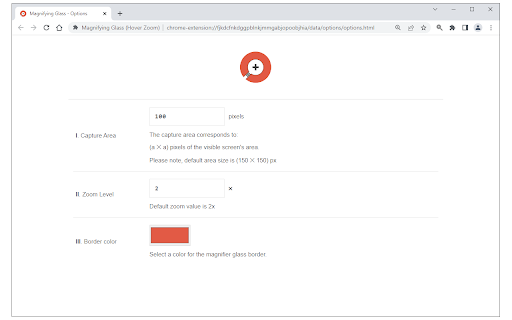
Please click on the toolbar button once to see the magnifying glass. Then move your mouse to see the magnified page within a circular section. If you want to hide the magnifier, simply click on the toolbar button once or click anywhere on the page. This addon has also an options page to adjust the magnifier zoom level and coverage area. Moreover, the toolbar button serves as an ON|OFF switch to turn the addon ON or OFF.

Note 1: when you install the addon, it is turned off. Please click on the toolbar button once to activate the addon. The toolbar icon is red when the addon is active and grey when it is inactive.

Note 2: if you want to change the zoom level, please visit the addon's options page.

To report bugs, please fill out the bug report form on the addon's homepage (https://mybrowseraddon.com/magnifying-glass.html).
Technical
- Version
- 0.1.8
- Manifest
- V3
- Size
- 41.08KiB
- Min Chrome
- 88
- Languages
- 1
- Featured
- Yes
Metadata
- ID
- gfcbebjdigncefnokoncehghgfndjcgn
- Developer ID
- u1cbcb78579a2f3402c48ebe9334f7465
- Developer Email
- [email protected]
- Created
- Jan 24, 2018
- Last Updated (Store)
- Feb 9, 2026
- Last Scraped
- Jun 6, 2026
- Website
- —
- Privacy Policy
- —
Similar extensions
Alternatives to Magnifying Glass (Hover Zoom), ranked by description similarity.

Hover Zoom
Enlarge images on hover for better accessibility. Perfect for visually impaired users.
303

Custom Page Zoom
Easily set a custom zoom level for each website (or all websites)
10.0K
★ 4.0

Zoom Extension
Zoom page with mouse pointer using customizable key.
5

Magnifying Glass & Screenshot
Magnifying Glass & Screenshot: One-click to magnify and capture your screen. Customize settings, save snapshots instantly!
980
★ 4.7

Magnifying Glass
Convert your mouse cursor to a high-quality magnifying glass
2.0K
★ 5.0

Enlargify Magnifying Glass
Magnifying Glass – Effortless, Customizable, with Convenient Keyboard Shortcuts. See More, Zoom Smarter!
10.0K
★ 3.0

PageLens
Magnify any part of a webpage with a hovering zoom lens. Perfect for reading small text or viewing details.
1

MouseHover Photo Zoom
Zoom in on images by hovering over them with your mouse.
1.0K
★ 3.0
Data sourced from the Chrome Web Store · last verified Jun 6, 2026.