Shortcut keys for selection search
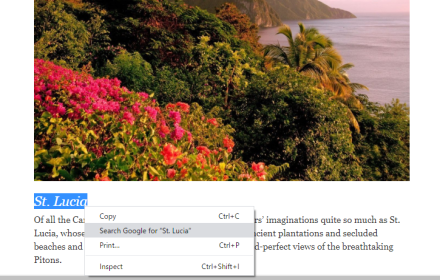
Add shortcut keys to open a new google result tab for selected text. Shortcut keys can be set in above left menu in Extensions.
As of May 2026, Shortcut keys for selection search has 4,000 users and a 4.84/5 rating from 25 reviews in the Workflow & Planning category.
Usersno change0%
4.0K
4,000
Ratingno change0%
4.84
25 reviews
Reviewsno change0%
25
Version
0.400
Manifest V3
History
2 snapshotsTracking since Apr 29, 2026.
View as table
| Date | Users | Rating | Reviews | Version |
|---|---|---|---|---|
| Apr 29, 2026 | 4.0K | 4.84 | 25 | 0.400 |
| May 26, 2026 | 10.0K | 4.84 | 25 | 0.400 |
| Now | 4.0K | 4.84 | 25 | 0.400 |
Permissions & access
- Permissions
- activeTabsearchscripting
- Host access
- None declared
Screenshots

About
Keyboard shortcut keys:
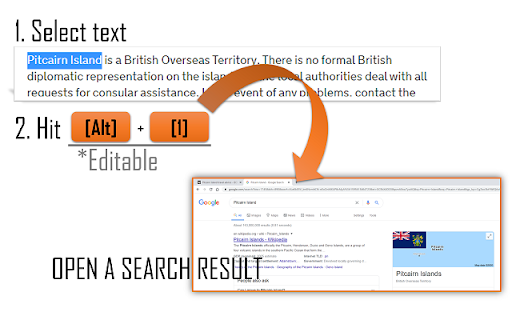
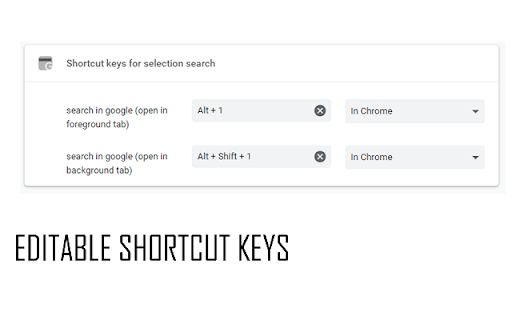
1. Alt+1 -> Open google result of selected text in foreground tab.
2. Alt+Shift+1 -> Open google result of selected text in background tab.
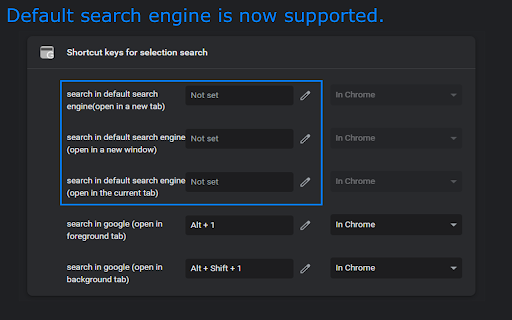
*Shortcut keys are editable at chrome://extensions/shortcuts

**For Chromebook users** (maybe also Mac OS users)
The Alt+1 key will click the first icon in the Shelf, and it will not work on Chrome browser.
After the installation,  please change the shortcut key from "Alt+1" to another one at chrome://extensions/shortcuts then avoid the built-in shortcut keys on your OS.
In the setting page, the right box should be "In Chrome".
(Input chrome://extensions/shortcuts in the address bar and press Enter to open a setting page.)

*Updates
2024/9/10 v0.400 Update manifest to V3 and minor bugfix.
2022/9/27 v0.201 (=v0.2)
2022/9/20 v0.3 Add feature to search text selected in a single PDF (in chrome's default PDF viewer)
2022/7/10 v0.2 Add feature to search by the default search engine.
2021/6/7 v0.1.0.1 Initial
Technical
- Version
- 0.400
- Manifest
- V3
- Size
- 9.13KiB
- Min Chrome
- 88
- Languages
- 1
- Featured
- No
Metadata
- ID
- emceciddhgnjkmjmpjoahmdhibmifohp
- Developer ID
- uaee4402ab0e92826cac5c9a87781e961
- Developer Email
- [email protected]
- Created
- Nov 17, 2019
- Last Updated (Store)
- Sep 11, 2024
- Last Scraped
- May 26, 2026
- Website
- —
Similar extensions
Alternatives to Shortcut keys for selection search, ranked by description similarity.

Keyboard Shortcuts
Map custom keyboard shortcuts to any Chrome browser command
18

Tablyt
Quickly access tabs, bookmarks, history, and context-aware actions through a command-palette.
47
★ 5.0

ZapSearch ⚡️
Spotlight Search for Chrome. The ⚡️ Blazing fast ⚡️ search for Bookmarks, History and Special commands.
13
★ 5.0

Lazy Chrome
Toggle pin tab, duplicate tab, mute tab and more in your custom keyboard shortcuts
346
★ 4.3

Supersearch
This plugin enables you to fulltext-supersearch all your tabs. Find more on https://gitlab.com/Schuemann/chrome-supersearch
744
★ 3.5

Bookmark Search
Search for bookmarks from the omnibox.
10.0K
★ 4.4

Calendar
Day, Month & Year
79

Pinboard Keyboard Shortcut
Bookmark the current page to Pinboard via a keyboard shortcut
267
★ 4.5
Data sourced from the Chrome Web Store · last verified May 26, 2026.